
























The digital transformation of IT environments is increasingly moving towards automation and the use of artificial intelligence. One of the most visible examples of this shift is the integration of AI capabilities into endpoint management tools. In this context, Microsoft Copilot combined with Microsoft Intune represents a significant step towards a new operational model for IT administrators.
This article explores how Copilot operates in practice in everyday Intune environments and examines both its tangible benefits and limitations in real-world use. This article is intended primarily for endpoint administrators, IT operations leads, and security engineers who already work day to day in the Intune admin center. It assumes familiarity with concepts such as compliance policies, configuration profiles, Conditional Access, and the Microsoft Defender suite. The objective is not to introduce the Copilot conceptually, but to examine where it genuinely changes daily practice – and where it does not.
Introduction
Key Insight: Copilot shifts endpoint management from UI-driven workflows to intent-driven operations.
Modern endpoint management has evolved beyond traditional configuration enforcement. Enterprises now operate highly distributed, hybrid environments consisting of diverse device types, identity contexts, and compliance requirements. This complexity introduces operational overhead that traditional tools struggle to address efficiently.
Microsoft Copilot introduces an AI-driven interaction layer that enables administrators to query, analyze, and interpret endpoint data using natural language. This represents a shift from interface-driven operations towards intent-driven management.
In large organizations, where environments often exceed tens of thousands of managed endpoints, this shift has a measurable operational impact. Administrators no longer need to navigate complex management hierarchies to retrieve insights, significantly reducing time-to-resolution.
The wider industry context reinforces this trend. According to recent Microsoft data, nearly 70% of Fortune 500 companies have integrated some form of Copilot into their workflows, and large-scale pilots – such as the UK Government deployment across 20,000 civil servants – have reported average daily time savings of around 26 minutes per user. While those figures cover Microsoft 365 Copilot more broadly, they illustrate the operational baseline against which enterprise IT leaders are now evaluating Copilot in Intune.
Copilot interaction model – operational shift
Example: Natural language queries replace multi-step troubleshooting workflows..
Copilot fundamentally changes how administrators interact with Intune. Instead of navigating multiple UI layers, administrators can request contextual insights directly.
Example scenario: A security engineer investigating compliance issues across a hybrid workforce may query: ‘Identify all non-compliant Windows devices with encryption disabled.’ Copilot correlates compliance policies, device configurations, and security telemetry to produce a consolidated response.
Another scenario involves audit preparation. Instead of manually generating reports, an administrator can request: ‘Generate compliance posture summary for EU region devices.’
Additional example: During incident response, administrators can ask: ‘Which devices received the latest policy update but remain non-compliant?’ – allowing for rapid anomaly detection.
Architecture overview
Architecture Insight: Copilot aggregates and correlates data across Intune and security layers.
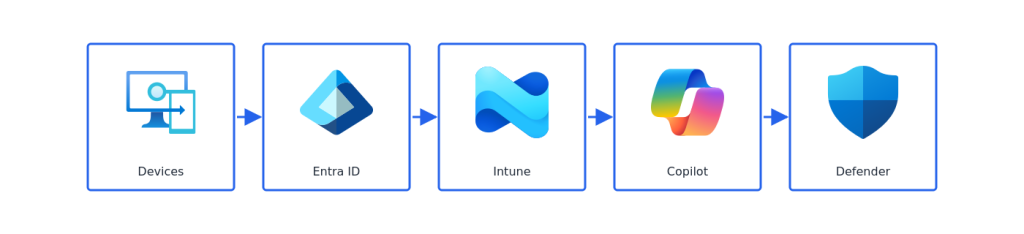
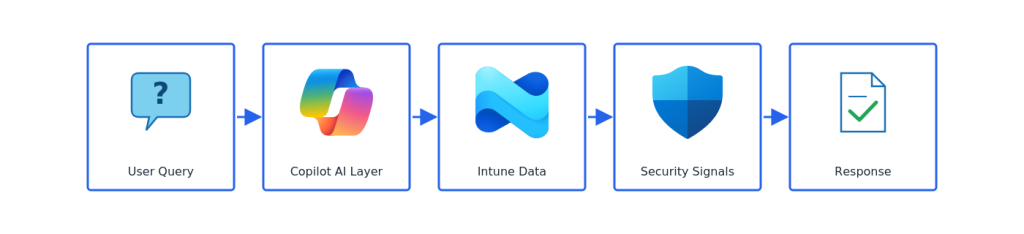
The Copilot + Intune architecture operates as an AI abstraction layer over endpoint management data. It integrates multiple data sources, including device inventory, policy assignments, compliance states, and security telemetry.
Conceptual architecture flow:
User Query → Copilot AI Layer → Intune Data → Security Signals → Aggregated Insights → Response
Operational use cases (extended)
Use Case Highlight: Copilot accelerates root cause analysis across deployment, compliance, and security layers.
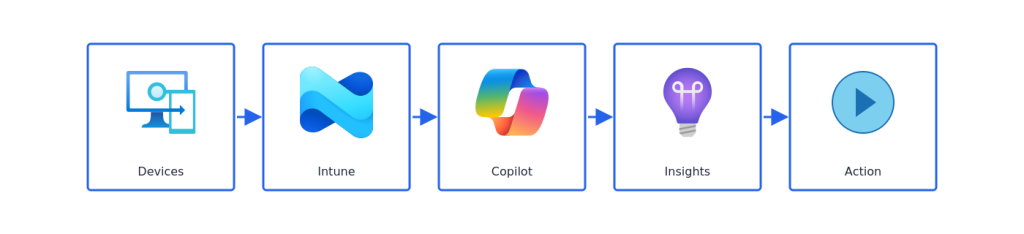
Troubleshooting: In enterprise environments, application deployment failures are common. Copilot enables correlation across assignment groups, dependency chains, and device readiness conditions.
Example: Copilot identifies missing dependency packages preventing deployment.
Configuration Analysis: Copilot compares policies across devices and identifies configuration drift.
Compliance Monitoring: Administrators receive summaries such as ‘Top 5 compliance issues across all endpoints’.
Security Operations: Copilot prioritizes devices with multiple risk factors, such as outdated OS and missing patches.
Additional scenario: onboarding new administrators is simplified through natural-language interaction rather than UI navigation training.
Security Incident Investigation: When a device shows signs of suspicious activity or an unknown device enrolls unexpectedly, Security Copilot enables rapid cross-platform triage. Administrators can query device properties, enrollment time, primary user, device type, and compliance status in a single natural language prompt. The response includes a direct link to the device in Microsoft Defender, enabling immediate follow-on actions without context switching between tools.
Example prompt: ‘Show me all details about device LAPTOP-XY443, when it enrolled, its primary user, and whether it is compliant.’
Employee Offboarding Automation: The Device Offboarding Agent handles the complete offboarding workflow for departing employees, including device retirement and certificate revocation. What previously required a manual multi-step checklist prone to omission is now handled autonomously, with all actions recorded in the Intune audit log for full compliance traceability.
Vulnerability Remediation at Scale: The Vulnerability Remediation Agent integrates Defender data to identify affected devices, prioritize remediation based on AI-driven risk scoring, and propose policy changes to close security gaps. In response to a CVE advisory, administrators can act across hundreds of managed endpoints in a fraction of the time previously required for manual identification and policy deployment.
Conditional Access Continuous Optimization: The Conditional Access Optimization Agent scans daily for policy coverage gaps and overlaps, suggests improvements, and ensures that every user is protected from day one of their tenure. Recommendations are delivered in report-only mode, allowing administrators to review and validate proposed changes before they are applied. All activity is logged for audit purposes.
KQL Query Generation and Custom Reporting: Administrators who lack deep Kusto Query Language expertise can describe their reporting needs in plain language. Copilot generates the corresponding KQL query, executes it against Intune data, and surfaces actionable results. This capability removes a significant technical barrier to ad hoc reporting and accelerates audit preparation.
Example prompt: ‘Show me devices not on the latest version of Windows and Office.’
Application Deployment Triage: When a Win32 or Microsoft Store app rollout fails on a subset of devices, traditional triage involves checking deployment status reports, manually examining the affected devices, and correlating them with assignment groups. Copilot collapses this into a single conversation: the administrator can ask why a deployment failed on a given device, and Copilot returns the relevant error code, a plain-language explanation, the assignment context, and the most likely remediation path. The error analyzer prompt accepts an Intune error code directly. It returns an explanation along with a possible resolution – useful for both live troubleshooting and educating junior staff about the meaning of recurring errors.
Example prompt: ‘Why did the Microsoft 365 Apps deployment fail on LAPTOP-XY443, and what should I check first?’
Patch Compliance Audits: Patch posture reporting is typically prepared at regular intervals for security and compliance reviews. Copilot can summarize the current update state across the device fleet, segment results by department or location using existing Entra ID attributes, and surface devices that are persistently lagging behind the deployment rings. Combined with the Vulnerability Remediation Agent, this turns a recurring manual exercise into a near-real-time view that both the security team and senior leadership can rely on between formal audits.
Comparative Device Diagnostics: When one device is healthy, and another running the same configuration is not, Copilot can compare the two side-by-side – surfacing differences in installed applications, assigned configuration profiles, hardware attributes, and recent compliance events. This pattern materially reduces the time spent on the classic “what is different about this one machine?” investigation, particularly in environments with diverse hardware vendors or country-specific configuration variants.
Quantifiable benefits
Metric Insight: Organizations report up to 50% reduction in diagnostic time.
Time-to-resolution is significantly reduced. Industry observations indicate diagnostic phases may be shortened by 30–50%. Microsoft-sourced data from production deployments further quantifies this impact: organizations using Security Copilot in Intune have recorded a 54% reduction in time to resolve device policy conflicts, and a 22.8% drop in alerts per incident within three months of adoption. Task completion speed for common admin workflows improves by approximately 30% compared to manual methods.
Operational scalability improves as junior administrators can execute complex analyses with AI assistance. The Explorer pane in the Intune admin center provides a dedicated natural language query interface, reducing the need for KQL expertise and allowing a broader range of staff to extract actionable insights independently.
Decision-making improves through contextual aggregation of data rather than fragmented manual analysis. Agent-driven automation further compounds these gains by executing multi-step remediation and offboarding workflows without manual intervention, reducing both time cost and the risk of procedural omission.
Before vs after Copilot
| Process | Before Copilot | With Copilot |
| Troubleshooting | Manual log correlation across systems | AI-driven root cause identification |
| Reporting | Manual report generation/export | Instant natural language summaries |
| Policy analysis | Multiple UI navigation paths | Single query contextual insight |
| Security analysis | Separate tools and dashboards | Unified correlated intelligence |
| Custom reporting/KQL | Manual KQL authoring or dedicated BI tooling | Natural language query with AI-generated KQL and instant results |
| Employee offboarding | Manual checklist across device retirement and certificate revocation | Automated end-to-end workflow via Device Offboarding Agent |
Limitations and risks
Risk Insight: Over-reliance on AI may undermine deep technical validation if not carefully managed.
Data dependency remains a primary limitation. Copilot reasons over the Intune data that the signed-in administrator is permitted to see, and its outputs are only as reliable as that data is accurate, complete, and up to date. Tenants with inconsistent device naming, stale Entra ID attributes, or partial scope tag coverage will see corresponding inconsistencies in Copilot responses. Investment in directory hygiene, therefore, directly affects the quality of AI-assisted insights.
Role-based access control must be respected, not bypassed. Copilot inherits the role assignments and Intune scope tags of the admin running the prompt, which is the correct security posture, but can occasionally produce results that look incomplete to the user. Administrators should expect, and design for, the possibility that two colleagues asking the same question will receive different answers because their permission boundaries differ.
Limited business context awareness may result in technically correct but operationally misaligned recommendations. Copilot understands the structure of Intune data; it does not understand internal change windows, project freezes, country-specific regulatory constraints, or the political weight of a given executive’s laptop. Recommendations from agents such as Vulnerability Remediation or Conditional Access Optimization should be reviewed against the business context before being applied, particularly in regulated industries.
Explainability challenges may affect auditability in regulated environments. While Copilot in Intune logs all agent actions to the audit log, the reasoning behind a given recommendation is not always reproducible – the same prompt asked twice may surface results worded differently. Organizations operating under frameworks such as DORA, NIS2, or HIPAA should pair Copilot adoption with internal procedures for capturing the prompt, the response, and the human decision that followed.
Prompt quality is a real, if undramatic, limitation. Vague prompts produce vague answers; ambiguous device identifiers can match more than one record. Teams that invest in a small library of well-constructed prompts – ideally captured as Security Copilot promptbooks – tend to extract significantly more value than teams that improvise each query.
Licensing and consumption costs deserve early attention. Security Copilot in Intune is metered in Security Compute Units (SCUs), which apply to prompts, promptbooks, and agent actions alike. Organizations should plan for SCU capacity in the same way they plan for any other consumption-based Microsoft service, monitor usage patterns, and avoid leaving high-frequency agents running unattended in non-production tenants.
Finally, there is the human risk of over-reliance. Copilot is an excellent accelerator, but it is not a substitute for understanding how Intune actually works. Teams that allow junior administrators to skip foundational learning in favor of always asking Copilot will, over time, lose the ability to validate Copilot’s answers. The intended posture is augmentation: AI handles the repetitive correlation work, while administrators retain the judgment that determines whether the resulting recommendation is the right thing to do in their environment.
Current capabilities and future outlook
Status Update: Autonomous Copilot agents in Intune reached general availability in July 2025 – controlled automation is no longer a future capability.
The autonomous agent capabilities described in the previous sections are not future roadmap items – they reached general availability in July 2025. The following Security Copilot agents are currently operational within the Intune admin center, each scoped to a specific administrative use case and governed by role-based access controls and full audit logging:
- Policy Configuration Agent: Accepts plain language instructions or imported documents and maps them to settings in the Intune settings catalog, recommending values and creating policies directly.
- Device Offboarding Agent: Executes the full offboarding workflow for departing employees, including device retirement and certificate revocation, with all actions recorded in the audit log.
- Vulnerability Remediation Agent: Monitors Defender vulnerability data, applies AI-driven risk prioritization, and proposes targeted policy changes to close security gaps across managed devices.
- Conditional Access Optimization Agent: Performs daily scans of Conditional Access policy coverage, identifies gaps and overlaps, and delivers AI-driven improvement recommendations in report-only mode before any changes are applied.
- Change Review Agent: Evaluates the impact of pending approval requests in Intune and provides recommendations to administrators before actions are confirmed.
Looking ahead, deeper integration between Copilot, Defender, Entra, and Purview will further unify cross-platform security posture management. Microsoft has signaled continued expansion of agentic capabilities, including diagnostics and licensing optimization for Windows 365 Cloud PCs, and broader support for community-developed agents via the Security Store. Organizations adopting Copilot in Intune today are positioned at the leading edge of an AI-driven endpoint management model that will continue to mature significantly over the near term.
Adoption recommendations
Adoption Insight: Treat Copilot as a capability that compounds over time, not a tool that delivers full value on day one.
Start with directory hygiene. Before enabling Copilot in production, audit Entra ID user attributes (department, country, manager) and Intune scope tag coverage. Copilot’s ability to segment, compare, and prioritize relies entirely on these attributes being populated and consistent. Time spent here pays back the moment the first prompt is run.
Pilot in a defined scope. Roll out Copilot to a single team – for example, the endpoint security squad or a regional IT operations group – before enabling it tenant-wide. A scoped pilot allows the organization to measure SCU consumption, refine the prompt library, and document expected response patterns without exposing the full admin population to a tool whose outputs they have not yet learned to validate.
Build a shared prompt library. The single highest-leverage adoption activity is documenting the ten or fifteen prompts that the team will run most often:
- compliance triage,
- deployment failure analysis,
- offboarding verification,
- audit preparation.
Capture these as Security Copilot promptbooks where possible. This converts AI-assisted work from an individual skill into an organizational capability.
Enable agents incrementally. Start with the lowest-risk agent for the environment in question – the Change Review Agent is a useful first choice because it advises rather than acts. Move on to the Conditional Access Optimization Agent in report-only mode, then to the Vulnerability Remediation and Device Offboarding agents only once the team has built confidence in the recommendations and the audit trail.
Track real outcomes, not adoption metrics. Counting how many prompts were submitted is a poor measure of value. Track the metrics that align with operational goals:
- time-to-resolution on Tier-2 incidents,
- audit preparation effort,
- mean time to compliance after policy publication,
- and the number of policy conflicts surfaced and resolved per quarter.
These figures justify continued investment.
Invest in skills, not just licenses. Copilot does not eliminate the need for endpoint expertise – it changes its shape. The skills that compound under Copilot are clear prompt construction, the ability to validate AI outputs against ground-truth Intune data, and the judgment to know when an agent recommendation should be applied unchanged versus tailored to local context. Training plans should reflect this shift.

IT Infrastructure
We will take care of your company's entire IT infrastructure 24/7, ensuring security, efficiency, and no downtime.
IT Infractructure offeringConclusion
Copilot in Microsoft Intune marks a meaningful shift in how endpoint administrators do their daily work. The change is not that AI does the job for them, but that the routine, time-consuming parts of the job – correlating telemetry, drafting reports, comparing devices, writing KQL, walking through offboarding checklists – can be delegated to a capable assistant that operates within the same RBAC boundaries and audit-logged context as the administrator.
The benefits are real and quantifiable: a 54% reduction in time spent resolving policy conflicts, a 22.8% drop in alerts per incident, and the tangible relief of being able to ask a plain-English question of a complex tenant. The limitations are equally real, and they revolve around data quality, business context, explainability, and the discipline required to avoid over-reliance.
For endpoint administrators, the practical message is straightforward. Copilot will not replace expertise; it will, however, decisively reward the administrators who learn to use it well. Those who treat it as an augmentation layer – one that handles the repetitive correlation work while they retain the judgment – will spend less of their day on mechanical investigation and more of it on the work that actually moves the security and reliability of the estate forward.
References
- Microsoft. (2024). Copilot in Microsoft Intune. Microsoft Learn.
- Microsoft. (2024). Security Copilot integration with Microsoft Intune. Microsoft Learn.
- arXiv. (2024). Randomized controlled trials for security Copilot.
- Microsoft. (2025, July 14). Improving IT efficiency with Microsoft Security Copilot in Microsoft Intune and Microsoft Entra. Microsoft Security Blog.
- Microsoft. (2025). Security Copilot agents in Intune overview. Microsoft Learn.
- Wintive. (2025). Copilot in Microsoft Intune: IT Admin Guide. wintive.com.













Leave a comment