


The Workday HCM Promotion Business Process, technically executed as a “Change Job” transaction, has been significantly streamlined to reduce the administrative burden on managers. By focusing on smart data validation and dynamic workflows, the system makes executing a promotion a guided, straightforward experience.
Here is a step-by-step breakdown of how the promotion process works, along with the features that make it easier for managers today.
Initiating the Promotion
The first step is formally starting the process, which is now designed to eliminate unnecessary data entry.
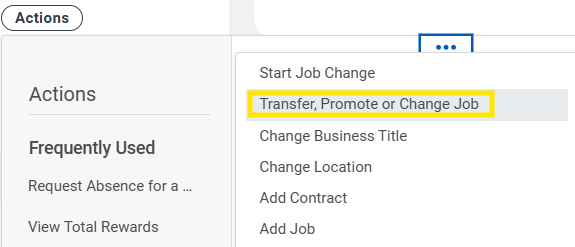
- The Process: You trigger the event directly from the employee’s profile via Actions > Job Change > Transfer, Promote, or Job Change.
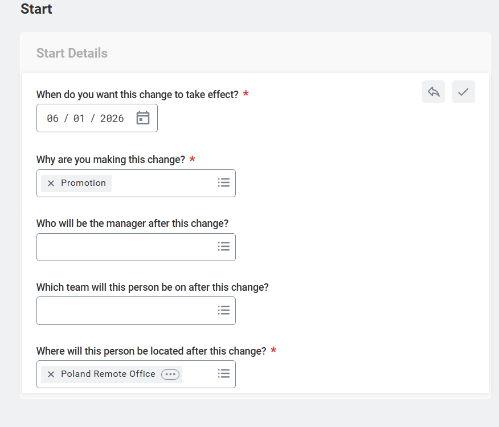
- The Manager Experience (Dynamic Templates): In the past, managers had to navigate massive forms filled with irrelevant questions. Now, Workday uses dynamic templates. When you select “Promotion” as the reason, the system automatically adapts the interface. It hides irrelevant fields (such as relocation details or onboarding tasks) and presents only the fields required for a grade-level or title increase.
Job Profile Selection & Details
Once initiated, you must define the new role and provide a business case for the promotion.
- The Process: You add the effective Date and select the Position and Job Profile for the employee’s new role.
- The Manager Experience (Centralized Architecture): You no longer need to look up administrative details manually. Once you select the new Job Profile, Workday automatically pulls in the correct Job Level and Management Level from your organization’s centralized Job Architecture. It consolidates the employee’s historical performance data and skills into a single view, making it easy to reference past achievements when completing the required promotion justification.
Proposing Compensation
Setting the new salary is often the most scrutinized step. Workday provides built-in guardrails to ensure your proposal aligns with established compensation bands.
- The Process: You navigate to the “Propose Compensation” step to enter the new base pay, bonus targets, or allowances.
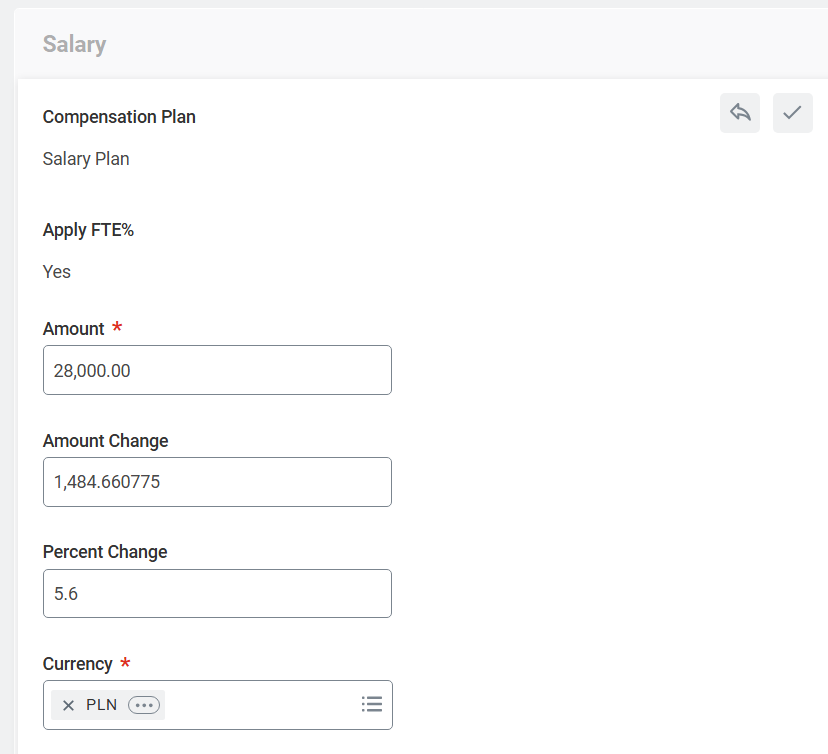
- The Manager Experience (Real-Time Guardrails): As you enter the proposed salary, the system cross-references it against the standard pay band (Compensation Grade Profile) assigned to the job. If your proposed amount falls outside the standard pay band, the system instantly flags it as an anomaly. This allows you to adjust the figure before submitting, preventing frustrating back-and-forth rejections from HR or Finance.
Review, Approval, and Automated Handoff
Once you hit “Submit,” the system takes over the heavy lifting to ensure a smooth finalization.
- The Process: The transaction enters the Business Process workflow, automatically routing to the necessary security groups (like HR Partners and Finance) for review and final sign-off.
- The Manager Experience: Because Workday acts as the System of Record, once the promotion is fully approved, the worker’s profile updates automatically on the effective date. Downstream systems like Payroll and Benefits are updated instantly without any further manual entry from the manager.

Sii x SAP
As an SAP Silver Partner, we have many years of experience in implementing ERP solutions in companies of various scales and process complexities.
SAP offeringSummary
The updated Change Job process shifts the manager’s role from manual data entry to simple review and decision-making. By using dynamic forms, auto-populating job details, and providing real-time compensation guardrails, Workday ensures that promotions are processed accurately and compliantly, with significantly less effort.













Leave a comment