
























The functionality that has significantly expanded the capabilities of Atlassian tools, known as Automation, has not always been with us. What is now a native part of Jira and Confluence Cloud and is available in Jira Software Data Center 9.0 and Jira Service Management Data Center 5.0 and above represents a powerful step towards no-code and low-code solutions.
“Automation for Jira” was first presented as a separate add-on created by Code Barrel in 2016. In just three years, Atlassian acquired this company and its products and integrated them into its structures. Ironically, the company was founded by former Atlassian employees.
From the very beginning of Automation\’s existence, it has been characterized by a low entry point, allowing it to pose a real challenge to the biggest players responsible for work automation in the Atlassian environment. The main idea of Automation, which can be summarized in three consecutive words:
When → If → Then,
and the lack of need for more than basic technical knowledge and programming skills means that anyone can handle many complex needs that arise when using the tool. All you need to get started is a project in Jira that you can manage.
How to get started with Automation
Before we fully embark on our journey with the tool, we need to answer the question, “What exactly is Automation?” To help, we can refer to Atlassian\’s definition:
“Automating tasks, processes, and workflows allows teams to focus on important work by eliminating the need to perform manual, repetitive tasks. With our simple rule builder, you can create automation rules for almost any action – from the simplest repetitive tasks to the most complex scenarios – with just a few clicks.”
So, where do we make those few clicks? We have two options:
- those managing single projects in Jira should go to the project where they want to implement automation and select “Project settings” → “Automation,”
- those with administrative privileges in Jira can configure automation for more than one project; this option is available in “Settings” → “System” → “Global Automation.”
We should see a “Create rule” button in the upper right corner in both cases.
Key elements of Automation: When, If, Then
“When”
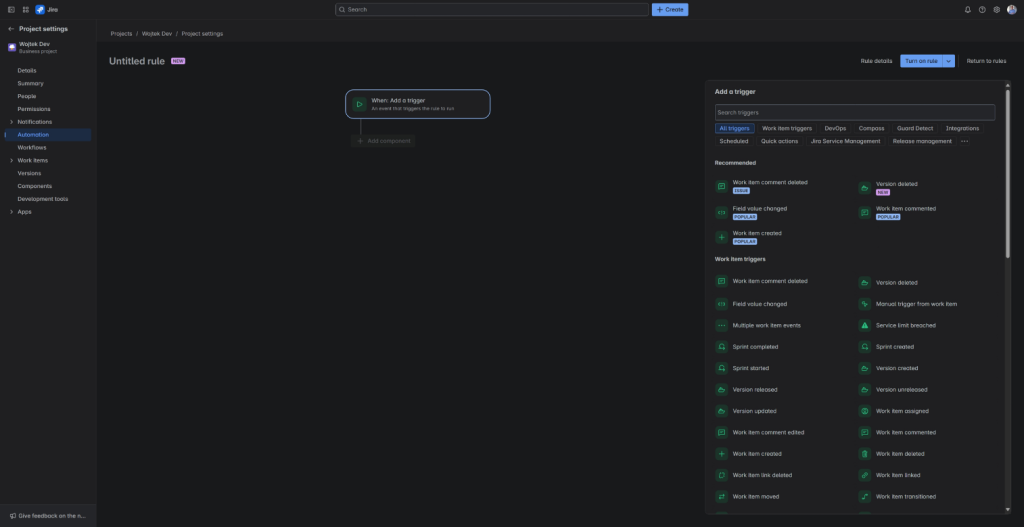
In Jira Automation, we always start from this point. It is the trigger element that will cause our automation to start and begin executing. We have over 50 options at our disposal, and this list is regularly expanded. Popular basic triggers include:
- “Work item commented”,
- “Work item updated”,
- “Work item created”,
- “Work item transitioned”,
- “Scheduled”.
In this section, we also find a dedicated DevOps section, which includes:
- “Build failed”,
- “Pull request declined”,
- “Branch created”,
- “Deployment successful” and many others.
We can change the selected trigger at any time, so at the beginning of building automation, we do not have to treat it as fully binding and can choose one that allows us to test it freely.
“If”
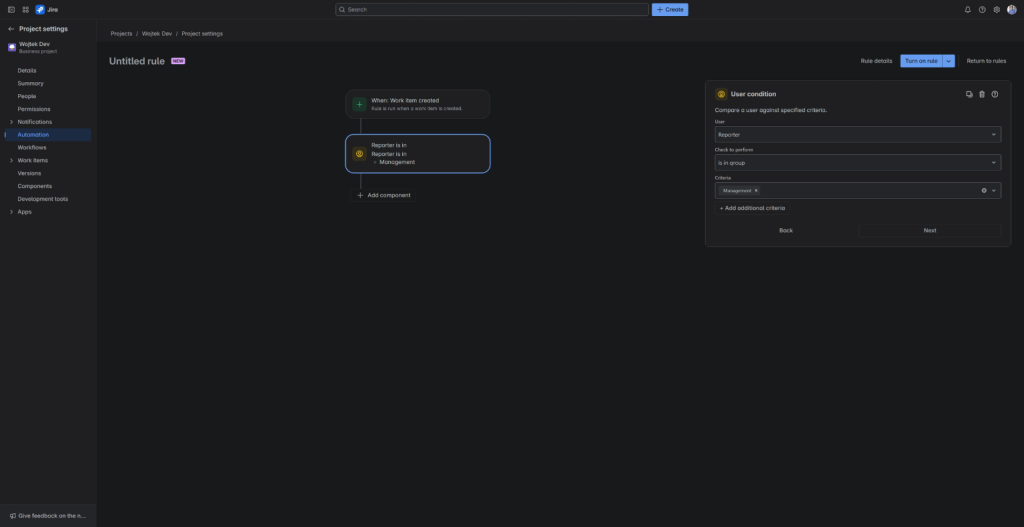
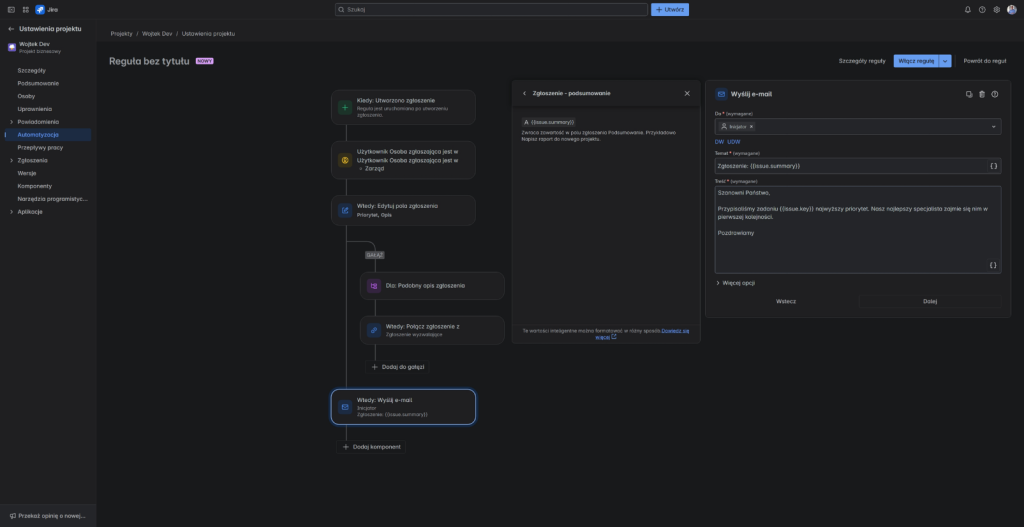
The optional “If” is where we can further condition whether the next automation step will be triggered. Suppose our automation is triggered when creating an issue, and we want a privileged group of people reporting tasks in our project to be handled with due diligence. We know that the chosen ones belong to the “Management” group. To ensure that the rest of the automation works only for them, we only need to select “User condition” for “If” and indicate that the reporter must be in the selected group.
“Then”
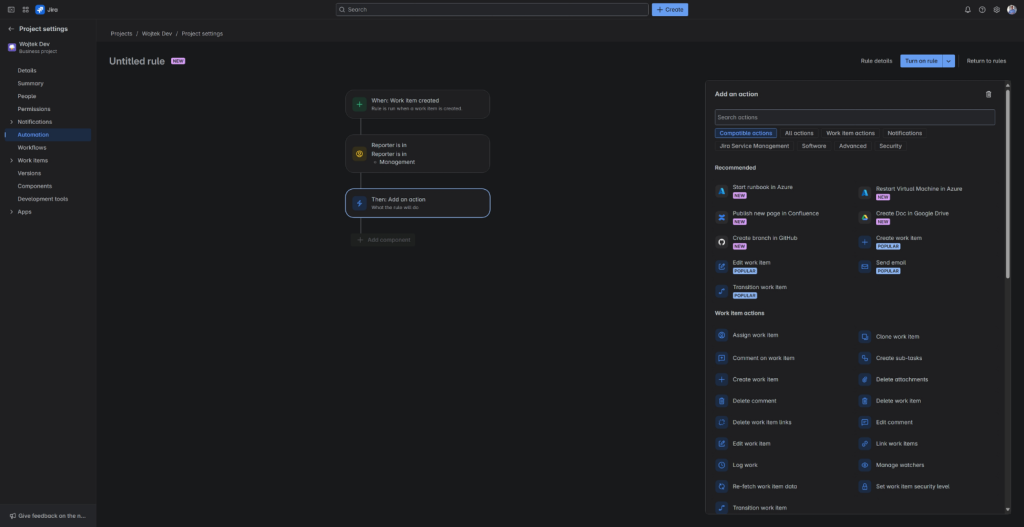
“Then” defines our impact on the Atlassian environment and third-party applications. When planning new automations, this is where we find ourselves in a place worth starting to plan and determine what we want to achieve, and there is much to choose from, as we also have over 50 different options available. Among them are:
- “Start runbook in Azure”,
- “Create Doc on Google Drive”,
- “Publish new page in Confluence”,
- “Send email”,
- “Assign work item” and many other exciting possibilities.
Additionally, the action “Send web request” sends an HTTP request to the specified URL, allowing us to communicate with other applications via API.
Suppose we want to change the priority after meeting the conditions from “If.” For “Then,” we select “Edit work item” and specify the field responsible for priority, then assign it a new value.
“For each”
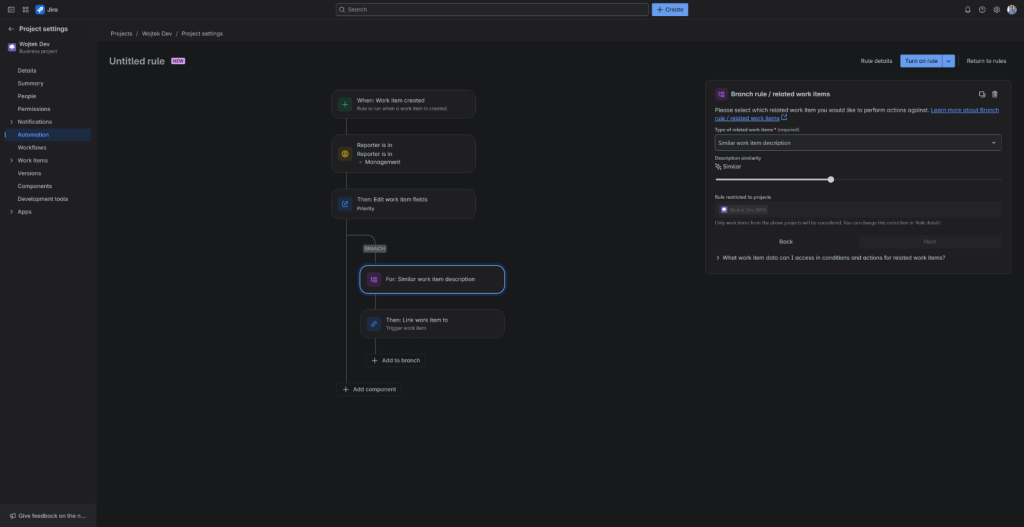
And what if we wanted to execute our “Then” for all sub-tasks, parent items, or issues in a sprint? Here, the optional “For each” will come to our aid; this section creates a new branch of automation, allowing for editing multiple dependent tasks. Within it, we can reuse the optional “If” and define the impact on the environment using “Then.”
Incorporating it into our example, we will configure the automation to search the project for similar issues and link them to the newly created one. This way, we will have easy access to information that may allow for more efficient work execution.
Smart values in Automation
Not all options can be presented as easily configurable blocks; another layer of possibilities can be unlocked through a well-documented low-code section. The next step for someone getting to know the tool should be “Smart Values”, which allow us to save even more time and effort by instantly inserting data into automation rules, such as names, time zones, and other information. For example:
- The smart value {{now.plusDays(5)}} will return today\’s date and add five days to it.
- The smart value {{issue.summary}} will return the summary of the selected issue.
Smart values utilize the Mustache library. To perform substitution, you need to wrap the value in double curly braces: {{example value}}
You can use the field name {{issue.my field name}} to access the field value. You need to refer to the field\’s value if it is an object. For example, for a custom user field, we would use: {{issue.my user field.displayName}}. This way, we will get the display name used by Jira in our custom user field, which we can use in a comment, custom email, or any other place supported by the Automation tool.
Differences between Cloud and Data Center
The main difference, particularly important for users of the Cloud version, lies in the limits. The number of automation executions in a Data Center is only limited by server resources, which we can scale quite easily. In the case of the Cloud, Atlassian has introduced a monthly limit on the number of automation executions. Only successfully executed automation counts towards the usage limit, and its size depends on the type of license used. The limits reset on the first day of the month.
| Number of rule executions per month | ||||
| Free | Standard | Premium | Enterprise | |
| Jira business projects | 100 | 1,000 | 1,000 multiplied by the number of users | The plan is not available for Jira business projects |
| Jira software projects | 100 | 1,700 | 1,000 multiplied by the number of users | Unlimited |
| Jira Service Management | 500 | 5,000 | 1,000 multiplied by the number of users | Unlimited |
| Jira Product Discovery | 200 | 500 | 1,000 multiplied by the number of users | Plan not available for Jira Product Discovery |
| Confluence | 10 | 100 | 1,000 multiplied by the number of users | Unlimited |
In defense of the good name of the Cloud version, it is worth noting that it is much more advanced compared to the on-premises version. It offers a range of functionalities not available in the Data Center version, such as:
- native integration with other Atlassian services (e.g., Confluence, Opsgenie, Compass),
- cross-project automation,
- the ability to use advanced AI features.
Moreover, functional updates are delivered continuously without administrator intervention, allowing users to access the latest tools and improvements more quickly. The Cloud version also provides flexibility in scaling – resources are automatically adjusted, eliminating the need for manual infrastructure configuration. Additionally, Atlassian focuses most of its development investments on the cloud, which translates into faster development and access to modern solutions.

Summary
Automation in Atlassian is a feature that significantly expands the capabilities of tools such as Jira and Confluence, enabling task and process automation without coding. It introduces a simple rule system based on three steps: When → If → Then, allowing users to easily create automations that can encompass various actions in Atlassian and third-party applications.
The rich number of ready-made automations available in the library of Atlassian and strong support from the community are other powerful assets of this tool. There are differences in the limits of automation executions between the Cloud and Data Center versions, where the Cloud version offers more features and flexibility but has monthly limits. Smart values also enhance automation capabilities, allowing dynamic data insertion into rules.
Ultimately, using this functionality can significantly streamline teamwork by eliminating manual, repetitive tasks. This will directly translate into saving one of the most valuable things, which is time.
***
If you\’re interested in Atlassian, be sure to also check out other articles by our experts.
‘













Leave a comment