
























Maintaining the security and efficiency of virtual machines (VMs) and on-premises servers is crucial in today’s fast-paced digital world. Azure offers a comprehensive suite of tools and services that simplify this process, making it accessible even for those without extensive technical knowledge.
This article explores the benefits of using Azure for monthly VM patching and managing Azure Arc-enabled on-prem servers, focusing on cost, security, efficiency, and ease of use.
Cost-effectiveness
One of the primary advantages of using Azure for VM and server management is the cost-effective approach. Azure Update Manager is available at no extra charge for managing Azure VMs and costs about $5 per month per Arc-enabled server.
Thankfully, the pay-as-you-go model ensures that you only pay for the resources you use. This can significantly reduce operational costs for consumption-based pricing model services such as Azure Arc and Azure Monitoring Agent [1].
Additionally, Azure Update Manager allows you to manage updates for all your machines, including those running on Windows and Linux, across Azure, on-premises, and other cloud platforms [2]. This centralized approach eliminates the need for multiple tools and reduces administrative overhead.
Enhanced security
Security is a top priority for any IT infrastructure. Azure provides robust security features that help protect your VMs and servers from vulnerabilities.
The Azure Monitor Agent collects monitoring data from the guest operating system of Azure and hybrid VMs. This data is used by various Azure services, such as Microsoft Defender for Cloud, to monitor for potential security threats proactively [3]. Additionally, Azure Arc-enabled servers allow you to manage physical servers and VMs hosted outside of Azure, ensuring consistent security policies across your entire infrastructure [4].
Improved efficiency
Azure’s automation capabilities significantly enhance operational efficiency. Automatic VM guest patching ensures that critical and security patches are automatically downloaded and applied during off-peak hours [5]. This minimizes downtime and ensures that your VMs remain compliant with security standards.
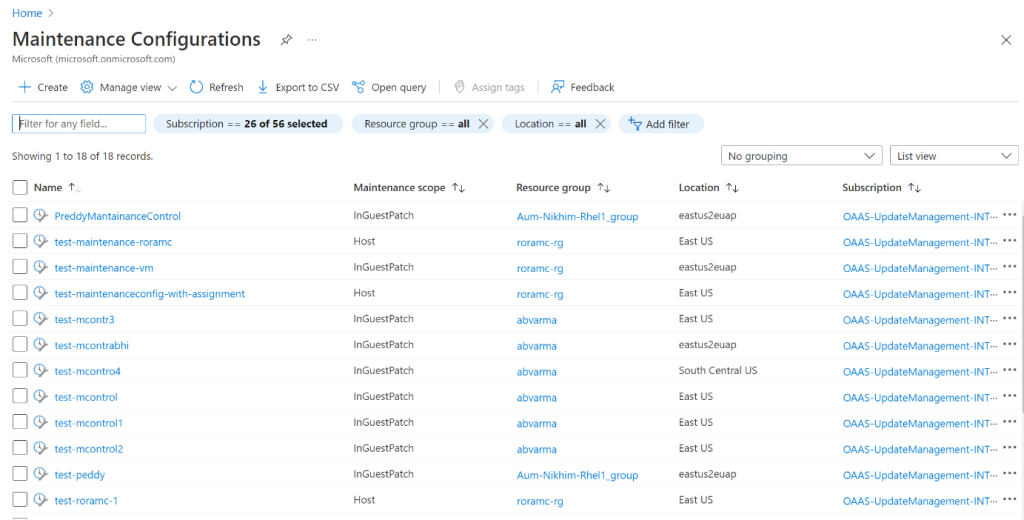
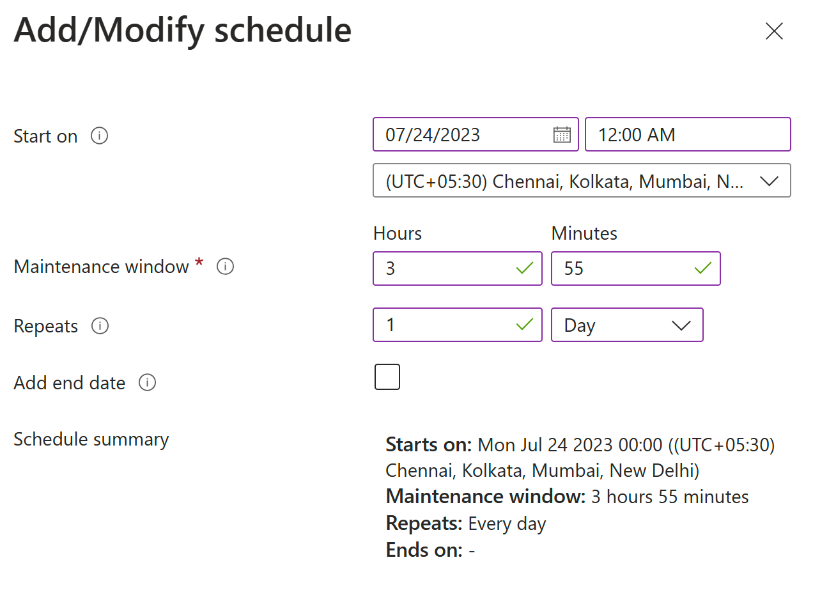
For more control, you can configure scheduled patching to define your maintenance windows [6]. Azure Update Manager also provides a single dashboard to view update compliance for your entire fleet of machines, making it easy to track and manage updates [7].
Ease of use
Azure’s intuitive user interface and comprehensive documentation make it easy for users to manage their VMs and servers. The Azure Monitor Agent can be installed using various methods, including Azure Policy, which allows for automated installation at scale [8].
Azure Arc-enabled servers provide a consistent management experience for hybrid environments, using standard Azure constructs such as Azure Policy and tags [4]. This consistency simplifies the management process and reduces the learning curve for users.
Tools required for patching the configuration
To successfully automate VM patching in Azure, you can leverage several tools and features:
- Azure Update Manager – this tool provides centralized control and visibility for managing updates across Azure, on-premises, and multicloud environments. It allows you to monitor update compliance, schedule updates, and apply patches in real-time or during maintenance windows. It supports automatic guest patching for both Linux and Windows VMs, ensuring they remain compliant with security standards [9].


- Azure Monitor Agent – this agent collects monitoring data from the operating system of Azure and hybrid VMs and delivers it to Azure Monitor for use by features, insights, and other services. It helps proactively detect and resolve issues, ensuring that your servers are always running optimally [3].
- Automatic Guest Patching – this feature automatically downloads and applies critical and security patches to your VMs during off-peak hours, ensuring that your servers are always up-to-date without manual intervention. It also monitors VM health to detect patching failures and follows availability-first principles [10].
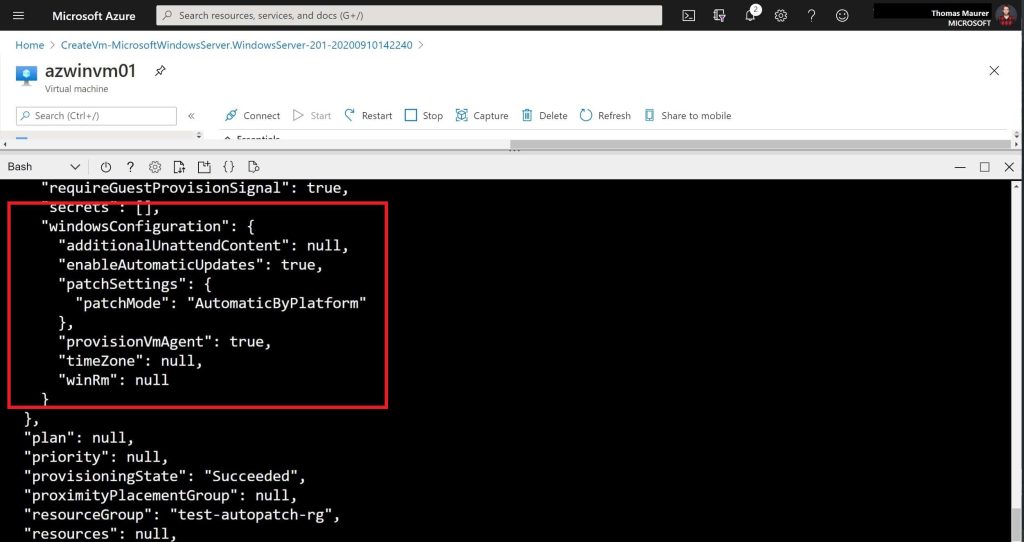
- Maintenance Configuration – for more control, you can configure scheduled patching to define your maintenance windows, ensuring that updates are applied consistently and with minimal disruption to your operations. This is useful for VMs created from customized images or when installing patches with other classifications [11].

Conclusion
Using Azure for monthly VM patching and managing Azure Arc-enabled on-prem servers offers numerous benefits, including low costs, high security, and an improved, easy-to-use structure. By leveraging tools like Azure Update Manager and Azure Monitor Agent, you can ensure that your infrastructure remains well guarded from various threats and is always up-to-date with minimal effort.
Sources
- [1] Azure Update manager – Pricing | Microsoft Azure
- [2] Azure Update Manager– Patch Management | Microsoft Azure
- [3] Azure Monitor Agent Overview – Azure Monitor | Microsoft Learn
- [4] Azure Arc-enabled servers Overview – Azure Arc | Microsoft Learn
- [5] Automatic Guest Patching for Azure Virtual Machines and Scale Sets – Azure Virtual Machines | Microsoft Learn
- [6] Updates and maintenance in Azure Update Manager | Microsoft Learn
- [7] Manage multiple machines with Azure Update Manager
- [8] Install and manage the Azure Monitor Agent
- [9] Azure Update Manager overview | Microsoft Learn
- [10] Automatic Guest Patching for Azure Virtual Machines and Scale Sets – Azure Virtual Machines | Microsoft Learn
- [11] Schedule recurring updates for machines by using the Azure portal and Azure Policy













Leave a comment