


JIRA is usually associated with ITSM, software development, and business work at the project and process level – things that never physically leave the office, or if they do, they also leave the tool, making it difficult to measure them within it.
Although this is precisely how most companies I’ve worked with over the past dozen years have used it, I can’t overlook a few interesting cases that show Jira can be applied in production, distribution, or service-oriented companies. Its usefulness doesn’t have to end at the office wall. Either on its own or with the support of ERP systems, Jira can make its way into production halls, warehouses, and service workshops. I’ll try to describe this below.
Example one – a transformer cabinet manufacturer
Many years ago, I created a configuration to track order stages for a transformer cabinet manufacturer. It was built in Jira Core (also known as Jira Business, later Jira Work Management, and now simply Jira).
At the client’s request, the whole setup was based on a single long workflow covering stages such as:
- customer order placement (the order itself was done outside Jira),
- raw material order summary from suppliers,
- delivery status,
- production stage starts,
- production stage confirmations by supervisors,
- quality control,
- transport and final on-site installation.
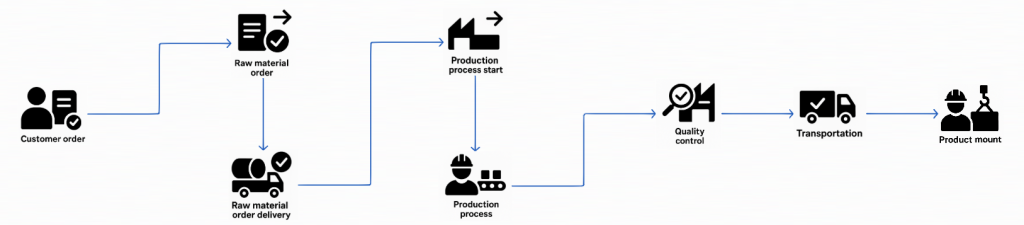
Each stage had its own tab with fields to be filled out, and these could only be completed by pressing the transition button to the next stage, passing the task to the next responsible person.
What about data visibility? Not all data was intentionally visible once fields were completed and saved. On top of that, I applied a security layer that allowed access only to the currently assigned person and a few decision-makers. Once the task was passed along, it disappeared from the previous assignee’s view.
It was a simple and effective solution, built during a one-day consultation and configuration session with the entire office team, which also served as their training. This was possible thanks to the company’s small size at the time, quick decision-making, and efficient internal communication.
Example two – a heavy industry service center
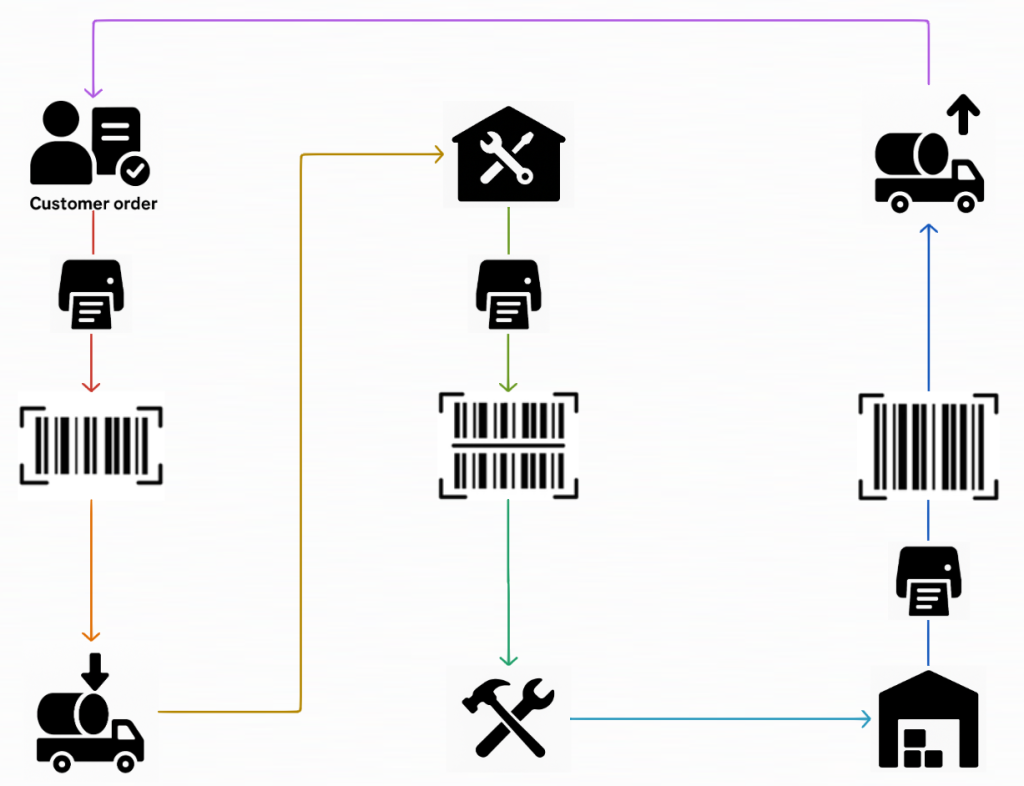
This was a setup for a heavy industry service center, handling incoming and outgoing shipments based on printed labels. I wasn’t the author of the solution but part of a larger team. It wasn’t as straightforward as the previous case.
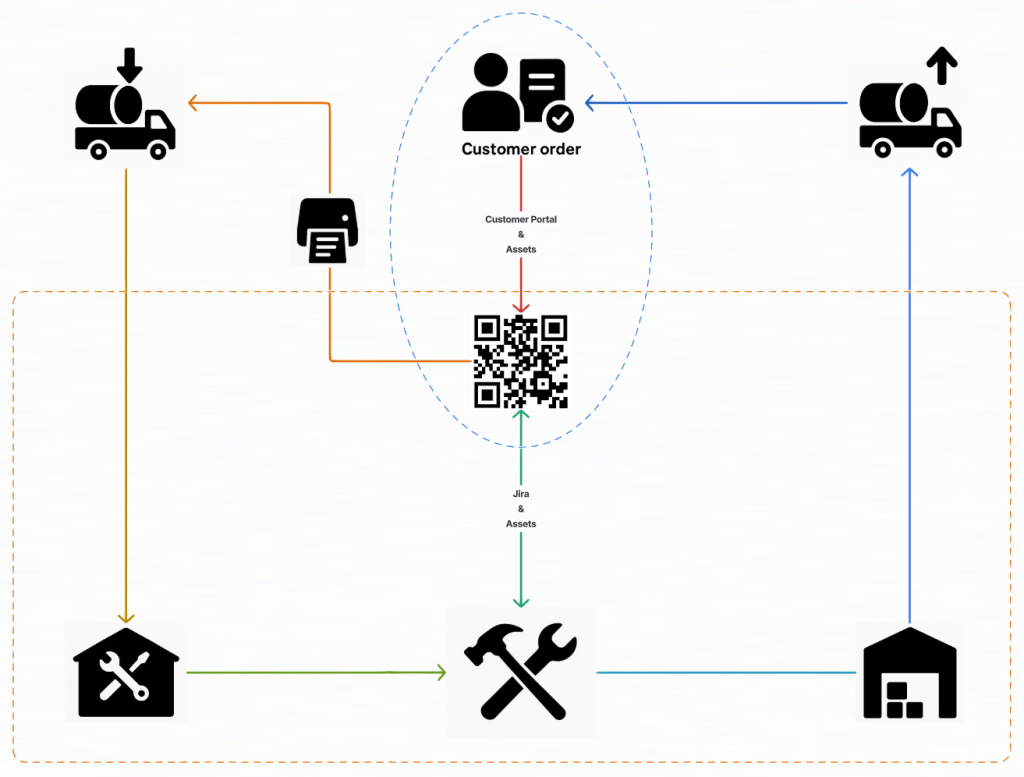
The team used Jira Service Management + Assets + Automation + Jira plugins. By leveraging Assets, recording incoming service items became much easier. We reduced the client’s previous method of three separate labels (each with a different barcode – receipt for service, service, and return shipping) down to a single QR code. This code links to all the necessary data stored in Assets, a third-party plugin that allows printing the QR code and shipping details.
Existing process:
Example three – a railway carrier
More recently, I created a configuration for a railway carrier, where repair workshops could actively participate in negotiating wagon repair deadlines by using free access via the Customer Portal. The necessary service data was pulled from an external ERP.
Because of the company’s field of operations, this implementation was exceptionally complex, with numerous automations required to achieve the desired outcome. The tools used included Jira Service Management + Customer Portal + Assets + Automation + Entra ID + ERP (the latter two already in place on the client’s side).
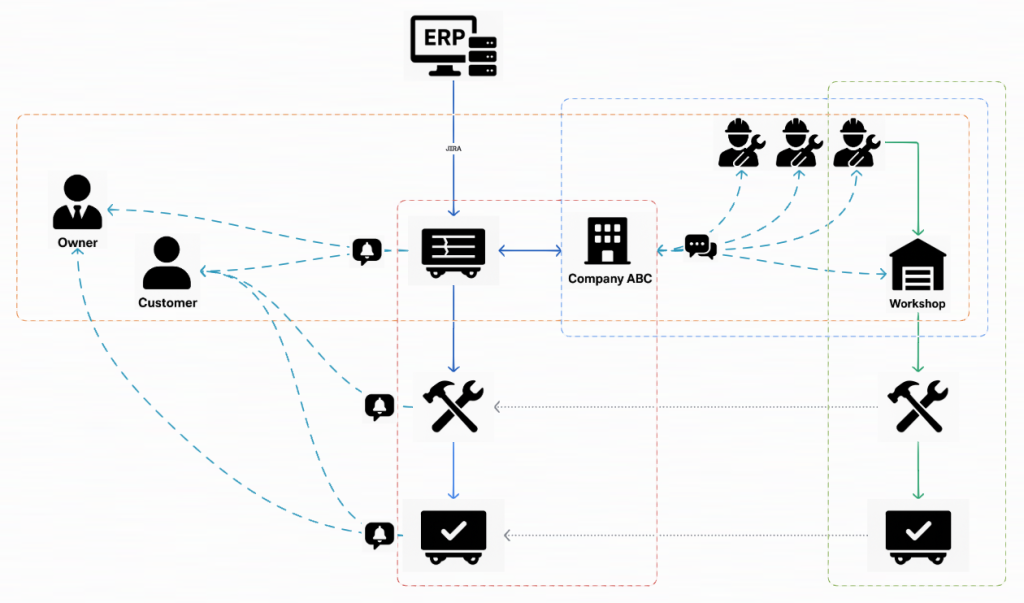
Since this is the newest and most interesting example, here’s a simplified overview of the process we supported.
Background
- The railway carrier (let’s call it company ABC) manages a fleet of wagons and locomotives, handles transport assignments, and maintains the equipment.
- ABC does not own every wagon; some belong to third-party companies (Owners).
- Each wagon is used for transporting goods for ABC’s Customers.
- ABC cooperates with repair Workshops across the country.
- Like many similar companies, ABC uses a third-party ERP dedicated to the railway industry. From what I’ve seen, I’d (informally) call it “SAP on steroids.”
I had to conduct a detailed interview with the client to understand their pain points, given that they could technically manage everything inside their ERP.
Since SAP and similar ERPs are not my specialty, I also spoke with colleagues and consultants with years of SAP experience.
The biggest issue is that SAP functions more as a state-based tool than a process-based one – unlike Jira. I know this is a controversial statement, but every conversation I have led has led to the same conclusion:
- Yes, SAP can run processes and almost everything can be automated with triggers, listeners, and schedulers – but it all happens under the hood, and on the surface, you’re managing states.
- Meanwhile, Jira is designed around workflows and people collaboration – that works on the state data underneath.
Our client’s pain point was the lack of a communication layer to support negotiating deadlines and managing wagon repairs.
Key challenges
How do you connect Jira with ABC’s ERP? How can you avoid duplicating all ERP data into Jira?
The simplest answer is to follow the process ABC described.
- Wagon failures are reported and categorized by train drivers via a mobile app into the ERP.
- The ABC specialist informs the Owner and Customer that the wagon is out of service, reads its location, and calls the nearest workshop to arrange a repair date.
- The specialist negotiates with others if the nearest workshop is unavailable.
- At the agreed time, the Workshop staff takes the wagon to the workshop, unless they cannot make it in time, in which case the ABC specialist will renegotiate with others.
- The workshop confirms repair completion to the Specialist by email.
- The Specialist restores the wagon to service and informs the Owner and Customer.
The solution
Data
We decided to import only the minimum – but still sufficient – amount of data from ERP into Jira Assets:
- a static list of wagons and their serviceable components;
- a static list of Owners + contacts;
- a list of Customers (may vary over time) + contacts;
- a list of cooperating workshops + contacts;
- a standardized list of damage types and codes.
Process
Since failures must be reported to the ERP first, only then is a service ticket sent to Jira.
Thanks to the data imported earlier to Assets, I minimized the data sent with each new ticket. ERP pushes only the wagon ID and damage type – everything else is populated locally from Assets in Jira, including immediate email notifications to Owners and Customers about the wagon’s operational status.
Negotiations between Specialists and Workshops – and later, repair order execution – are handled in a separate mirrored ticket, so stakeholders are not dragged into that complex communication.
Both tickets will be closed automatically once the Workshop completes the service process.
Owners and customers can communicate with the ABC Specialist at any time. Even more importantly, Owner, Customer, and Workshop accounts do not increase the cost of using Jira. As process handlers, only ABC Specialists have paid Jira Service Management Agent accounts.
Other configuration items
It’s impossible to list them all, but I implemented:
- dynamic SLA timers,
- reminders and escalations,
- multiple automations that updates the necessary data of assets and people at specific stages,
- a mechanism preventing ticket processing if ERPs send a new wagon without related customer info (so they wouldn’t miss outage and repair notifications).
Other possibilities for using Jira and ERP configurations
Jira has enormous configuration potential, so it’s popular worldwide. The examples above – especially the last one – show that this potential can be leveraged even further, particularly when integrated with existing ERP systems.
Earlier, I mentioned my conversations with SAP users and specialists. One of them shared examples of “pain points” that people encounter. Here they are, with my comments on possible Jira-based solutions:
- Communication with customers spread across messy email threads, manually entering orders into SAP based on them. Instead, use Jira Service Management’s Customer Portal with free customer accounts. The requirements would be collected in one place using dynamic forms, accessing data from the Assets module, making it much easier to transfer data to SAP (I’m deliberately not suggesting automatic SAP order creation, as while technically possible, process-wise it’s unacceptable).
- Lack of a clear order management process – sales representatives achieve great sales results, but by processing offers and orders in a non-standardized and chaotic manner, they slow down the entire process, which results in extended lead times for customers. Solution: Jira Service Management with Assets, or – if broader sales-management interaction is needed – Jira Work Management with Jira Product Discovery, Goals, and Teams modules.
- Customers don’t get updates on revised delivery dates. While SAP could send such updates, the implementation and maintenance costs (including in-house customer data) of that solution would be much higher. By using Jira, with minimal order data pushed through integration, notifications could be sent to free customer accounts.
- SAP users do not automatically receive updates about partial order fulfillment and, therefore, shipping delays. Again, SAP to Jira, or Jira with SAP, can automatically send such information and adequate notifications. Alternatively, at minimal cost and without integration, simply create an automated process in Jira that would notify the Specialist when an order is approaching or has missed its deadline.

Summary
I am sure that an experienced SAP consultant, reading the above, could argue that none of this is a problem and that everything can be configured within the existing system. And I would fully agree. At the same time, I believe the same consultant would also acknowledge that implementing such adjustments in an established ERP environment is likely to be significantly more costly than delivering them through simpler Jira integrations.
What do you think of this approach? If you see potential for improvements in your company, contact us.













Leave a comment