


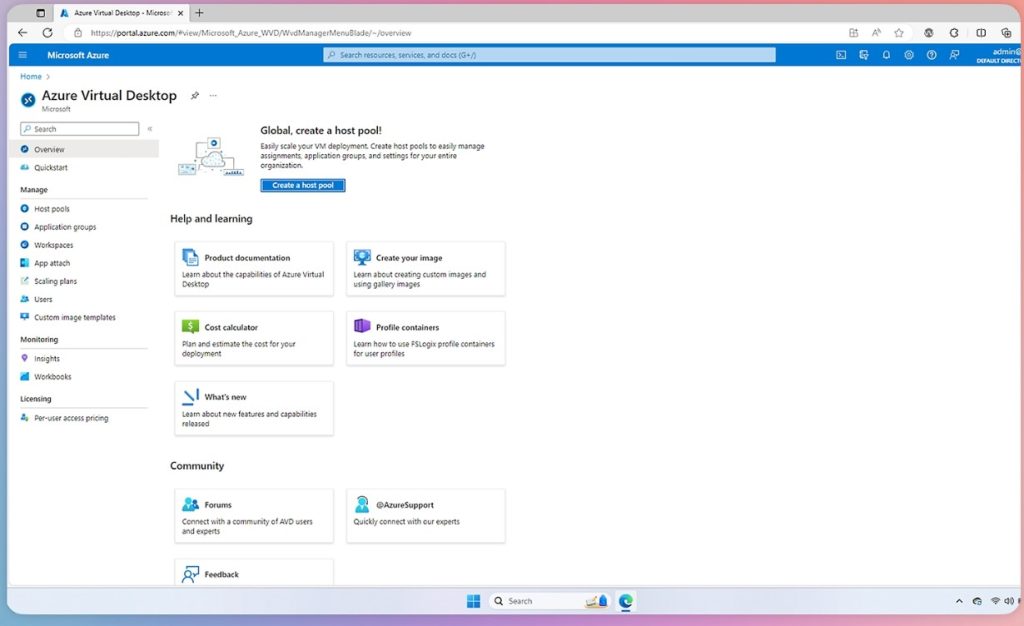
In today’s fast-paced digital world, businesses constantly seek ways to improve flexibility, security, and cost-efficiency. Azure Virtual Desktop (AVD) is a rapidly gaining traction solution. A cloud-based desktop and application virtualization service from Microsoft.
In this article, I will explain what AVD is and why it is worth connecting to Intune.
What is Azure Virtual Desktop?
So why is it a big deal? Azure Virtual Desktop allows users to access a full Windows desktop experience from virtually any device, anywhere in the world. Instead of relying on physical machines, AVD delivers desktops and apps through the cloud. This means employees can work securely from home, on the go, or in the office without needing a powerful local computer. AVD is built on Microsoft Azure and integrates seamlessly with Microsoft 365, offering a familiar and productive environment for users and can be managed by Microsoft Intune. (source: 1, 5)

Intune? What’s that?
For the uninitiated, Intune is Microsoft’s cloud-based endpoint management solution. It allows IT teams to:
- manage devices,
- enforce security policies,
- deploy applications,
- and ensure compliance.
AVD and Intune offer a seamless, secure, and highly manageable digital workspace ideal for modern businesses. (source: 4)
Benefits of using AVD
Remote work made easy
AVD empowers employees to work from anywhere while maintaining access to the necessary tools. Whether on a laptop, tablet, or smartphone, users can connect to their virtual desktop and continue working as if they were in the office. This flexibility is essential for hybrid work models and global teams.
AVD also supports Bring Your Own Device (BYOD) policies, allowing staff to use personal devices securely without risking company data. Intune ensures that these devices meet security standards before granting access. (source: 6, 7)

Low costs, great possibilities
Traditional desktop infrastructure requires a significant upfront investment in hardware, software, and maintenance. AVD eliminates much of this by offering a pay-as-you-go model, where companies only pay for the resources they use. Additionally, AVD supports multi-session Windows environments, allowing multiple users to share a single virtual machine, which can dramatically reduce costs. (source: 1)
Companies can also scale resources up or down based on demand, making it ideal for seasonal workloads or rapid growth. Intune further reduces costs by streamlining device management and automating tasks like software deployment and patching. If you wish to learn more about the price of AVD for your needs, check out Microsoft’s official webpage: Azure Virtual Desktop Pricing | Microsoft Azure. (source: 1, 6, 9)
Stay secure, stay compliant
Security is always a top concern for any business. With AVD, sensitive data is not stored on individual devices, but in the cloud, reducing the risk of data loss or theft. Microsoft’s robust security features, including multi-factor authentication, data encryption, and network security groups, help protect against cyber threats. AVD also supports compliance with over 100 global certifications, making it suitable for industries with strict regulatory requirements.
Together with Intune, they support Conditional Access, ensuring that only trusted users and compliant devices can access sensitive resources. (source: 3, 1, 4)
Management made easy
Managing physical desktops across multiple locations can be a logistical nightmare. With Intune, IT administrators can manage all AVD instances from a single console.
This includes:
- deploying apps,
- enforcing policies,
- and pushing updates without needing to touch each device individually (source: 1).
This centralized approach reduces complexity, saves time, and ensures consistency across the organization. As for the User experience, AVD integrates effortlessly with Microsoft 365, Teams, and other Azure services. This means users can access familiar tools like Word, Excel, and Outlook in their virtual environment, boosting productivity and reducing the learning curve. (source: 2)
No threat too big
Unexpected events, such as hardware failures, natural disasters, or even a pandemic, are disruptors that can cripple operations and even permanently change the way companies approach their Business Continuity Plans. AVD provides built-in disaster recovery and failover capabilities, ensuring employees can continue working even during outages.
With features like session state backup and geo-redundancy, businesses can maintain uptime and protect critical data, whereas lesser solutions can become devastating and costly for the company. (source: 3)
Practical application of AVD and Intune
Azure Virtual Desktop is more than just a remote access tool; it’s a strategic platform that, together with Intune, is already transforming industries:
- Healthcare: Secure access to patient data for remote clinicians.
- Finance: Compliance with strict regulations while enabling remote work.
- Education: Access to educational tools from any device.
- Manufacturing: Remote use of CAD software by engineers.
- Government: Secure, compliant access to sensitive data for remote employees. (source: 6)

Summary
AVD offers flexibility, security, cost savings, and scalability to help organizations modernize their IT infrastructure and support a more agile workforce.
Whether you work for a small business or a large enterprise, AVD with Intune is a game-changer that is definitely worth considering if you want to simplify IT management, support remote work, increase security, and reduce costs.
Źródła
- Microsoft Azure Virtual Desktop Overview
- Why Azure Virtual Desktop is a Gamechanger for Your IT Strategy
- Azure Virtual Desktop business continuity and disaster recovery concepts
- Using Azure Virtual Desktop with Intune
- What is Azure Virtual Desktop?
- Modern Digital Workspace with Intune and AVD
- Admin checklist for software updates on BYOD in Microsoft Intune | Microsoft Learn
- Microsoft Azure Virtual Desktop
- Cennik usługi Azure Virtual Desktop | Microsoft Azure













Leave a comment