


With this article, I would like to start a series of entries in which I will show you how to build a modern test automation framework step by step using Playwright and TypeScript.
There are differing opinions on whether “test framework” or “test library” is more appropriate. However, I assume that we are using the term “test framework” for this series of articles.
I published an entry some time ago that described how to start your adventure with Playwright. Two other articles about the Playwright appeared on the Sii blog a little later.
Today, we will take it one step further. We will focus on creating a more advanced solution – one that you can use in your everyday work.
First, it is worth considering choosing the right programming language. We will compare options to choose the best tool to achieve our goals.
- Popularity of the solution – why TypeScript?
- What should a test framework have?
- Design patterns and good practices
- Reporting
- CI/CD
I will divide the topic into two parts. In the first one, I will focus a little more on the theory and highlight which areas are important. In the next one, I will show the code and discuss it step by step. The entire code will be available with the second entry.
Kod
Our testing framework will contain two test examples that can be downloaded from Sii Poland’s GitHub.
I will use Trello to create the tests.

Trello is an application for managing projects using the Kanban methodology. It is an advanced tool in terms of both user interface (UI) and API capabilities. From our perspective, it is an excellent environment for practicing process automation skills.
We encourage you to create an account for testing purposes – the free plan is completely sufficient.
Why TypeScript?
TypeScript has been a popular programming language for years, used to create front-end web applications. There are several reasons why It is perfect as a language for testing frameworks.
Here are the most important arguments:
- Strong typing – enables error detection at the compilation stage, which increases code stability.
- Better cooperation with Playwright API – Playwright, in combination with TypeScript, offers the largest number of improvements and new functions compared to other implementations.
- Built-in support for async/await makes creating stable and readable automatic tests easier.
- Popularity and community support – thanks to a large community, it is easy to find answers to questions, and Playwright itself was created in TypeScript.
It is worth adding that despite the advantages of TypeScript, Playwright can also be used in other programming languages, such as C# or Java. I have successfully used these implementations in my everyday work, and they have also worked well. The article can still be valuable for people who don’t plan to use TypeScript because the concepts behind creating a test framework are consistent regardless of technology.
Popularity of the solution – TypeScript and other programming languages
When I wrote the article Playwright – should you get interested in the Microsoft tool?, Playwright was slowly becoming an increasingly popular test automation solution. It has taken the lead over Cypress and Selenium regarding the number of monthly downloads. You can also notice in job offers that the number of offers in which a Playwright is required is increasing.
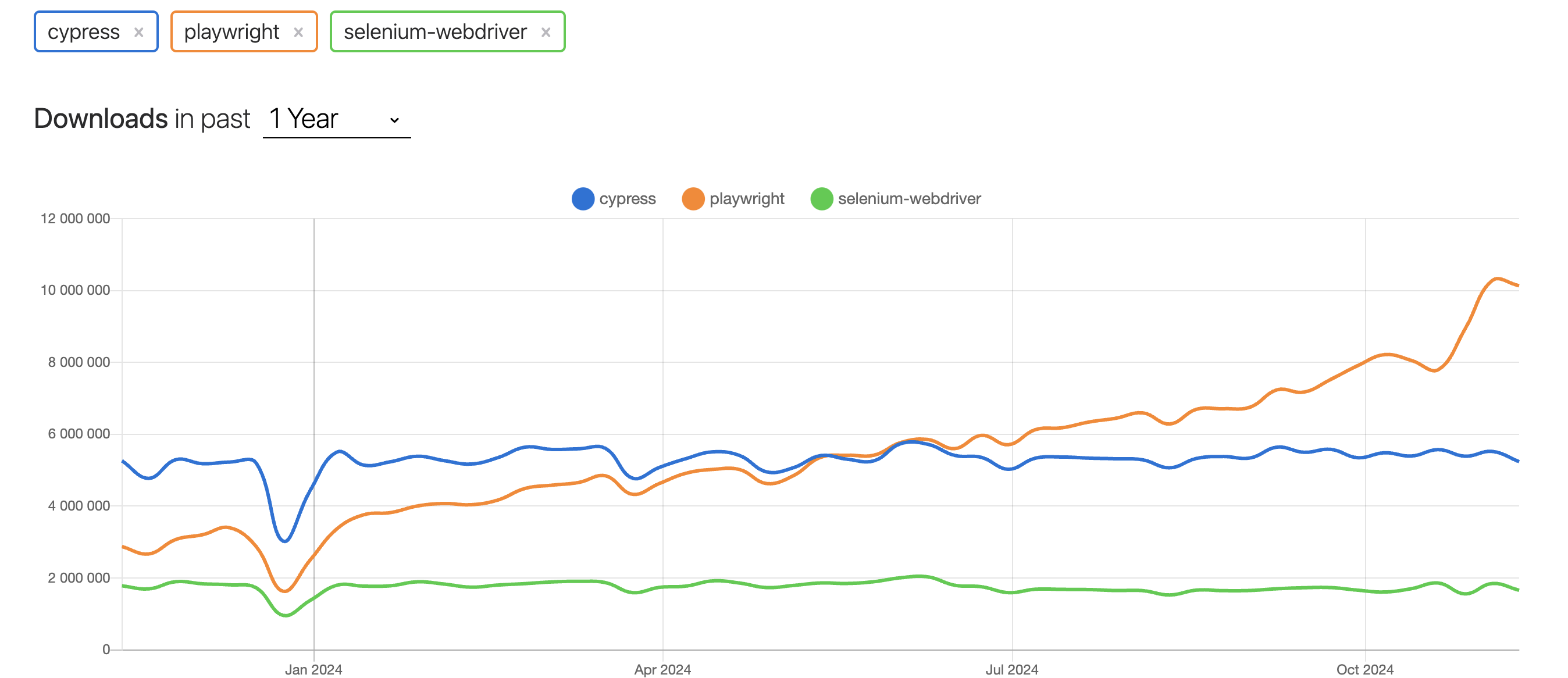
It’s worth emphasizing that I’m not saying that Selenium or Cypress are bad tools. I have used both in various projects, and I believe that with the appropriate experience of the test writer, I can achieve excellent results in both cases.
What attracts me to Playwright and why I am so eager to write about it and create presentations is the tool’s dynamic development and the availability of several more effective solutions. However, it is worth observing the development of other tools, such as Selenium, where intensive work has been carried out for some time. This may make Selenium an even more popular and modern solution. It should also be noted that most of the API or UI testing concepts are similar, so even if you don’t use Playwright, this article may be useful for you.
What should a test framework have?
The testing framework should allow you to create easily maintained solutions and support several areas:
- Design patterns and good practices – our solution must include practices that will allow us to develop and maintain the tool easily.
- Concurrency – in addition to increasing test coverage, an equally important aspect is ensuring that tests run as quickly as possible.
- Reporting test results – implementing an effective method of reporting test results. I wrote an article about Reporting at Playwright.
- CI/CD – even the best testing framework, if not integrated with our CI/CD tools, becomes a significant problem for the entire solution.
It is also worth paying attention to the test pyramid so that you do not have a huge number of UI tests, but try to move these tests to a lower layer if possible. Of course, a lot depends on the application architecture. When creating tests for an application consisting of microservices, it will probably be better to focus on integration/contract tests.
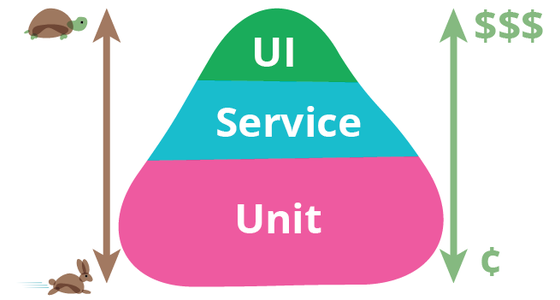
I have seen various implementations of the test pyramid, and it is important to strive to place functional tests at lower levels. This makes them more stable and perform faster.
Design patterns and good practices
The testing framework should support the design patterns used in our solution. This means that it has to be flexible enough to enable the use of good practices. Playwright meets these requirements, so I will present some practices that can help you create a solution that is easy to maintain and promotes the pleasant and efficient creation of subsequent tests.
Let’s start by talking about Fixtures!
Fixtures
This mechanism in TypeScript/JavaScript allows you to create reusable code in various test areas. It works great for page objects or other elements we want to initialize in one place and use in many places, such as test code.
Advantages of the approach:
- possibility of repeated use of data,
- increased readability.
Disadvantages of the approach:
- overhead caused by maintaining the concept,
- potentially oversized classes that contain too many object initializations.
How does it work in practice?
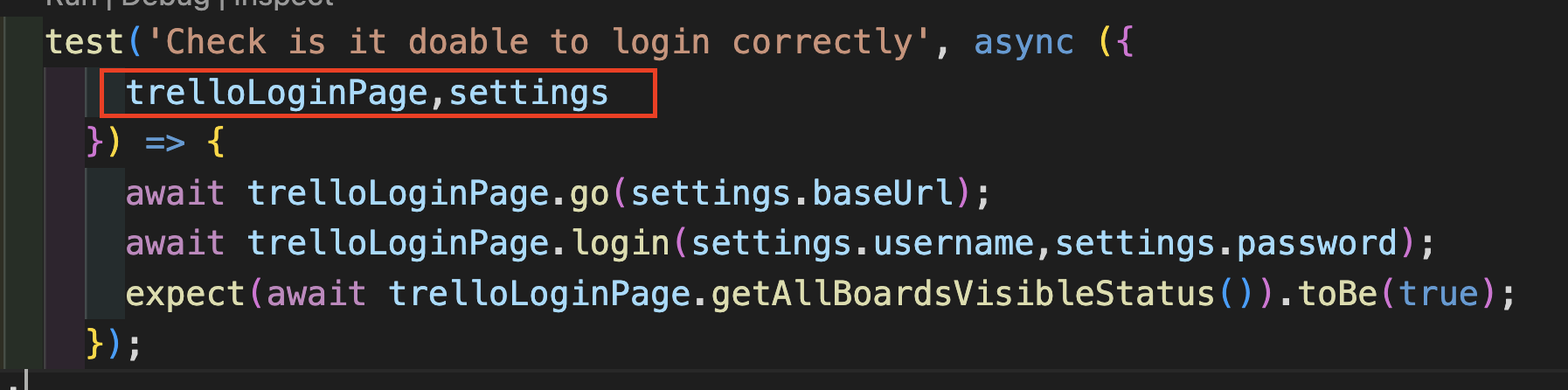
We will find several elements required for various tests in the code below. An example is the LoginTrelloPage class, which represents a Page Object. It is used in many tests where it is necessary to log in to the application.

In our code, the TrelloFixtures type will contain additional element definitions that will be used repeatedly. An example is a TrelloLoginPage page object that takes a page object as a parameter. This object is responsible for interacting with a given page in Playwright. Additionally, type Settings allows you to pass necessary configuration values. In addition to object initialization, it is also possible to perform actions such as await page.goto, which allows you to go to the page related to a given object.
Page Object Pattern
What is Page Object Pattern? As you probably know, this is a popular design pattern promoted by Martin Fowler, a famous programmer associated with ThoughtWorks. He is also behind another well-known concept, the Test Pyramid.
The Page Object Pattern involves creating a class associated with a specific page of the application, which contains defined elements and actions related to this page. This produces readable code that makes it easier to maintain the tests.
Of course, there are many different implementations of this pattern. Still, from my perspective, the key is to start by passing a fresh object responsible for controlling the action in a given browser window. In the Playwright’s world, such an object is a page. The page object represents a single page in the browser and allows you to interact with its elements. This may be less intuitive for people unfamiliar with Playwright, but in practice, it is an extremely effective solution.
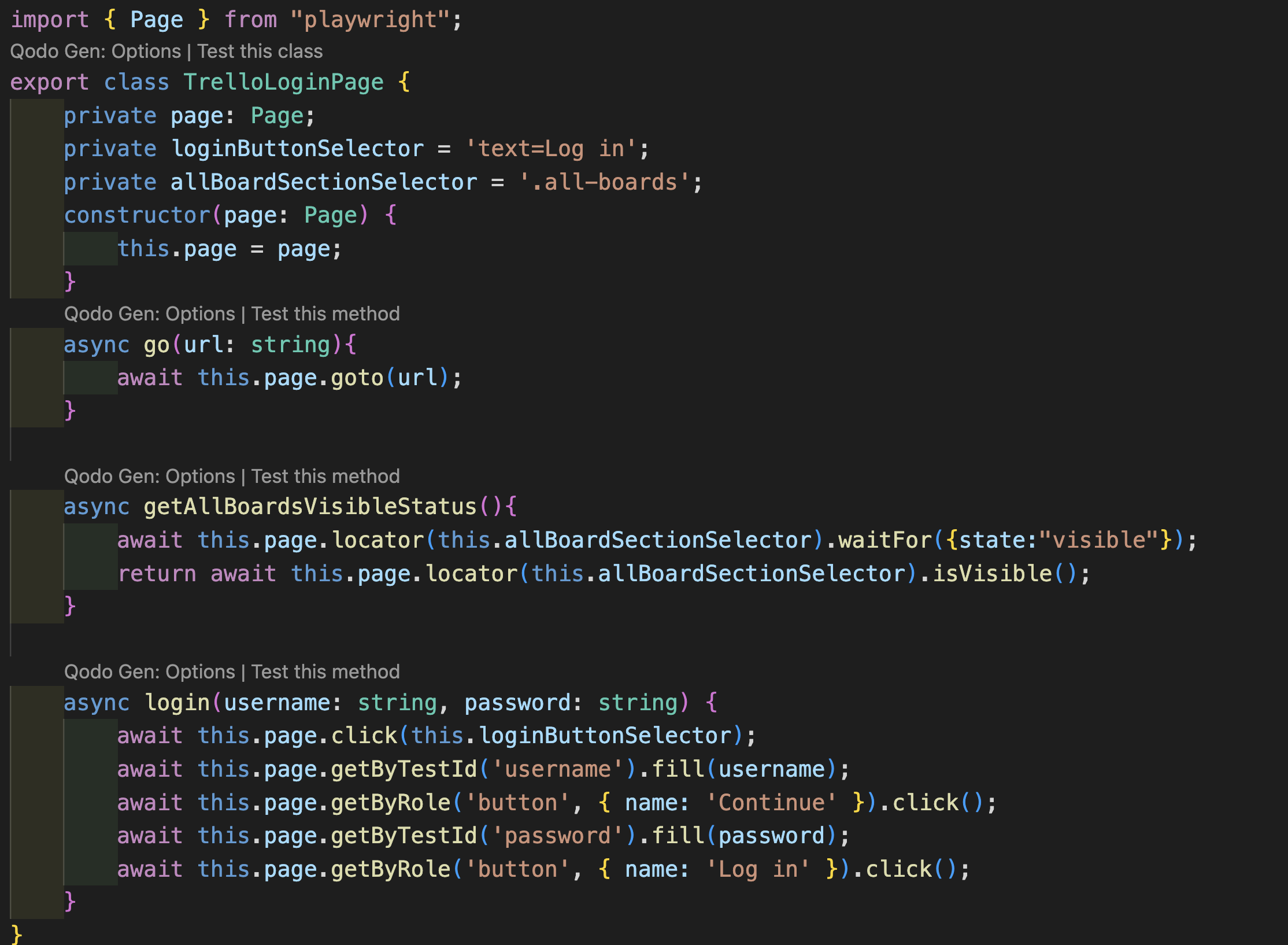
Going further, in our example of TrelloLoginPage, the natural method will be login, allowing you to log in to the application. It’s a good idea to store selectors as fields in a class, such as loginButtonSelector, which makes them easier to maintain and reuse. Additionally, the getAllBoardVisibleStatus() method could return the visibility status of the element representing all “boards” available after logging in.
Factory Pattern
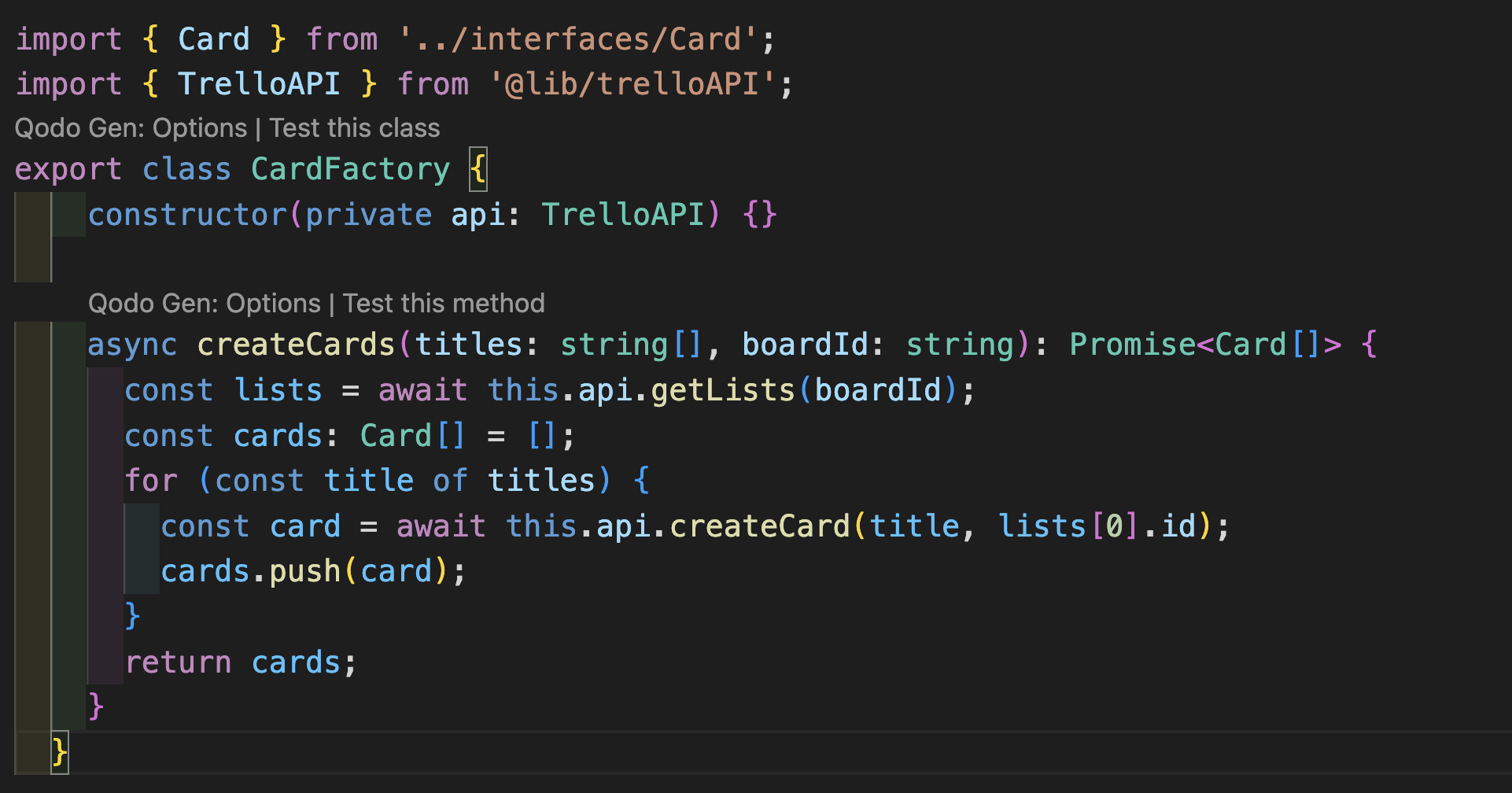
This pattern can work well in creating solutions for automated tests. Of course, there are more advanced applications, but too complex abstractions can lead to additional problems.
In our examples, let’s assume that we create two Factory classes:
- the first one for Card objects, i.e., FactoryCard, which will contain a method for creating a specific card in Trello,
- the second one is BoardFactor, responsible for creating the board in Trello.
Advantages of the approach:
- code reusability and standardization,
- the ability to create different variants of our objects,
- easier code maintenance and test data refactoring,
- separation of object creation logic from tests.
Disadvantages of the approach:
- potentially complicated code,
an additional abstraction layer – this could make the code more difficult to understand.
Parallelism – running tests concurrently
One of the key aspects to remember when creating an automated testing framework is choosing a tool that allows you to run tests concurrently.
What exactly is concurrent test running? This is a process in which tests are executed in parallel in many threads instead of using one thread, which significantly reduces their execution time. This is one of an automation tester’s most important elements. Adding more tests doesn’t accomplish much if they take hours or even days to run. Focusing on this aspect can significantly speed up the delivery of solutions.
An example is one of the projects in which my team and I implemented Playwright in combination with C#. With about 150 quite complex UI & API tests, their run time on four threads was only 8 minutes, which is relatively short. Increasing the number of threads could be even more satisfying this time.
Possibility to use parallelism in Playwright
Using concurrency itself could be the subject of a separate article or publication. Still, using a few examples, I will present what possibilities Playwright offers in this area.
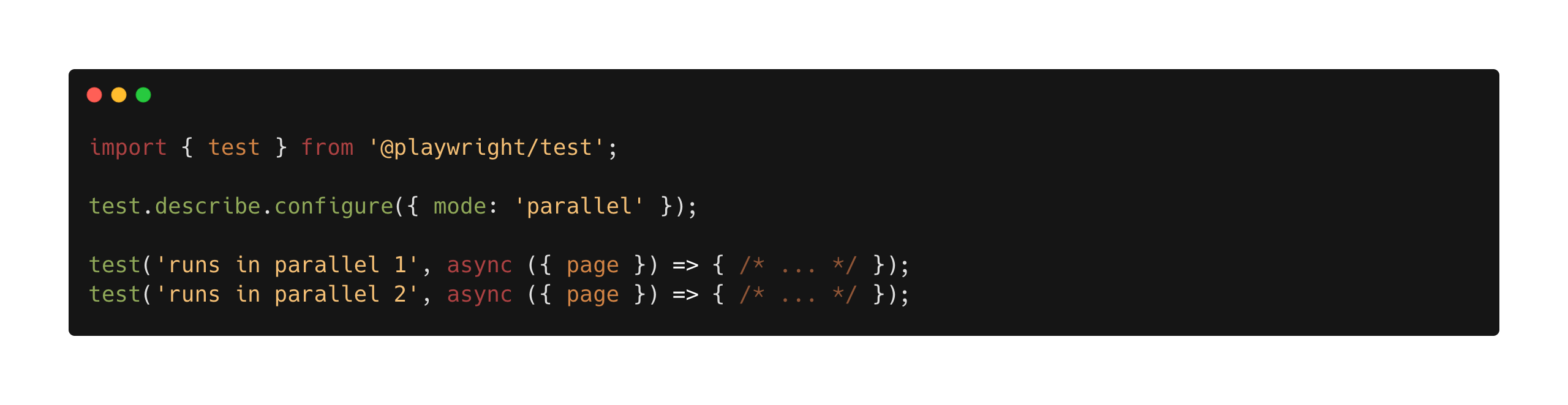
The first important thing is the wide range of options for using concurrency. For example, we can run all or some of the tests concurrently. It is worth preparing a solution so that all tests run concurrently. This approach is highly recommended because it is best to avoid exceptions and tailor tests to run concurrently, increasing efficiency and reducing test execution time.

When we set the fullyParallel option to “true” in the playwright.config.ts file, all tests will automatically run concurrently. What is also interesting is that if we have more than one browser defined, e.g., if we use Chromium and Firefox, these tests will run concurrently on both browsers.
Parallel in the class
In Playwright, it is also possible to define concurrency at the test class level – whether a given class should use concurrency or not. In my opinion, however, it is better to invest time to ensure the correct operation of tests in a concurrent environment rather than create workarounds. This will avoid situations where some tests run concurrently and others do not, improving the consistency and maintenance of the entire test database.
Sharding
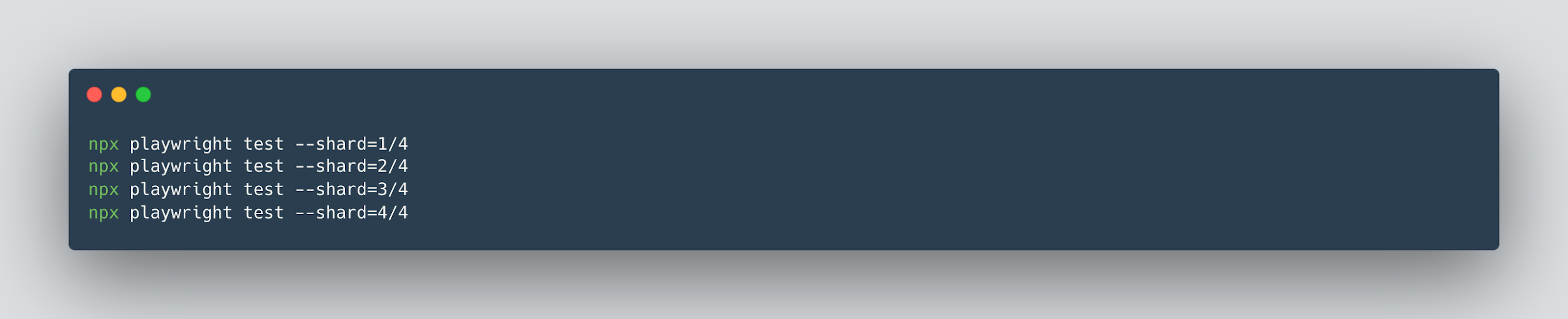
One of the interesting mechanisms offered by the Playwright is the so-called Sharding. This mechanism, also called fragmentation or division, allows you to divide automated tests into smaller parts (e.g., four fragments) and run them in parallel in separate tasks (jobs) in the CI system.
Sharding is particularly useful when we do not plan to use more advanced tools (such as Moon) or cloud testing platforms (such as BrowserStack, SauceLabs LambdaTest, or others). By running tests in a split form on many jobs, we can significantly shorten the total execution time of automatic tests, which positively affects the process’s efficiency.
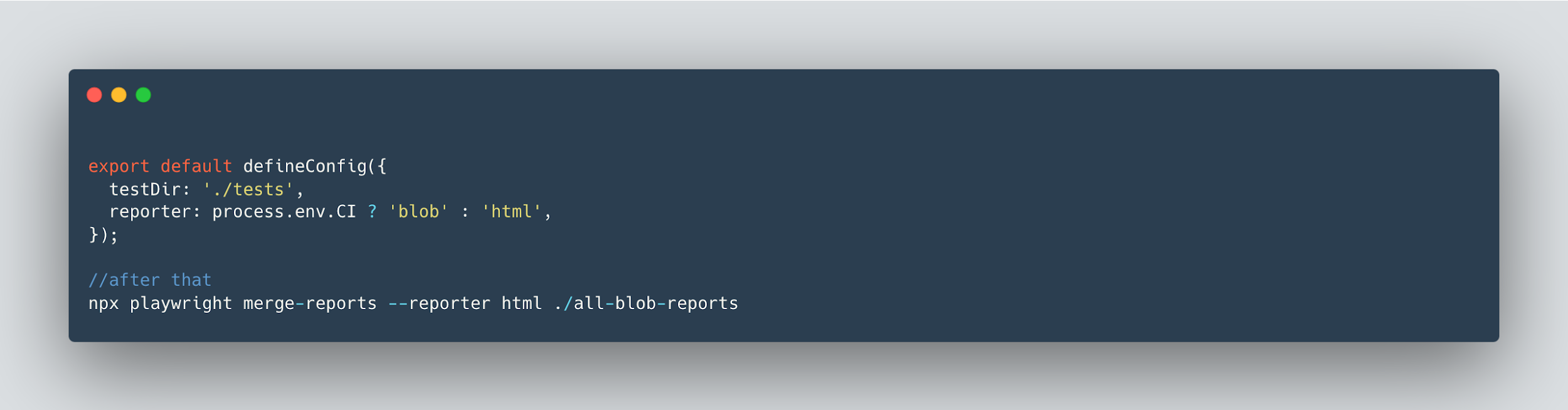
An additional advantage of this solution is the ability to integrate test results. By default, the results are generated separately for each task but can be merged into one collective report. Such a report significantly facilitates the analysis of results and monitoring of the tests’ effects, providing a consistent picture of the application quality.
Assertions – how do we approach assertions in our solution?
The approach to assertion in testing can be diverse and is widely described in the literature and publications. It is crucial that the Page Object class does not contain assertions but only allows for returning the state of a given object. For example, instead of performing an assertion in the class, it should return the visibility state of the element, leaving the validation itself to be performed in the test code.
However, there are situations in which it is difficult to return the state of an item directly, for example, when you need to check several fields of one object (like the properties of a product added to the cart in an online store). In such cases, you can map all object values to the appropriate fields and save them in a dedicated object. Thanks to this, the Page Object class can return such an object, and the correctness is verified in the test code by comparing the object downloaded from the page with a previously defined reference object.
An alternative solution is to create a dedicated class containing methods for more advanced validation. An example of this approach is below. However, be aware of the potential risks associated with this approach – for example, if the name of a method in this class is incorrect, it may lead to errors that are difficult to detect. Therefore, it is important to exercise caution and appropriate attention to detail when implementing such solutions.
VerifyElementsInCart(cardTitles: string[], columnName: string)
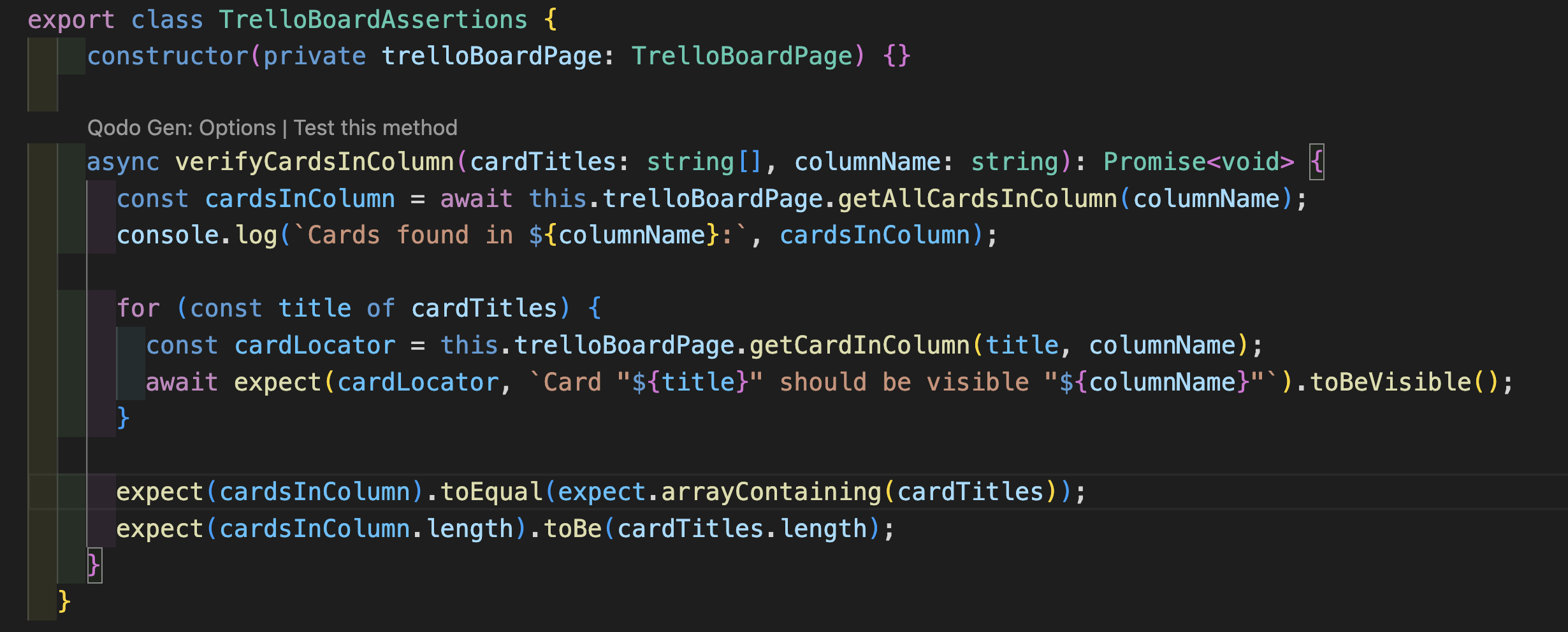
We don’t really know what exactly this method checks, and there is also a risk that, in the future, someone will change its implementation, stopping it from verifying what we originally assumed. Of course, changing the method name can make it easier to understand the context of what “Verify” means. On the other hand, it is clear to many people that this method checks whether “Cards” are in a specific column.
However, it is worth being precise to avoid potential problems. If we know exactly what a given method should do, we can include the appropriate assertions to check the contents of the shopping cart. Alternatively, you can use an approach in which the method returns a specific state, and assertions are made only in the test. Thanks to this, the test code remains readable, and the checking logic remains clear and centralized.

Based on this approach, we have a separate element for checking a specific thing/state/element with a page object.
Soft Assertions

This is also an interesting way to introduce assertions to the code in such a way that the check is performed during the test but, at the same time, does not cause the test to end with an error immediately.

Summary
In this part of the article, I presented several key aspects of creating a UI and API testing framework in Playwright.
Due to the topic’s wide scope, I focused on discussing selected design patterns, the importance of concurrency, and the approach to assertion. I presented various strategies and solutions and explained why concurrency is a key enabler for rapid test feedback in today’s demanding environment.
In the following sections, I will expand on the topic of test data and show what the full test looks like in practice.
***
If you are interested in Playwright’s topics, be sure also to check out other articles by our experts.













Leave a comment