


Digital accessibility is no longer just about meeting legal requirements – it’s about taking a responsible approach to designing digital services and products. With new regulations coming into force, organizations must ensure that their websites and applications are accessible to the widest possible range of users, including those with disabilities.
Tools that support accessibility testing play a key role in this process. Tricentis Tosca, thanks to its integration with the axe-core engine, enables teams to detect many accessibility issues early in the development cycle, helping them build more inclusive digital solutions.
Regulatory changes in digital accessibility
The European Accessibility Act, adopted into EU law in 2019, requires member states of the European Union to implement measures that ensure greater accessibility of digital services. For example, in Poland, these regulations are implemented by the Act of April 26, 2024, on ensuring the accessibility requirements of certain products and services by economic operators. According to the Act’s effective date, starting June 28, 2025, most digital products and services must be adapted to meet the needs of people with disabilities.
In practice, this adaptation means complying with the success criteria outlined in the WCAG 2.1 standard at level AA.
WCAG (Web Content Accessibility Guidelines) is a set of guidelines for ensuring the accessibility of websites and applications. The standard defines the principles that must be met for a website or application to be considered “accessible” to people with disabilities and digitally inclusive. WCAG is based on four core principles:
- Perceivability – the ability to use the application through available senses. This is achieved in practice by providing, for example, text alternatives for non-text content, transcripts for audio and video materials, logical content structure, visual cues not based solely on color, the ability to use the site with 200% zoom, and responsive design (automatic adjustment to screen size).
- Operability – refers to, among others, the ability to access all functionalities using only a keyboard, the option to pause dynamic content, links that allow users to skip to specific content sections, clear headings, visible focus on the active element, and avoiding complex gestures.
- Understandability – ensured through plain language, explanations of abbreviations and acronyms, setting the page language in the website’s code, consistent appearance and behavior of interface elements, and clear labels and messages.
- Robustness – ensuring that content and features work properly across various user tools such as web browsers, screen readers, and other assistive technologies.
These four principles are further detailed in 13 specific guidelines, each including measurable success criteria.
Economic entities covered by the Act that fail to meet these accessibility requirements may face financial penalties of up to ten times the average monthly salary in the national economy for the previous year, but no more than 10% of their revenue from the fiscal year preceding the penalty.
However, more severe than financial penalties may be reputational damage and lost revenue due to limited access to websites and apps for a portion of the user base. This can mean between 4 and even 7 million users in Poland alone. The World Health Organization (WHO) estimates that over one billion people worldwide live with some form of disability, representing around 15% of the global population.
Aside from the matter of social responsibility and the ethical and moral duties of decision-makers in the application development process, one must ask: “Can we afford such a loss?” and “Is it worth marginalizing this issue?”.
Accessibility testing
Manual testing plays a crucial role in accessibility testing, as the results of automated digital accessibility analysis – regardless of the tools used – will never be fully comprehensive. Automated tests analyze individual elements in isolation and cannot interpret context accurately, so they typically detect only about 50% of all accessibility issues.
A simple yet illustrative example is evaluating alternative text for images and graphics. An automated tool can check whether alt text exists, but cannot determine whether the text is meaningful or appropriate in the given context. Similarly, it cannot distinguish between purely decorative images and those that convey essential information or functionality within an application.
Still, 50% coverage is a significant result that can greatly enhance the efficiency of accessibility analysis in a project – particularly if historical results are used as a benchmark during regression testing.
Suppose we want to shift the detection of accessibility issues as early as possible into the development process. In that case, we can integrate automated accessibility checks into our pipelines – before the product reaches manual testers for a more thorough accessibility audit.
A practical solution for this is using the axe-core engine, which enables automated testing of the user interface accessibility in HTML-based applications. Axe-core implements rules based on WCAG 2.0 and above, covering levels A, AA, and AAA, and includes a collection of best practices for proper use of HTML semantics and ARIA roles on websites.
Automated accessibility analysis in Tricentis Tosca
Tricentis also recognized the potential of the Axe-core engine, which integrated it into the Tosca testing tool (functionality available starting from version 2023.1). Thanks to this integration, 50% of accessibility issues can be detected quickly and easily, significantly improving early-stage accessibility validation.
Types of accessibility tests implemented in Tricentis Tosca
Tricentis Tosca offers three types of accessibility analysis:
- “Specified Webpage” – performs an accessibility analysis for a specific webpage defined in the Search Criteria parameter of the Check Webpage Accessibility module.
- “Before Inputs” – runs an accessibility analysis before data is entered in a test step (for ActionMode Input).
- “After Inputs” – runs an accessibility analysis after data is entered in a given test step (also for ActionMode Input).
Creating an accessibility analysis in Tricentis Tosca
The process of creating accessibility tests in Tosca is intuitive and consists of just a few steps:
- Create a new, empty TestCase.
- Add the Browser parameter to the Test Configuration Parameter (TCP).
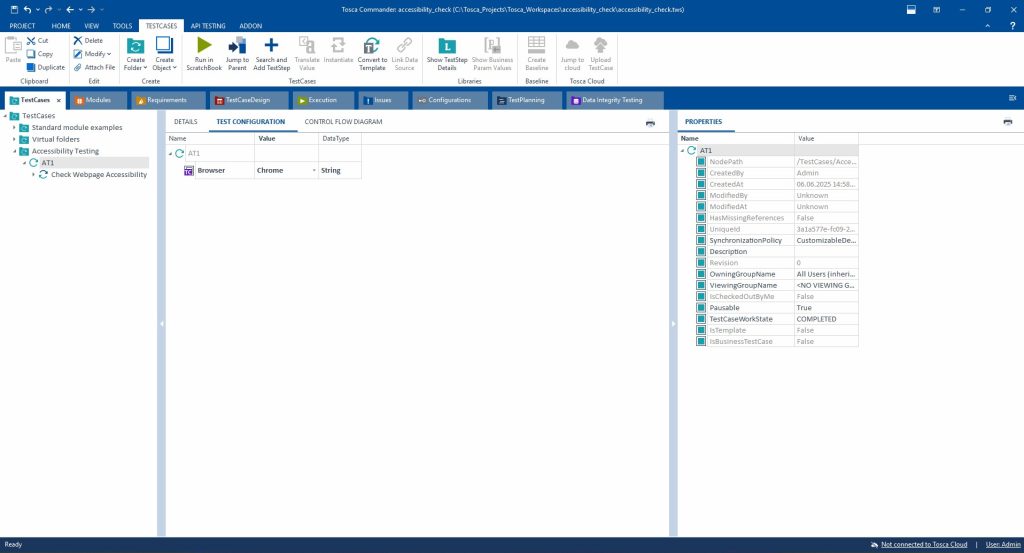
- Decide which type of accessibility analysis you want to perform:
- Option 1: “Before/After Inputs” – add the RunAccessibilityAnalysis parameter to the TCP and assign it the value “After Inputs” or “Before Inputs”.
- Option 2: “Specified Webpage” – add the Standard Module Check Webpage Accessibility to the test and provide a value for the Search Criteria parameter.
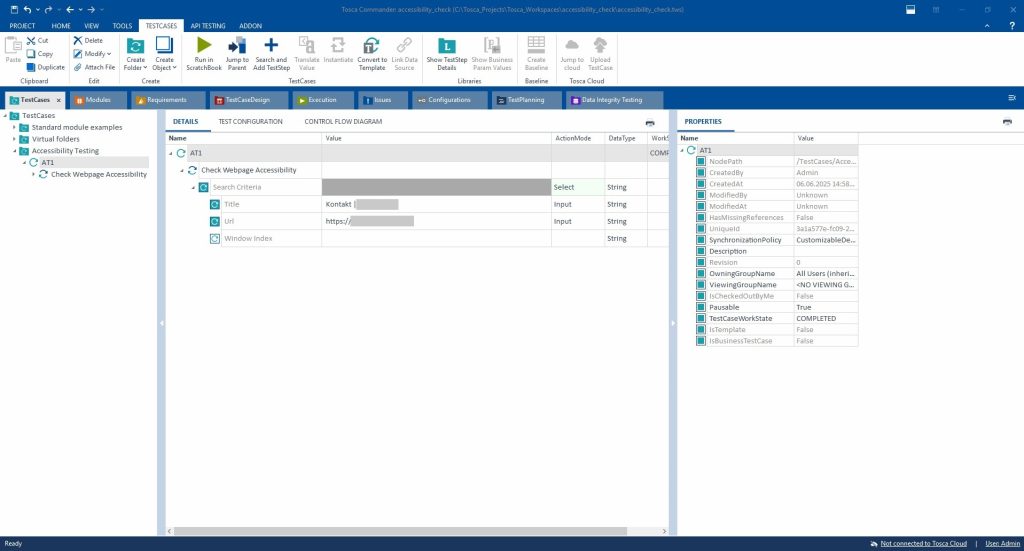
- Execute the TestCase from the ExecutionList.
Accessibility analysis reports in Tricentis Tosca
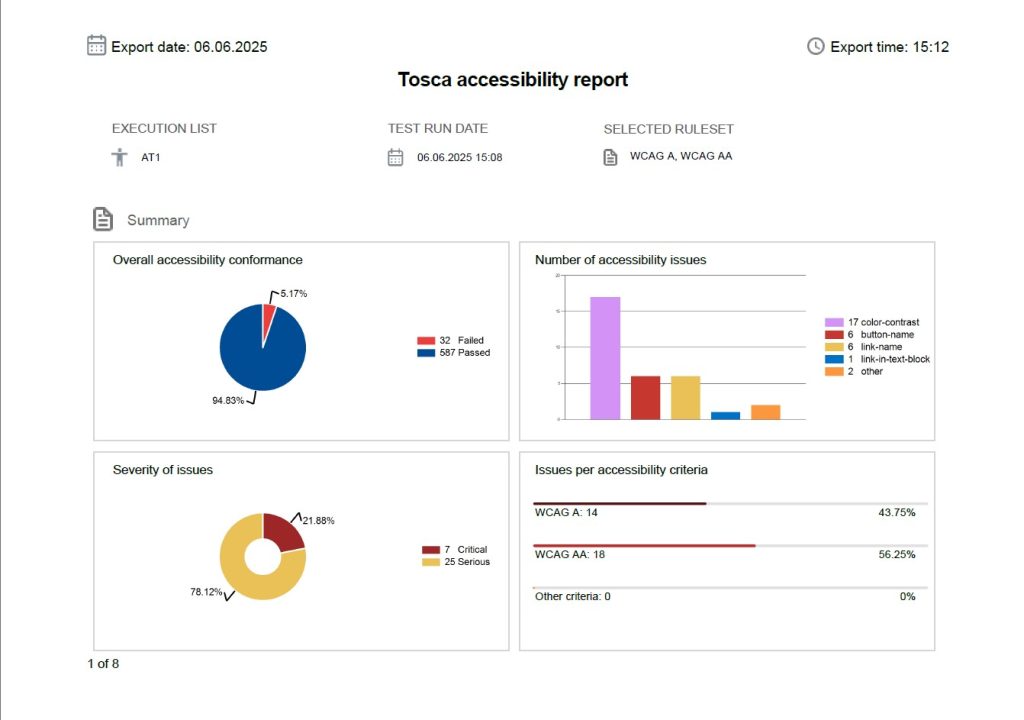
After running tests from the ExecutionList in Tosca, the results of the accessibility analysis will appear in the Accessibility column, categorized by severity level. Tricentis defines four levels of severity:
- Critical – issues affecting the most essential functionalities and core components of the application, completely blocking user interaction.
- Serious – issues that partially prevent user interaction and can lead to user frustration or present significant usability barriers.
- Moderate – usability issues that do not affect key functionalities, but still pose accessibility challenges.
- Minor – low-impact issues that may seem subtle but must still be addressed to achieve full WCAG compliance.
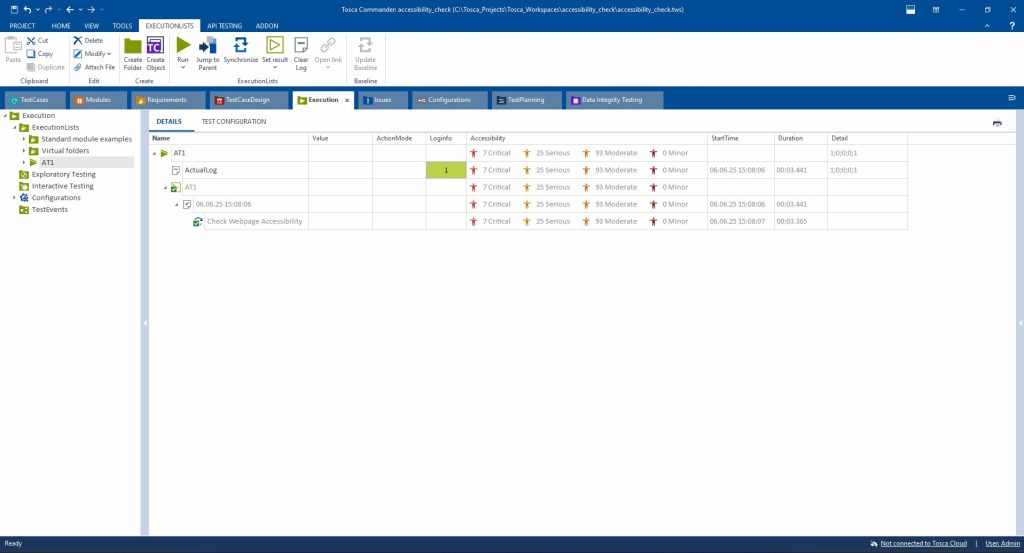
A detailed description of accessibility issues can be found in the report, which can be generated by right-clicking on the desired ExecutionList entry and selecting the “Export accessibility report” option.
It is possible to generate the report in both PDF and JSON formats.
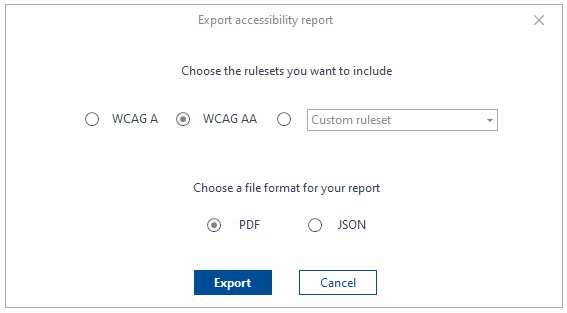
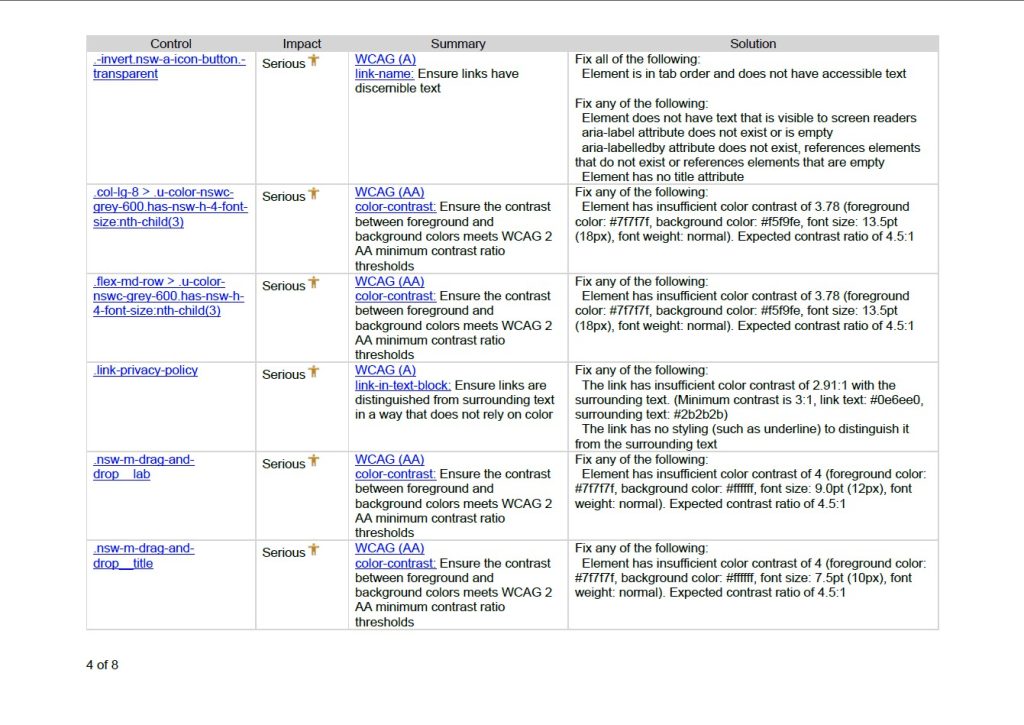
The report includes a summary page of the results and a detailed table analyzing the issues. This table contains information about the severity of each error, the violated WCAG success criteria, and proposed solutions.
An example excerpt (pages 1 and 4) from the Accessibility Report is below.

Summary
In the context of increasing legal requirements and, more importantly, growing societal expectations, ensuring digital accessibility is becoming an obligation and a conscious choice of mature organizations. Thanks to its integration with the axe-core engine, Tricentis Tosca offers real support in automating accessibility testing by enabling early detection of issues, improving the efficiency of regression tests, and reducing the costs of potential fixes.
However, it is important to remember that tools like Tosca do not replace manual testing; they only complement it. The key to effective accessibility assurance lies in combining technology with empathy – that is, understanding the real needs of users. The sooner we make accessibility an integral part of the software development process, the less it will be seen as a burden and more as a standard for designing modern, inclusive digital products.
Sources
- Dostępność cyfrowa
- Ustawa z dnia 26 kwietnia 2024 r. o zapewnianiu spełniania wymagań dostępności niektórych produktów i usług przez podmioty gospodarcze
- Web Content Accessibility Guidelines (WCAG) 2.1
- Ile jest osób z niepełnosprawnościami w Polsce?
- axe-core Documentation
- Run web accessibility testing early in your development
- Web accessibility testing













Leave a comment