

























If you are working with Git, you are probably using Git flow or any other type of workflow that assumes the main branch code is production-ready. It means that any pull request targeting this branch should be validated and tested. This is where Azure DevOps Branch policies shine.
In this article, we will go over settings that will help us maintain high code quality, speed up PR review, and minimize post-deployment problems.
This comprehensive guide covers:
- Understanding cross-repository vs. single-repository branch policies.
- Configuring minimum reviewer requirements and code quality checks.
- Setting up build validation.
- Implementing security checks and status validations.
- Best practices for different team sizes.
- Quick-start configurations for immediate implementation.
Cross-Repository vs. Single-Repository branch policies
Let’s start with a quick explanation of these two types.
Cross-repository policies will be applied to all repositories inside a project, as the name suggests. You can apply them to the default branch (main/master) or any other branch that matches a specified pattern. This is really handy for settings like minimum number of reviewers or security checks (more on that later).
You can find these policies under Settings > Repositories > Policies > [default branch]
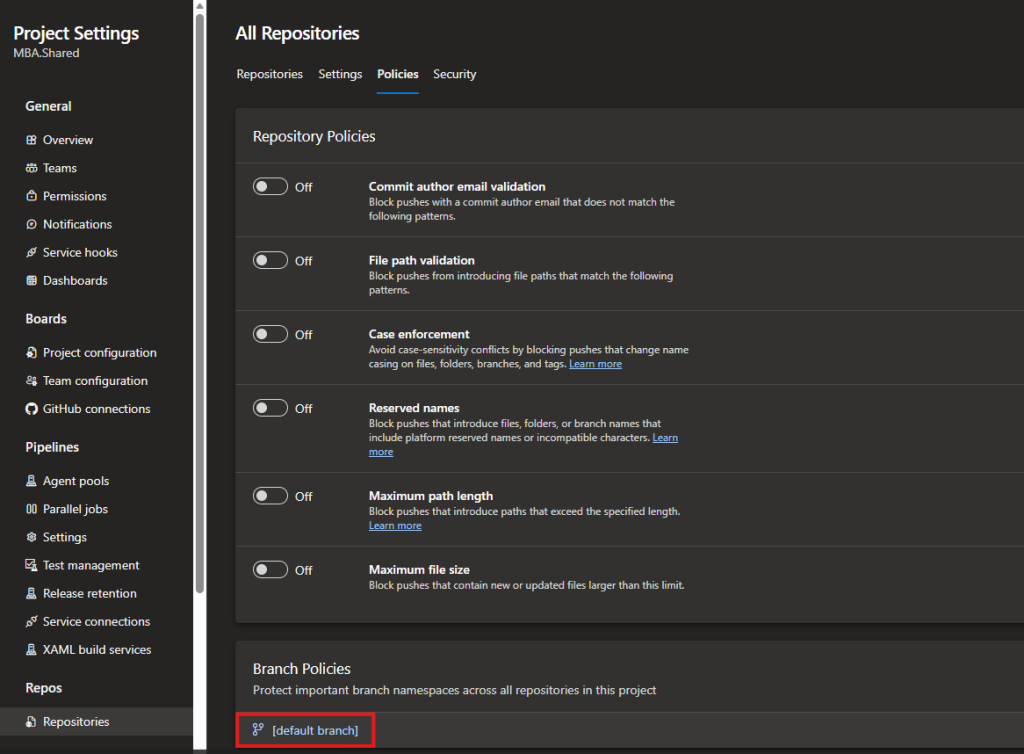
Single-repository policies are applied to a specific repository only. You can find these policies by navigating to Settings > Repositories > [your repository] > Policies > [your branch name]
Important: Single-repository policies are additive to cross-repository policies. If you set up a cross-repository policy, it will be applied on the repository level, but you can add more restrictive policies if needed.
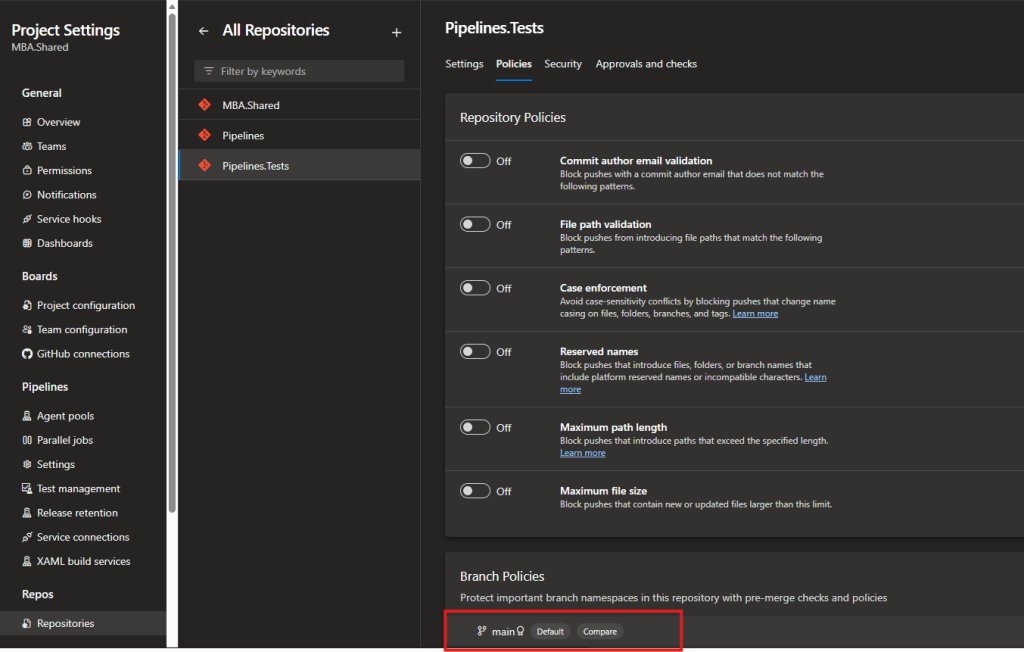
Branch policies overview
Azure DevOps offers several types of branch policies. Let’s explore the most commonly used ones.
Require a minimum number of reviewers
You should always have someone check your code. Not only does it lead to improved security and better code quality in PR, but feedback also helps you develop your skills as a software engineer over time.
That’s why we are always aiming for at least 1 reviewer who is not an author or a co-author of the PR (top 2 checkboxes).
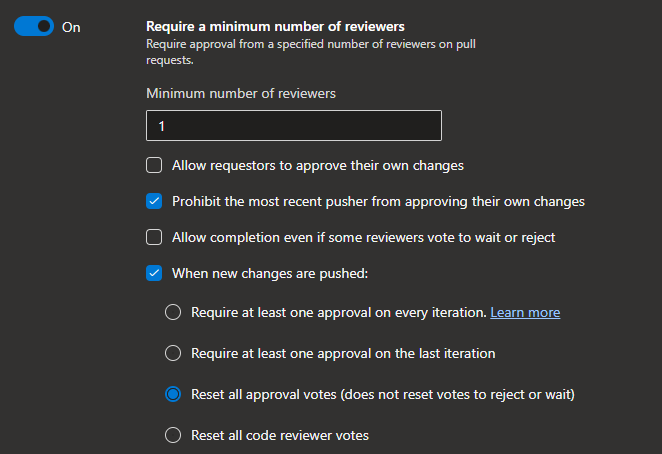
If new changes are pushed, all approval votes should be reset. It ensures that no accidental changes are approved in the main branch.
Check for comment resolution
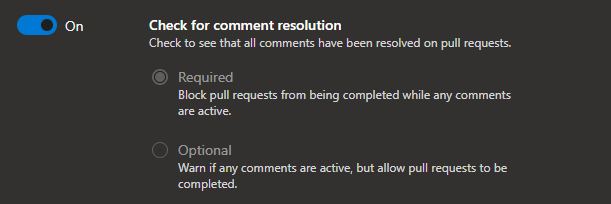
This policy ensures that all comments in a pull request are resolved before merging.
Why it matters: It prevents incomplete discussions from being merged into main and helps maintain code clarity. If a reviewer asks a question or suggests an improvement, the policy ensures it’s addressed before the PR is completed.
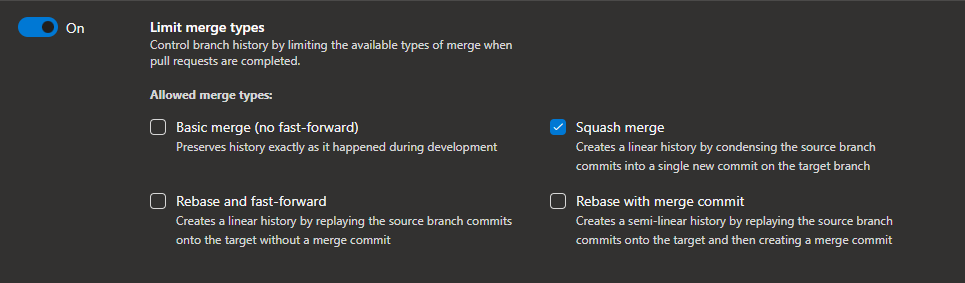
Limit merge types
Merge types are not necessarily something that you want to limit. It depends on your GIT workflow and preferences.
However, in most cases, I find “Squash merge” a good option. It gets rid of all junk commits like “fix typo in variable,” helping keep the main branch history clean and readable.
Check for linked work items
This policy requires pull requests to have linked work items, improving traceability and project management.
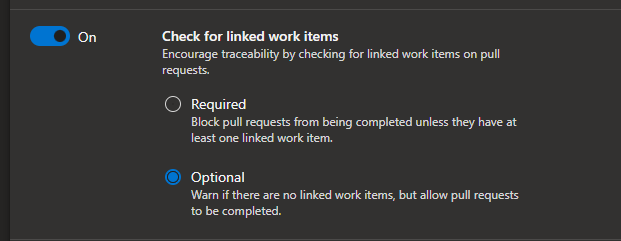
Why it matters: Every code change should correspond to a business requirement, user story, or bug. This policy ensures:
- Complete audit trail of what changed and why.
- Better tracking for compliance and governance.
- Improved sprint planning and retrospectives.
- Easier identification of related changes across the codebase.
Developers simply link work items when creating or updating the PR. It can be done in the PR UI or by simply typing #ID into the PR description or commit messages.
Build validation
Build validation ensures that code builds successfully and passes tests before merging. This is one of the most important policies for maintaining code quality.
Understanding build pipeline stages
Your CI/CD pipeline typically consists of multiple stages:
- Build Stage: Compiles code and creates artifacts.
- Test Stage: Runs unit tests, integration tests, and code coverage analysis.
- Deploy Stage: Deploys to test/staging environments for additional validation.
Build stage should always run using Release/Publish configurations. That speeds up the review process by showing us compilation errors immediately.
Test stage should always finish with 100% success rate. This ensures that the PR doesn’t introduce new bugs or break existing functionality.
Deploy stage is often skipped in PR validation but is really helpful for QA to have live preview for changes. Also, it’s necessary to validate deployments when using an infrastructure-as-code (IaC) approach (ARM templates, Terraform, Bicep files, etc.). Then it’s crucial to check every time you make changes in the repository.
Configuring Build Validation
To set up Build Validation, simply select your pipeline. The result should expire every time the protected branch is changed. It should also automatically run again whenever new changes are pushed to a PR. This ensures all checks are up to date.
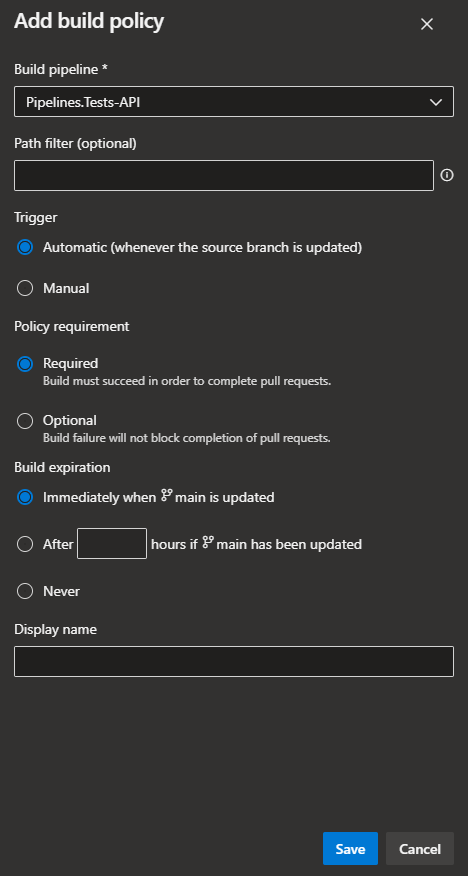
Recommendation: You can use the same pipeline for manual deployments and PR-triggered ones. If you need to alter the behavior slightly, you can use a simple condition:
${{ if eq(variables['Build.Reason'], 'PullRequest') }}
Status checks
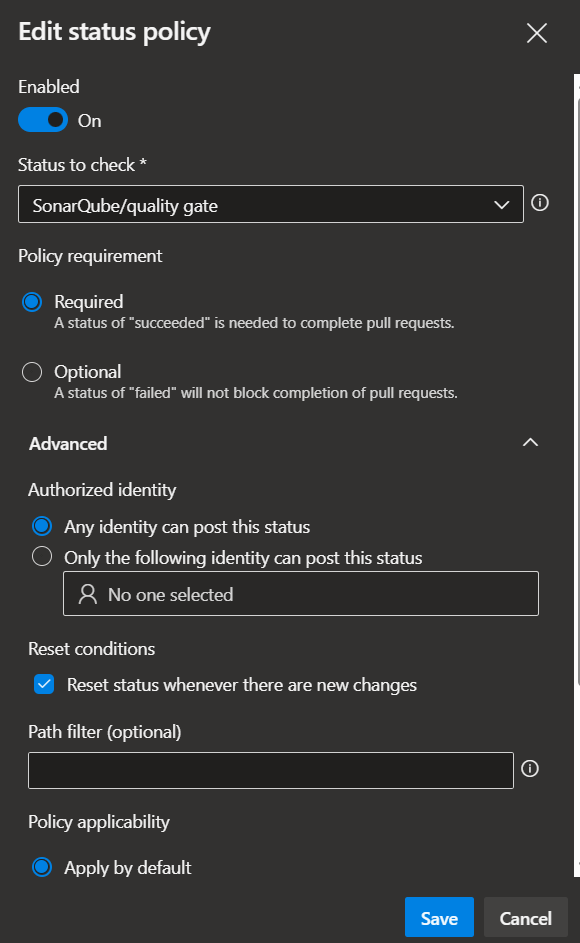
Status checks are used to validate the status posted by external services. It is often used for:
- custom code quality gates,
- security scanning services,
- integration tests from external systems.
They are often triggered from the pipeline, but the results are published separately. They help you maintain high-quality code and speed up the review process.
Configuration: Link to external status check endpoints that report pass/fail status for your PR.
Security best practice: Secret exposure detection
For smaller projects, I recommend at least using secret leak detection tools like Gitleaks. It can be set up quickly in a build pipeline or a dedicated security pipeline. That small step will help us quickly catch accidental exposure of passwords or API keys.
Automatically included reviewers
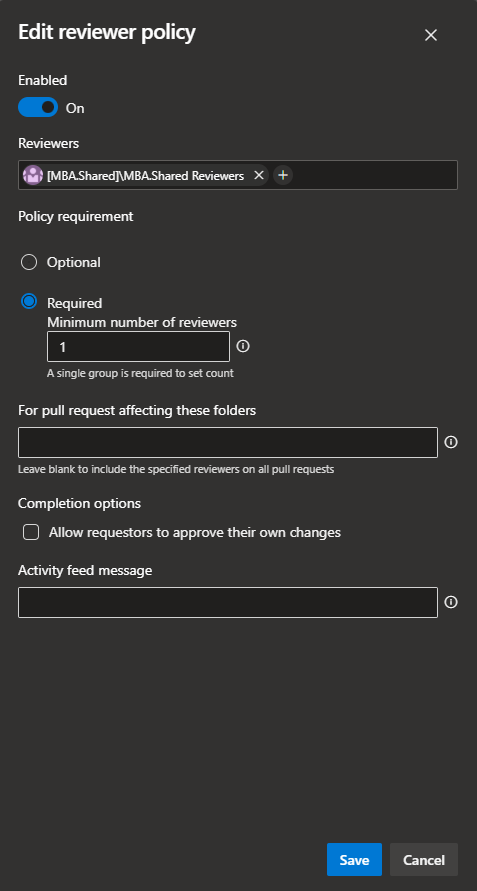
This setting is one of the developers’ favorites. You can automatically add reviewers to your PR, so everyone gets a notification when you create one. You can specify specific people, or take it a step further and add an Azure DevOps team as a reviewer.
You can include all developers in your team or set up a dedicated review/QA team that will be included as required reviewers across all repositories. All of them will receive a notification, but only 1 needs to approve the PR to complete this policy.
Quick start recommendations
Based on team size and project complexity, you can use the following branch policy configurations:
For small projects
- Require a minimum of 1 reviewer (not author/co-author).
- Check for comment resolution.
- Build validation (Build + Test stages).
- Check Secrets exposure.
- Check for linked work items (optional; use if adopting Agile/Scrum).
Rationale: Keep it lean while ensuring code quality and peer review.
For enterprise projects
- Require a minimum of 2-3 reviewers (including architect/tech lead review).
- Check for comment resolution.
- Build validation (Build + Test + Deploy stages).
- Check for linked work items.
- Limit merge types to squash merge.
- Status checks (security scanning, code quality gates).
- Use cross-repository policies for consistency in organization.
Rationale: Stricter controls ensure quality, security, and compliance across large codebases and teams.

Sii x Microsoft
As a Microsoft Cloud partner, we offer a range of solutions that optimize processes, improve collaboration and enable businesses to achieve agility augmented with AI.
Microsoft offeringBest practices summary
- Start conservative: Begin with essential policies (reviewers + build validation) and add more as you go
- Document your policies: Communicate to the team why each policy exists
- Review regularly: Periodically assess whether policies are too strict or too lenient
- Automate what you can: Use status checks for security scanning and code quality tools
- Allow exceptions: Some users may need permission to bypass policies for emergency hotfixes
- Gradual enforcement: Start policies as “optional” warnings before making them “required.”
Conclusion
Branch policies can make our lives easier. They help us maintain high code quality and reduce deployment issues in Azure DevOps. By understanding the different types of policies and configuring them appropriately for your team size and project needs, you can significantly improve your development workflow.
The key is finding the right balance: strict enough to catch problems early, but not so strict that developers bypass policies or become frustrated.
For more information, refer to the documentation.













Leave a comment