
























Atlassian’s approach is to balance autonomy and alignment. We want agile teams to make quick decisions and work autonomously, while at the same time, we want the IT department to ensure that the work is aligned and not risky for the business. Atlassian’s tools are based on the premise that every organization is different. To make them fit and reduce the risk of error, it may be necessary to map complex dependencies across the company or keep a record of intangible assets such as licenses and signed documents. But of course – the requirements can be simpler and only involve tracking computers and hardware.
From the article, you will learn more about “The Atlassian Way” and get to know the answer to why you should use resources in Jira Service Management.
What is “The Atlassian Way”?
Built on the Jira Service Management platform, Assets provides scalable IT asset and service configuration management to meet the needs of high-performance teams. Assets combine the asset management and CMDB capabilities required to effectively manage assets and critical data. Whether you are looking for a lightweight single tracker for your assets or a system for larger enterprises, Atlassian Assets in Jira Service Management allows you to define your assets and work with them in the way that suits you and your business best, as well as providing a platform to extend system monitoring and maintenance automation.
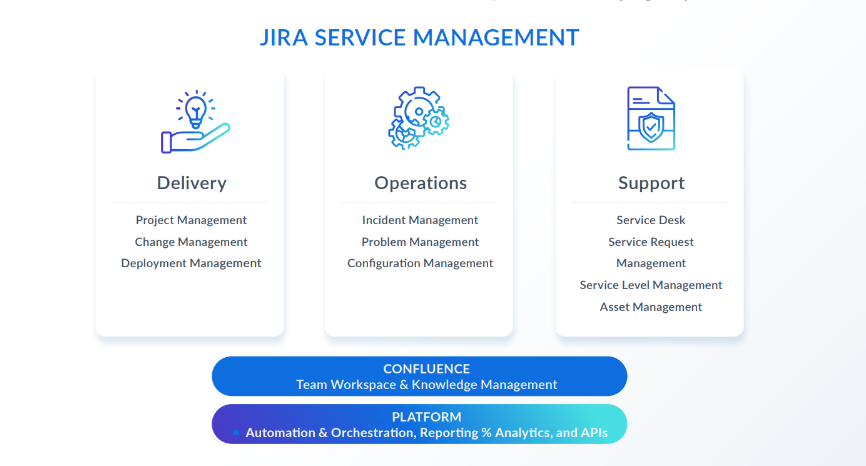
The Atlassian approach enables teams to work on one platform, providing delivery, support, and a great user experience in one place: Atlassian Assets. Assets in Jira Service Management give IT, development, and business teams an overview of critical systems and enable collaboration on priorities and resource allocation. With Jira Service Management on the same platform as Jira (formerly Jira Software or Jira Work Management), all resources and related requests are stored in one place, and teams can easily understand how they relate to their work.
This provides information on the reason for acquiring the hardware, who it’s assigned to, and its previous history, whether it’s a fault report, replacement, or a new purchase order. Jira Service Management and Jira Software enable seamless communication and visibility, reducing friction between development and IT teams.
Advantages of the solution
Jira Service Management allows for:
- A user-friendly method for creating tickets.
- Improved response to service requests by gaining a better overview through tickets.
- Minimizing IT risk by understanding the impact of downstream changes.
- Quicker troubleshooting and resolution of major incidents and problems.
- Tracking IT resources and gaining insight into the relationships between critical applications, services, and the underlying infrastructure.
- Identifying and tracking assets to facilitate planning, audits, and compliance.
- Managing assets outside of IT, such as HR, sales, legal, facilities, and other functions by handling the process in Jira.
Why use Assets in Jira Service Management?
Digital transformation of an enterprise, an innovative initiative, changes how we view IT asset management. This includes information and longevity, moving from on-premise software and hardware to SaaS apps and cloud services. Technology management as a whole requires clear visibility into all IT, and it all starts with unloading historical baggage like CMDB. This term often evokes feelings of inaccuracy and unreliability. Gartner has previously documented that only 25 percent of organizations are getting value from their current CMDB investment1.
However, CMDBs can provide valuable insights and enable IT to make better and faster service delivery decisions. New research from Forrester indicates that:
A CMDB is an integrated operational data warehouse containing key IT/digital assets, code layers, and dependencies. It can enable impact analysis and manage IT portfolios when assessing risk, efficiency, and performance. In the Forrester survey, 67% of respondents said their organization has a CMDB; of those, 91% agreed that their CMDB is critical to their business.
Forrester Research, Inc. “The State of Service Management, 2022.”
Forrester further suggests that:
Organizations that invest in this have a better understanding of their digital estate, leading to higher performance on multiple dimensions. In particular, high-performing organizations overcome the data quality and complexity issues that have plagued CMDBs and created failure; respondents in these groups are also more likely to report that they have automated their CMDB data maintenance as much as possible.
Forrester Research, Inc. “The State of Service Management, 2022.”
How do we reassess the current and future landscape?
The key to successful technology management in the current era is alignment with new goals and shedding older perceptions of what CMDBs mean for IT inventory and assets. So, how can an organization reassess its current and future landscape? By looking at what is demanded and needed, we can provide the correct data to the right stakeholders at the right time.
Assets in Jira Service Management provides a modern database for managing assets and configurations. When you say “modern,” you mean an agile, hybrid, or changeable environment based on emerging DevOps practices, new SaaS products, or a mix of mobile and on-premises devices and cloud platforms.
Atlassian Assets was built with this complex, ever-changing landscape in mind and has advantages over other vendors’ offerings:
- Tool structure – by standardizing a single tool for asset and service configuration management, users benefit from tighter process integration and gain richer information context through shared data. Customers can also realize cost savings through faster implementation and easier maintenance of a single tool.
- Flexibility – the open data structure gives customers more control over their assets and critical installations. Customers can track assets and crucial data required to support key business processes, reducing implementation time and maintenance.
- Accuracy – no-code/low-code automation keeps data up-to-date and significantly reduces manual workflow.
- Centralization – a wide range of integrations so customers can use a single entry point to their data.
- Reputation – with Jira Software’s reputation among software developers, we can improve CMDB’s authority from a “stopper” to an “enabler” in DevOps.
How do I start using Atlassian Assets in Jira Service Management?
The Assets tool in Jira Service Management allows teams to adopt a customizable and scalable approach to building their IT asset and service configuration management system.
Use ITIL 4 principles to include processes, methods, people, and tools you already have. Consider the following ones:
- Start where you are.
- Focus on added value.
- Progress iteratively with feedback.
- Keep it simple and practical.
- Optimize and automate.
- Collaborate and promote visibility.
- Think and work holistically.
While no one likes “homework,” successful asset and service configuration implementation requires preparation. Most customers conduct a series of workshops to outline the company’s key business initiatives and establish clear goals for implementation.
Checklist for next steps
This checklist provides a high-level overview of the steps to take when starting IT asset and service configuration management. Organizations can implement a complete system by starting small and focused in just a few months.
Build your business case
- Choose a current business problem that will deliver value to the business. We recommend that you solve just one or two issues for the first IT asset and service configuration management iteration.
- Put together a team to tackle this problem. You choose the team based on the business problem.
- Consider which teams interact with the problem area and draw stakeholders from each relevant team.
- Choose a project manager from your organization responsible for the results you want to achieve.
- Make sure everyone has the same understanding of IT asset and service configuration management.
- Describe the business problem in detail, how asset and service configuration management can help overcome it, and the business outcome it will lead to.
- Define your goals as reducing average time to resolution by 10% or increasing customer satisfaction by 15%.
- Build a business case using the problem statement and the goals of getting stakeholder buy-in and budget approval.
Understand what data you need
- Understand what information you need to solve your chosen problems.
- List relevant assets and configuration categories (e.g., laptops, servers, databases) and what information (attributes) you need to know about each category.
- Understand where that information exists today (e.g., spreadsheets, in people’s heads, external databases).
- Decide what data to leave in their current tool and what to move into the CMDB. It’s definitely time to leave spreadsheets and isolated data behind.
- Understand which integrations to third-party tools or file imports you want to implement based on the above.
- Understand how often data changes to inform how usually integrations need to be run to keep your CMDB up to date.
- Understand if there are any governance, compliance, or audit requirements. Do you operate under specific legal requirements, etc.?
- Make a final check. Does each piece of data have a purpose? If not, remove it.
Implementation
- Conduct all relevant product training for your team that will build, maintain, and work with your tool.
- Learn more about data modeling best practices. Plenty of resources are available, including in-depth YouTube lectures.
- Map out the structure you want on paper or a whiteboard. Make sure your chosen structure can support the access permissions you need.
- Import data and organize it according to your plan. Integrate Atlassian Assets with your service management project.
- Set up relevant automation rules to keep data up to date. Test and repeat.
- Review the data regularly to keep it up to date.
- Choose the next problem to solve and keep expanding. Get help from an external expert.

Conclusion
The resources in Jira Service Management provide IT, development, and business teams with a comprehensive overview of critical systems, allowing them to monitor performance and identify potential issues in real time. This enables teams to collaborate effectively by setting priorities and optimizing resource allocation to resolve incidents and implement improvements more quickly.
***
If you are interested in project management and IT tools, be sure to read other articles by our specialists.
1 Rich Gibbons, MD, ITAM Review. “ITAM INSIGHTS REPORT – Analysis of the changing cost of software, hardware and cloud by the industry charged with managing it.” Published in 2023.













Leave a comment