


If you’re one of those people who travel often for work, you know what comes with it. Booking flights, hotels, ground transport, plus managing expenses and paperwork – all of it can be time-consuming and stressful. Usually, each of these things lives in a different corporate system, which, more often than not, ends in frustration and an angry email to HR.
What’s striking is that the answers to most of these problems are out there and could perfectly well be gathered in one place. “Can I fly business class to Berlin?” “What’s the hotel limit in London?” “What paperwork do I need to file after I get back?” – These are questions for the company policy, not for a human being.
I decided to take a look at this problem from an AI angle and see how it could be solved. As a bonus, I managed to kill two birds with one stone – joining the Sii AI Grants program (more on that later) and testing Google’s framework for building multi-agent systems.
The idea: AI used for integrating corporate travel systems
At its core, handling corporate travel breaks down into 3 main areas:
- Booking and travel organization
- I’m looking for the best connection to Los Angeles, ideally direct, but I don’t know whether my company has any preferences about airlines.
- I want to book the best possible hotel in the city center, but I have no idea what the per-night limit is.
- I need to organize a complex multi-leg flight, and on the ground, rent 2 company cars and arrange transport for the whole delegation.
- Document management
- I want to find out what paperwork I need to file after a business trip.
- I’m wondering whether I can extend my stay by a few days to do some sightseeing, but I don’t know whether I need to file any extra documents.
- I don’t know who at HR to ask about the issue I’m dealing with.
- Expense management
- I need to settle the costs of a trip.
- As an HR employee, I want easy access to information about employees’ expenses so I can manage the budget better.
- As head of finance, I want to prepare a report on travel spending for the last quarter.
Notice that these areas are interconnected and often require cooperation between different systems and departments in the company. So, it’s a perfect field for AI, which can integrate all these different systems in one place.
Make it easier, not harder
To avoid building yet another system that would be just another app for employees to learn, I decided to approach the problem from the user’s perspective. Since we already have a ticketing system in the company (Atlassian Jira), why not use it as the main interface for handling corporate travel? Employees are already used to working with it, so we don’t need to train them on a new tool. Instead, we can build an AI agent that acts as a “corporate travel assistant” and integrates with Jira, letting employees manage their trips easily.
And so GAIA was born (an acronym for Google, AI, Atlassian) – a combination of Jira and AI that lets employees manage their corporate travel in one place.
It helps everyone:
- people heading out on a trip,
- the people settling the expenses,
- and the HR team, which can easily monitor and manage all corporate travel across the company.
With this setup, the employee doesn’t have to learn a new tool, and their interaction with the system is no different from what they’re already used to – only the backend changes: instead of a human on the other side of the inbox, it’s AI doing the answering. As a side effect, problems that used to take hours or days can now be resolved in minutes.
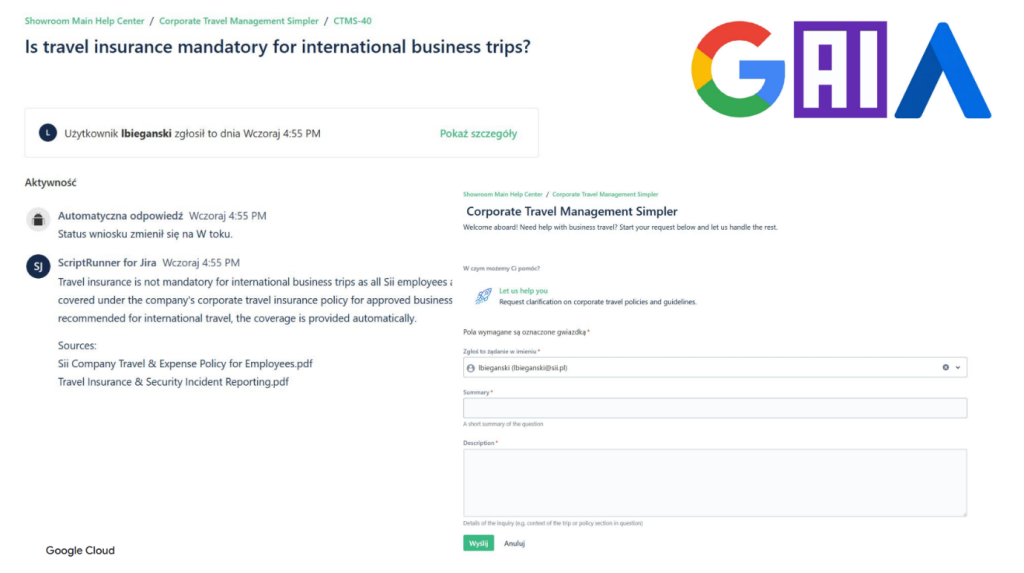
An employee asks a question about travel insurance, and the system automatically replies in a comment, citing specific paragraphs of the company policy.
Sii AI Grants
The GAIA project came to life as part of the Sii AI Grants program, which supports innovative projects using artificial intelligence – the kind of projects there’s no time for during day-to-day client work, but that can deliver real value to the company. It’s meant for testing new technologies, experimenting with ideas, and building prototypes.
It’s a great opportunity to try something new, develop new skills, and contribute to the company. GAIA is exactly one of those projects – it exists because I had the chance to spend time experimenting and testing ideas.
Architecture
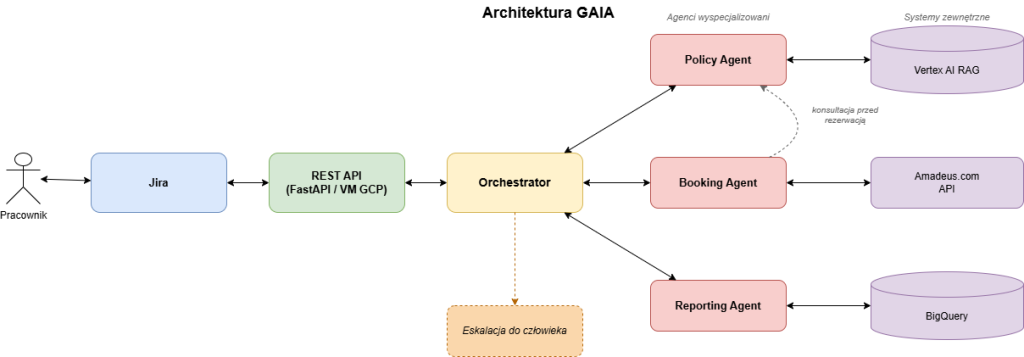
The employee communicates with the system via Jira Service Management. The ticket is sent via REST API to the Orchestrator, which delegates tasks to specialized agents (Policy, Booking, Reporting), each of which connects to its corresponding external system (Vertex AI RAG, Amadeus.com, BigQuery). When needed, the Orchestrator escalates the case to a human.
Orchestrator
GAIA uses Jira as its main and only interface between itself and the user. The employee creates a ticket in Jira (with any query in natural language), which is then sent via the REST API to GAIA.
GAIA is a multi-agent system. At the top sits the Orchestrator – the main agent that manages the whole process of handling a query. The Orchestrator analyzes the query and decides which sub-agents are needed to handle it. It’s the only one that talks directly to the user (via comments on the Jira ticket). It has access to all information about the ticket (its content, author, comment history, and so on) and uses that to decide what to do next. Specialized agents help it out, each responsible for a different task. They can also talk to each other directly.
The Orchestrator also ensures the conversation with the user runs smoothly. Thanks to built-in intent-recognition mechanisms, it can tell whether the user is satisfied with the answer or needs more information or clarification. It’s also equipped with several so-called guardrails that help it avoid mistakes and misunderstandings. For example, if the user asks a question the Orchestrator doesn’t know the answer to, instead of making something up, it can ask for more details or hand the conversation over to a human.
Policy Agent – the company policy expert
Answers questions about rules, limits, and procedures. Where does it get its knowledge? From a corpus of company policy documents made available by HR. The corpus is wired into a RAG on Vertex AI.
This way, the agent has access to up-to-date, official information that always aligns with company policy. Updating that information is simple – with the right setup, all you have to do is add a new document to the database (and calling it “a database” is being generous: HR drops documents into a folder on Google Drive – it’s hard to imagine anything simpler). The agent will automatically index it and start using it.
Once it finds the answer to a question, the agent passes the collected knowledge back to the Orchestrator, backing its response with proper citations. Of course, if the Policy Agent can’t find an answer, it can either ask for more information or simply admit it doesn’t know, rather than make something up.
Reporting Agent – the data analyst
Answers questions about historical and current data: how much did we spend on hotels last quarter, which departments went over budget, and who is currently on a trip abroad.
This agent is connected to a BigQuery database that stores all data on corporate travel (bookings, expenses, documents, and so on). While building this agent, one thought stayed with me: I wanted it to explore the database on its own and correct itself along the way – I didn’t want to feed it ready-made SQL queries to run, because that approach would obviously limit what it could do.
I also assumed that a database like this can (and will!) contain errors, inconsistencies, and gaps (for example, meal expenses tagged as “Food”, “diet”, or “dinner”). What’s more: in most real cases, the “database” is going to be a pile of spreadsheets someone updates by hand, rather than a properly structured database.
3 sub-agents
Hence, the decision to split the Reporting Agent into 3 sub-agents that work iteratively, in a reflection loop:
- QueryPlanner analyzes the user’s query and plans an approach in natural language – it might, for example, decide to check the table schema in the database before running the actual query.
- QueryExecutor translates the plan into SQL and runs it in BigQuery. Crucially, it has read-only access.
- FeedbackAgent – the agent responsible for quality control and correctness of the response. It determines whether the answer is sufficient or requires further exploration of the database. If it decides the answer is not good enough, it can send the query back to the QueryPlanner to rethink the approach.
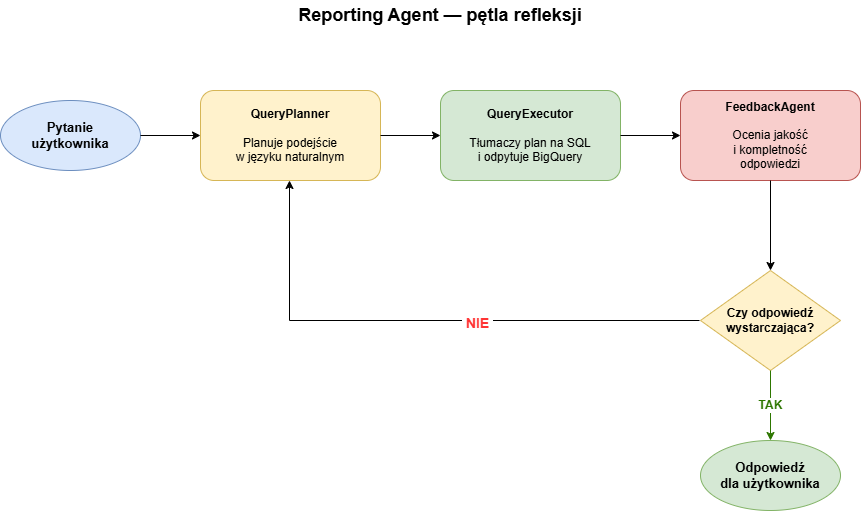
The user’s question goes to the QueryPlanner, which plans an approach; the QueryExecutor translates the plan into SQL and runs it in BigQuery; the FeedbackAgent judges the quality of the answer and decides whether to return it to the user or send it back to the planner for a better approach.
I capped the loop at 3 iterations to avoid the agent spinning forever. In practice, though, most queries get resolved on the first or second iteration.
Booking Agent – the booking assistant
Helps the user organize a business trip, walking them through a multi-step conversation and collecting the necessary information: who’s going, where, when, and for how long. Once it has everything, it searches for available options and presents them to the user, helping them make a choice.
Thanks to the agent’s connection to the Amadeus.com API, it can check real data on hotel and flight availability, which means it can show the user current, accurate information. Of course, the final booking decision belongs to the user – the agent is just there to help with the decision-making. For this agent, I programmatically forced an interaction with the Policy Agent – every time, before starting the booking process, the Booking Agent has to consult the Policy Agent to make sure the proposed options are in line with company policy (e.g., whether a given hotel fits within the price limit, whether a given flight is acceptable, and so on).
This way, we can be sure the user always gets policy-compliant options, and we don’t have to worry about the agent suggesting anything that isn’t allowed.
Google Agent Development Kit
To build GAIA, I used Google Agent Development Kit (ADK) – a framework for building multi-agent systems. It provides tools and libraries that make it easier to create, train, and deploy AI agents, as well as manage their communication and collaboration.
What’s more, since it’s a Google product, it offers native integration with other Google services like Vertex AI, BigQuery, and Google Drive, which makes it much easier to implement individual agents and connect them to different data sources. ADK also – in theory – makes it easy to deploy and scale the system via automatic deployment on Vertex AI.
A big advantage of ADK is its flexibility and modularity – it lets you build agents at varying levels of complexity, from simple bots to more advanced multi-agent systems like GAIA. Because ADK is a framework, not a finished product, I had full control over the architecture and functionality of my system, which let me tailor it to the specific needs of my project.
The availability of tools and ready-made building blocks was the main reason I was able to put GAIA together from start to finish in just 10 days – including thorough testing and the Jira integration.
But does it actually work?
People like to say that AI systems are so-called black boxes – we don’t know exactly how they work, and their behavior is often unpredictable. And while a single LLM is a black box, a multi-agent system like GAIA is a set of black boxes connected by opaque links, wrapped inside yet another black box.
So how can we be sure such a system works correctly and does its job? The answer is simple: by testing it in practice. For AI systems, on top of the usual unit and integration tests, you use functional tests (so-called content tests), which boil down to simulating realistic scenarios and checking whether the system reacts to them the way you’d expect. This approach usually combines deterministic tests with the LLM-as-a-judge paradigm.
In either case, the first step is to prepare a set of test scenarios that are representative of real situations the system will need to handle. Then you check whether the system behaves as expected in those scenarios.
In deterministic tests, the expectations are clearly defined, and the system should always respond the same way. An example is checking whether the Policy Agent cites the right paragraphs from the company documents. Every time, the set of citations should be similar – hence the determinism. With the LLM-as-a-judge approach, you use a separate, independent LLM to check whether the system’s answer is close enough to the expected answer, accounting for the fact that it can be worded in many different ways.
Tests
While working on GAIA, I built a set of over 250 content tests that covered the behavior of individual agents across different scenarios. On top of that, I prepared another 16 tests with scenarios involving multiple back-and-forth interactions between the user and the system, which let me assess how GAIA handles more complex situations requiring cooperation among several agents and iterative communication with the user.
For these more complex scenarios, the LLM-as-a-judge checked not only the alignment with the target answer but also the alignment with the expected flow of the conversation – it’s hard to predict exactly how the system will react to every user question, but you can define the general shape of that conversation (e.g. whether the system should ask for more information, whether it should consult another agent, and so on). Because the tests were based on real scenarios, I could be sure GAIA would be able to handle the real situations it would face in day-to-day work.
It’s worth pointing out that content tests aren’t meant to be a one-off check – on the contrary, just like unit tests, I run them after every major change to the system to make sure it still works correctly. That said, given the randomness inherent in large language models, I didn’t set the passing threshold at 100% – I accept that the system may fail some tests even when it’s working correctly. So, I set the threshold at 90% – if the system passes 90% of the tests, I consider it working correctly (the 10% of failing tests should be random – if the system can’t pass the same test repeatedly, you need to look at that test and figure out why).
Tests’ results
The averaged metrics from those tests:
- 96% of queries handled by the system without human intervention,
- only 3% of cases escalated to a human,
- maximum response time: 5 minutes.
It’s worth unpacking what’s behind those 3% of escalations. When GAIA can’t handle a query on its own – because the problem is too complex, falls outside its competence, or requires human judgment – the system hands the conversation off in a controlled way. The user receives a message that a person will handle their case, and the Jira ticket is assigned to the appropriate member of the travel support team. There’s no silent “dropping” of the query – the handoff to a human is a deliberate, explicit step the system takes.
Multi-agent vs single-agent
Why did I split the functionality across several agents instead of building a single one to do everything? The answer is simple: modularity, specialization, and testability.
Each agent in GAIA has a clearly defined role and area of expertise, which allows it to focus on specific tasks and perform them more effectively. Because each agent is responsible for a different area, I could tune their behavior to the specific needs of each area.
Splitting the functionality across multiple agents also makes the system easier to manage and evolve. If I want to add a new feature or improve an existing one, I can do it inside a single agent without affecting the others. It also makes testing much easier – I can test each agent on its own and how they cooperate in different scenarios. Last but not least, there’s cost optimization – each agent can use a different model. That way, I can use a powerful model for the heavy lifting (e.g., the Reporting Agent) and a simpler, cheaper one for tasks that don’t need it (e.g., the Orchestrator).
What I learned
Many LLMs mean many sources of surprises
In multi-agent systems, each agent has its own context and assumptions. Information does not automatically flow up the hierarchy. During development, I used a “mock first” approach: start with mocked responses for all tools, then gradually replace them with real implementations. It’s an approach that lets you test the agents’ logic before you’ve plugged in the external APIs.
The trouble started when a tool was still mocked, and I forgot about it. The agent using that tool knew it was getting a response from a mock, but didn’t pass that information up to the Orchestrator. The user would receive a response that appeared legitimate but was built on mock data. In a multi-agent system, a subtle bug in one place can produce a perfectly reasonable-looking output.
The practical takeaway: automated tests are critical – not just tests of individual agents, but tests that verify the entire pipeline end-to-end. Manual checking is not enough when the bug is semantic rather than syntactic.
ADK is in its experimental phase
Important: the GAIA project was built at the turn of August and September 2025.
When I was building the project, ADK was a young, actively evolving framework. The documentation was sometimes incomplete or described APIs that were already behaving differently. More than once, I spent a serious amount of time debugging something that turned out to be a bug in the docs, not in the code. Auto-deploy on Vertex AI didn’t work reliably and was hard to debug – in the end, I went with my own REST API on a VM in GCP, which gave me full control over deployment and debugging.
Worth being aware of when planning a similar project: with early-stage frameworks, you have to budget time for that kind of fight.

Artificial Intelligence
We deliver AI solutions tailored to your business, driving efficiency and boosting productivity within your teams.
AI offeringSummary
The GAIA project showed that AI can be an effective tool for solving real business problems, such as corporate travel management.
With a multi-agent system, I built a solution that integrates multiple systems and data sources into a single platform, enabling employees to manage their trips more easily. The project was also a great opportunity to experiment with new technologies and develop my AI skills.
I can’t end without underlining the role of ADK – it’s thanks to that framework that I was able to build GAIA in just 10 days.













Leave a comment