


























Before we begin, we recommend familiarizing yourself with a few key definitions:
- LLM (Large Language Model) – a deep learning algorithm capable of performing natural language processing (NLP) tasks.
- Prompt – a natural language query provided to an LLM.
- Augmented LLM (Augmented Large Language Model) – an enhanced language model that uses an additional knowledge base (e.g., a company’s knowledge base), supplementary tools to improve the response quality.
- RAG (Retrieval-Augmented Generation) – a technique where the language model generates answers based on documents retrieved from external knowledge sources.
- AI Agent – an autonomous AI system capable of making decisions and executing actions using language models and tools.
- Graph – a workflow (process) in LangGraph, with defined nodes and their connections (actions).
- Orchestration – managing, coordinating, and controlling workflows to ensure consistent and harmonious operation.
Introduction to Human-in-the-loop
The concept of Human-in-the-loop (HILP) refers to human involvement in the decision-making processes of AI systems.
Although the HILP approach has existed in IT for a long time, it has become particularly valuable within AI. Although artificial intelligence systems are highly effective today, there remain scenarios where human judgment and verification are indispensable – especially when precision and the safety of outcomes are crucial.
How exactly does the HILP work?
When an AI system encounters a scenario not covered by its predefined set of rules, it pauses the process (specifically, the workflow loop) to await human input. This human-provided response enables the AI agent to continue the process in the direction specified by the human operator.
LangGraph: Building AI-driven processes
AI Agent applications can be developed using the company’s basic SDK libraries to create language models. One of the most popular is the OpenAI SDK, which is used to communicate with ChatGPT.
However, alongside the evolution of LLM-based software, additional frameworks were also developed. These frameworks enable integration with models from multiple providers and offer many supplementary features that simplify agent creation and orchestration.
One of the most popular frameworks currently is LangGraph, a library designed for building advanced decision-making workflows using LLMs (such as ChatGPT and others). It enables seamless integration of various components, including tools, external memory, and the core concept of human-model interaction within a specific graph (workflow).
What is the Process Graph?
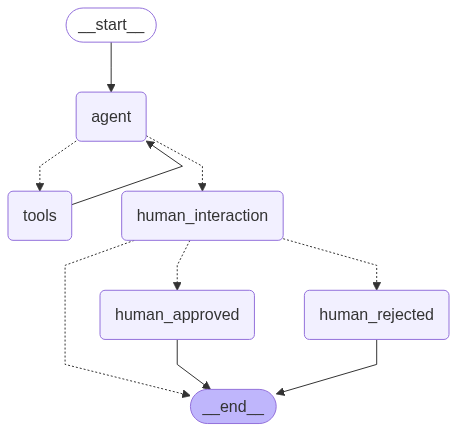
LangGraph allows workflow stages to be defined as a graph composed of nodes, each with a distinct purpose.
Below are several node types we will use in our example:
- Agent Node – responsible for communication with the LLM.
- Tool Node – a tool that searches an external knowledge base.
- Human Decision Node – where the user interacts with the process by accepting or rejecting the Agent’s work.
The RAG technique
To build our augmented LLM, we need one more technique. In the example provided below, we used the RAG technique.
RAG (Retrieval-Augmented Generation) extends the capabilities of an LLM’s built-in knowledge base by incorporating an additional retrieval step, which grants the model access to external data sources.
Thanks to this, the model can generate more accurate responses, as it incorporates context from supplementary data sources, such as a company’s FAQ. The AI chatbot application can use these data sources to provide precise answers to the company’s customers.
In our code, RAG allows the retrieval of documents indexed in a vector database.
Note: The subject of vector databases is very wide and beyond the scope of the current article. Nevertheless, they are crucial for converting text into mathematical representations of data used by LLM algorithms.
Human-in-the-loop – LangGraph implementation
LangGraph is a framework providing an SDK for two programming languages: Python and JavaScript. In our example, we decide to use Python.
As the “brain” of our system, we used ChatGPT’s LLM in version 4o-mini. Therefore, to run the application, you must first generate an API key from the official OpenAI platform. You’ll also need to create a user account if you don’t already have one.
In addition, using the OpenAI API may generate a minor costs, especially if we choose NOT to share the conversation data for LLM training purposes. You can find more information about this here.
Development environment setup
- Python interpreter installed (version 3.10.x+)
- optionally – if you need a debugger – install the python3.10-dev library
- pip package manager installed, including packages:
- pip install chromadb + pip install langchain-unstructured
- API key from the OpenAI platform: https://platform.openai.com/api-keys
- please save your API key inside the application’s directory, e.g., in .env
- example of .env file, you can find it at the end of this article
- knowledge-base.txt (file you can find at the end of this article) – place this file within your application directory
- please save your API key inside the application’s directory, e.g., in .env
Recommended application structure:
|-- /projects/hitl-example-app/
  |
  |-- .env (environment variables)
  |-- app-hitl.py (application code)
  |-- knowledge-base.txt (local knowledge base)
Let’s start programming!
We start by importing the necessary libraries and packages (using import and from statements).
"""
Base Python libraries
"""
import os
import uuid

from pathlib import Path
from typing import Literal
from dotenv import load_dotenv
from IPython.display import Image, display

"""
Required LangGraph and LangChain libraries
"""
from langchain_core.messages import SystemMessage
from langchain_core.tools import tool
from langchain_openai import ChatOpenAI, OpenAIEmbeddings

from langgraph.checkpoint.memory import MemorySaver
from langgraph.graph import StateGraph, MessagesState, START, END
from langgraph.prebuilt import ToolNode
from langgraph.types import Command, interrupt

"""
Context search libraries
"""
from langchain_community.vectorstores import Chroma
from langchain_community.vectorstores.utils import filter_complex_metadata
from langchain_unstructured import UnstructuredLoader
from langchain_text_splitters import RecursiveCharacterTextSplitter
Then, we perform basic script configuration:
"""
-------------
Configuration
-------------

Enable detailed logging for model responses (optional)
"""
detailed_model_response = False

"""
Load environment variables such as API keys
"""
load_dotenv(dotenv_path=Path(".env"))

"""
--------------------------------------------------------------------------------------------------------------------
Data source / Knowledge Base configuration
--------------------------------------------------------------------------------------------------------------------

Specify the path to the knowledge base file, which will be vectorized
"""
datasource = 'knowledge-base.txt'

"""
--------------------------------------------------------------------------------------------------------------------
Build memory
--------------------------------------------------------------------------------------------------------------------

Define a checkpointer responsible for saving and restoring our graph state (messages, current node settings, process state, etc.).
IMPORTANT: In this example, we decide to use the non-persistent in-memory state saver.
"""
memory = MemorySaver()
In the next step, we need to configure the model and tools that the AI Agent will use:
"""
Define a tool function (using the `@tool` annotation) to search the knowledge base and augment the LLM’s database.
The function receives the query param content from the LLM (via the `query` parameter).
Each time it’s called, it loads the data from a file, splits it into chunks, and converts every chunk into the vector format.
"""
@tool
def context_searcher(query: str):
    """Search the relevant documents"""

    loader = UnstructuredLoader(datasource)
    document = loader.load()

    text_splitter = RecursiveCharacterTextSplitter(chunk_size=100, chunk_overlap=50)
    split_documents = text_splitter.split_documents(document)
    filtered_documents = filter_complex_metadata(split_documents)

    vectorstore = Chroma.from_documents(
        documents=filtered_documents,
        collection_name="knowledge-base",
        embedding=OpenAIEmbeddings(),
    )

    retriever = vectorstore.as_retriever()
    results = retriever.invoke(query)

    return "\n".join([doc.page_content for doc in results])

"""
--------------------------------------------------------------------------------------------------------------------
AI Agent
--------------------------------------------------------------------------------------------------------------------

Define the list of tools available for LLM (model)
"""
tools = [context_searcher]

"""
Initialize the LLM and attach available tools to LLM
"""
openai_api_key = os.getenv("OPENAI_API_KEY")
model = ChatOpenAI(model="gpt-4o-mini", temperature=0, api_key=openai_api_key).bind_tools(tools)

"""
IMPORTANT: The `temperature` is a key parameter in building agents — it controls the randomness of generated responses.
When building agents based on a custom knowledge base, it is recommended to use a deterministic approach (no random responses),
which is represented here by setting the temperature to 0.
"""
The next step is defining the functions used in the graph/workflow that are needed by the Human-in-the-loop (HILP) concept:
"""
human_interaction() – the most important function in the whole HILP concept - it pauses the workflow and waits for human interaction.
NOTE: every function used in a graph node must define the possible exit paths to other nodes in process. It was reached by using the action definition, e.g.:
`Command[Literal["human_approved", "human_rejected", END]]`.
Finally, after the human's decision, the process follows to the appropriate node ("human_approved" or "human_rejected"), or terminates (END).
"""
def human_interaction(state: MessagesState) -> Command[Literal["human_approved", "human_rejected", END]]:

    """IMPORTANT: The LangGraph's `interrupt()` function pauses the graph/process and prompts the user."""
    answer = interrupt(
        {
            "question": "Hi human! :) If the answer are correct? Type: `y` or `n`",
        }
    )

    print(">>> Agent message <<<<<<<<<<<<<<<<<<<<<<<<<<<<<<<<<<<<<<<<<<<<<<<<<<<<<<<<<<<<<<<<<<<<<<<<<<<<<<<<<<<<\n\n")
    print("Your answer: ", answer, "\n\n")

    """
    Based on the user's response, the process is routed via a command to the appropriate graph node.
    """
    if answer == "y":
        return Command(goto="human_approved")
    if answer == "n":
        return Command(goto="human_rejected")
    else:
        print("Unsupported answer. Terminating...")
        return Command(goto=END)

def human_approved(state: MessagesState) -> Command[END]:
    print(">>> Agent message <<<<<<<<<<<<<<<<<<<<<<<<<<<<<<<<<<<<<<<<<<<<<<<<<<<<<<<<<<<<<<<<<<<<<<<<<<<<<<<<<<<<\n\n")
    print("✅ Do something in approved path.")
    return Command(goto=END)

def human_rejected(state: MessagesState) -> Command[END]:
    print(">>> Agent message <<<<<<<<<<<<<<<<<<<<<<<<<<<<<<<<<<<<<<<<<<<<<<<<<<<<<<<<<<<<<<<<<<<<<<<<<<<<<<<<<<<<\n\n")
    print("❌ Do something in rejected path.")
    return Command(goto=END)
Now that we have the necessary node functions for HILP, so, now we can move on to graph modeling:
"""
--------------------------------------------------------------------------------------------------------------------
Build state graph workflow
--------------------------------------------------------------------------------------------------------------------

IMPORTANT: Below we got the few utility functions used only by the AI Agent.

call_model() – sends a prompt to the LLM and stores the model’s response into the graphs' state (please, take a look at the `memory` variable).
"""
def call_model(state: MessagesState):
    messages = state['messages']
    response = model.invoke(messages)
    return {"messages": [response]}


"""
This is a controller function (known as a conditional edge in LangGraph nomenclature).
After receiving a response from the LLM, the controller helps to determine the next node, e.g.: whether to use a tool or ask a human.
"""
def should_continue(state: MessagesState) -> Literal["tools", "human_interaction"]:
    messages = state['messages']
    last_message = messages[-1]
    if last_message.tool_calls: # If the LLM need to use a tool, route to the tool node
        return "tools"

    return "human_interaction"

"""
Initialize the graph (workflow)
"""
graph_builder = StateGraph(MessagesState)

"""
Add the agent node
"""
graph_builder.add_node("agent", call_model)

"""
Add the tool node, which the agent and LLM can use
"""
graph_builder.add_node("tools", ToolNode(tools))

"""
Add the nodes required by the HILP process
"""
graph_builder.add_node("human_interaction", human_interaction)
graph_builder.add_node("human_approved", human_approved)
graph_builder.add_node("human_rejected", human_rejected)

"""
Finally, configure the entry and exit points (START, END) for the workflow, and the conditional edge, which allows
the agent to make routing decisions
"""
graph_builder.add_edge(START, "agent")
graph_builder.add_conditional_edges("agent", should_continue)
graph_builder.add_edge("tools", "agent")
The graph will look like the following:
Now all that remains is to compile the graph and run the application:
"""
--------------------------------------------------------------------------------------------------------------------
Compile and run
--------------------------------------------------------------------------------------------------------------------

Compile configured graph, specifying the memory module for state storage (`checkpointer=memory`)
"""
graph_config = {"configurable": {"thread_id": uuid.uuid4()}}
compiled_graph = graph_builder.compile(checkpointer=memory)

"""
Define the prompt — a specific query for the LLM
Note that the prompt also indicates the data source (our knowledge base) and specifies the expected response format.

Interestingly, the knowledge base file was intentionally obfuscated with irrelevant information to demonstrate
how the model can handle with noise and extract the relevant data ;)
"""
prompt = {"messages": [
        SystemMessage(content="Provide the temperature for all cities described in `knowledge-base`. Respond in JSON format without any additional text (JSON only without markdown).")
]}

"""
Display messages generated during the process — up until to the point when it waiting for human interaction
"""
for event in compiled_graph.stream(prompt, config=graph_config, stream_mode="values"):
    stream_parser(event)

"""
Receive input from human
"""
human_response_input = input()
"""
Finally, we continue streaming messages after receive the human answer
"""
for event in compiled_graph.stream(Command(resume=human_response_input), config=graph_config, stream_mode="updates"):
    stream_parser(event)
Complete application code You can find at the end of this article.
Now, let’s take a look at the application’s console output after running it:
================================ System Message ================================
Provide the temperature for all cities described in `knowledge-base`. Respond in JSON format without any additional
text (JSON only without markdown).
================================== Ai Message ==================================
Tool Calls:
  context_searcher (call_kZ7MnU6UjP2KlHd80P6bdok7)
 Call ID: call_kZ7MnU6UjP2KlHd80P6bdok7
  Args:
    query: temperature
================================= Tool Message =================================
Name: context_searcher

Here are some words to confuse the LLM and create confusion in the context. The average temperature
confusion in the context. The average temperature in Bialystok is 27 C.
Meanwhile, Warsaw can boast an average of 22.5 C.
However, in Gdansk it can be 25 C. And here is some more content to confuse the model again and see
================================== Ai Message ==================================
Tool Calls:
  context_searcher (call_L46mEnkzlfjfJu3DCZZwhhMF)
 Call ID: call_L46mEnkzlfjfJu3DCZZwhhMF
  Args:
    query: Bialystok temperature
  context_searcher (call_9TgcqpBqjp4PayXy1mP0DL7w)
 Call ID: call_9TgcqpBqjp4PayXy1mP0DL7w
  Args:
    query: Warsaw temperature
  context_searcher (call_2mWkttSW8tbo8sG25NpXCrYT)
 Call ID: call_2mWkttSW8tbo8sG25NpXCrYT
  Args:
    query: Gdansk temperature
================================= Tool Message =================================
Name: context_searcher

Meanwhile, Warsaw can boast an average of 22.5 C.
Meanwhile, Warsaw can boast an average of 22.5 C.
Meanwhile, Warsaw can boast an average of 22.5 C.
Meanwhile, Warsaw can boast an average of 22.5 C.
================================== Ai Message ==================================
Tool Calls:
  context_searcher (call_7h7SIsFlIvXJ7ZamsMN36J6g)
 Call ID: call_7h7SIsFlIvXJ7ZamsMN36J6g
  Args:
    query: Bialystok
  context_searcher (call_KzuJXj6S1MioIbnc7p9KBTH3)
 Call ID: call_KzuJXj6S1MioIbnc7p9KBTH3
  Args:
    query: Warsaw
  context_searcher (call_uYle26b7Dd1rrQgEq8WWP5t3)
 Call ID: call_uYle26b7Dd1rrQgEq8WWP5t3
  Args:
    query: Gdansk
================================= Tool Message =================================
Name: context_searcher

Meanwhile, Warsaw can boast an average of 22.5 C.
Meanwhile, Warsaw can boast an average of 22.5 C.
Meanwhile, Warsaw can boast an average of 22.5 C.
Meanwhile, Warsaw can boast an average of 22.5 C.
================================== Ai Message ==================================
{
  "Bialystok": "27 C",
  "Warsaw": "22.5 C",
  "Gdansk": "25 C"
}
>>> User interaction <<<<<<<<<<<<<<<<<<<<<<<<<<<<<<<<<<<<<<<<<<<<<<<<<<<<<<<<<<<<<<<<<<<<<<<<<<<<<<<<<<<
{'question': 'Hi human! :) If the answer are correct? Type: `y` or `n`'}

y
>>> Agent message <<<<<<<<<<<<<<<<<<<<<<<<<<<<<<<<<<<<<<<<<<<<<<<<<<<<<<<<<<<<<<<<<<<<<<<<<<<<<<<<<<<<
Your answer:  y

>>> Agent message <<<<<<<<<<<<<<<<<<<<<<<<<<<<<<<<<<<<<<<<<<<<<<<<<<<<<<<<<<<<<<<<<<<<<<<<<<<<<<<<<<<<
Do something in approved path.
What exactly happened here?
Firstly, the system used a predefined prompt to retrieve information about the current temperature in various cities from Poland (the LLM performed this task without explicit instructions regarding any city name).
Additionally, the LLM successfully retrieved the requested information despite some data being partially obscured. Finally, it requested a human to confirm his own response.

Summary
As you’ve seen, implementing the Human-in-the-loop concept using LangGraph is relatively straightforward.
Importantly, it enables the effective combination of LLM capabilities with additional context (a knowledge base in our example) and with the essential human oversight.
That solution significantly elevates the utility of AI-driven applications to an unprecedented level.
Complete application code
The .env file (environment variables) content:
OPENAI_API_KEY=TWOJ_KLUCZ_OPEN_AI
ANONYMIZED_TELEMETRY=False
The knowledge-base.txt file content:
Here are some words to confuse the LLM and create confusion in the context. The average temperature in Bialystok is 27 C.
However, in Gdansk it can be 25 C. And here is some more content to confuse the model again and see how it handles with this.
Meanwhile, Warsaw can boast an average of 22.5 C.
"""
Base Python libraries
"""
import os
import uuid

from pathlib import Path
from typing import Literal
from dotenv import load_dotenv
from IPython.display import Image, display

"""
Required LangGraph and LangChain libraries
"""
from langchain_core.messages import SystemMessage
from langchain_core.tools import tool
from langchain_openai import ChatOpenAI, OpenAIEmbeddings

from langgraph.checkpoint.memory import MemorySaver
from langgraph.graph import StateGraph, MessagesState, START, END
from langgraph.prebuilt import ToolNode
from langgraph.types import Command, interrupt

"""
Context search libraries
"""
from langchain_community.vectorstores import Chroma
from langchain_community.vectorstores.utils import filter_complex_metadata
from langchain_unstructured import UnstructuredLoader
from langchain_text_splitters import RecursiveCharacterTextSplitter

"""
-------------
Configuration
-------------

Enable more details in LLM response (debug logs)
"""

detailed_model_response = False

"""
Load external environment variables contained project specific data (API keys etc.)
"""
load_dotenv(dotenv_path=Path(".env"))

"""
--------------------------------------------------------------------------------------------------------------------
Data source / Knowledge Base configuration
--------------------------------------------------------------------------------------------------------------------
"""

datasource = 'knowledge-base.txt'

"""
--------------------------------------------------------------------------------------------------------------------
Build memory
--------------------------------------------------------------------------------------------------------------------
"""

memory = MemorySaver()

"""
--------------------------------------------------------------------------------------------------------------------
Utils
--------------------------------------------------------------------------------------------------------------------
"""

def stream_parser(stream_message):
  if "messages" in stream_message:
    stream_message["messages"][-1].pretty_print()
  if "__interrupt__" in stream_message:
    print(">>> User interaction <<<<<<<<<<<<<<<<<<<<<<<<<<<<<<<<<<<<<<<<<<<<<<<<<<<<<<<<<<<<<<<<<<<<<<<<<<<<<<<<<<<\n\n")
    print(stream_message["__interrupt__"][-1].value)
  else:
    if detailed_model_response:
      print(stream_message)

  print("\n")

"""
--------------------------------------------------------------------------------------------------------------------
Tools
--------------------------------------------------------------------------------------------------------------------

Tool required to search the relevant documents (like prepared knowledge-base)
"""
@tool
def context_searcher(query: str):
  """Search the relevant documents"""

  loader = UnstructuredLoader(datasource)
  document = loader.load()

  text_splitter = RecursiveCharacterTextSplitter(chunk_size=100, chunk_overlap=50)
  split_documents = text_splitter.split_documents(document)
  filtered_documents = filter_complex_metadata(split_documents)

  vectorstore = Chroma.from_documents(
    documents=filtered_documents,
    collection_name="knowledge-base",
    embedding=OpenAIEmbeddings(),
  )

  retriever = vectorstore.as_retriever()
  results = retriever.invoke(query)

  return "\n".join([doc.page_content for doc in results])

"""
--------------------------------------------------------------------------------------------------------------------
AI Agent
--------------------------------------------------------------------------------------------------------------------

List of available tools
"""
tools = [context_searcher]

"""
Initialize the LLM model and attach tools
"""
openai_api_key = os.getenv("OPENAI_API_KEY")
model = ChatOpenAI(model="gpt-4o-mini", temperature=0, api_key=openai_api_key).bind_tools(tools)

"""
--------------------------------------------------------------------------------------------------------------------
Functions required by Human in the loop concept
--------------------------------------------------------------------------------------------------------------------
"""

def human_interaction(state: MessagesState) -> Command[Literal["human_approved", "human_rejected", END]]:
  """note: we not use the state in the current graph example - remember the state contains the LLM context"""
  answer = interrupt(
    {
      "question": "Hi human! :) If the answer are correct? Type: `y` or `n`",
    }
  )

  print(">>> Agent message <<<<<<<<<<<<<<<<<<<<<<<<<<<<<<<<<<<<<<<<<<<<<<<<<<<<<<<<<<<<<<<<<<<<<<<<<<<<<<<<<<<<\n\n")
  print("Your answer: ", answer, "\n\n")

  if answer == "y":
    return Command(goto="human_approved")
  if answer == "n":
    return Command(goto="human_rejected")
  else:
    print("Unsupported answer. Terminating...")
    return Command(goto=END)

def human_approved(state: MessagesState) -> Command[END]:
  print(">>> Agent message <<<<<<<<<<<<<<<<<<<<<<<<<<<<<<<<<<<<<<<<<<<<<<<<<<<<<<<<<<<<<<<<<<<<<<<<<<<<<<<<<<<<\n\n")
  print("✅ Do something in approved path.")
  return Command(goto=END)

def human_rejected(state: MessagesState) -> Command[END]:
  print(">>> Agent message <<<<<<<<<<<<<<<<<<<<<<<<<<<<<<<<<<<<<<<<<<<<<<<<<<<<<<<<<<<<<<<<<<<<<<<<<<<<<<<<<<<<\n\n")
  print("❌ Do something in rejected path.")
  return Command(goto=END)


"""
--------------------------------------------------------------------------------------------------------------------
Build state graph workflow
--------------------------------------------------------------------------------------------------------------------

Get LLM response function
"""
def call_model(state: MessagesState):
  messages = state['messages']
  response = model.invoke(messages)
  return {"messages": [response]}

"""
Conditional-edge function
"""
def should_continue(state: MessagesState) -> Literal["tools", "human_interaction"]:
  messages = state['messages']
  last_message = messages[-1]

  """If the model needs a tool, then call the "tools" node"""
  if last_message.tool_calls:
    return "tools"

  return "human_interaction"

"""
Create a new State graph (workflow)
"""
graph_builder = StateGraph(MessagesState)

"""
Add an agent node
"""
graph_builder.add_node("agent", call_model)

"""
Add tools node
"""
graph_builder.add_node("tools", ToolNode(tools))

"""
Add human interaction nodes (HITL)
"""
graph_builder.add_node("human_interaction", human_interaction)
graph_builder.add_node("human_approved", human_approved)
graph_builder.add_node("human_rejected", human_rejected)

"""
Configure workflow conditions (edges)
"""
graph_builder.add_edge(START, "agent")
graph_builder.add_conditional_edges("agent", should_continue)
graph_builder.add_edge("tools", "agent")

"""
--------------------------------------------------------------------------------------------------------------------
Compile and run
--------------------------------------------------------------------------------------------------------------------
"""

graph_config = {"configurable": {"thread_id": uuid.uuid4()}}
compiled_graph = graph_builder.compile(checkpointer=memory)

"""
Streaming the model output
"""
prompt = {"messages": [
  SystemMessage(content="Provide the temperature for all cities described in `knowledge-base`. Respond in JSON format without any additional text (JSON only without markdown).")
]}
for event in compiled_graph.stream(prompt, config=graph_config, stream_mode="values"):
  stream_parser(event)

"""
Waiting for human response (if needed)
"""
human_response_input = input()
for event in compiled_graph.stream(Command(resume=human_response_input), config=graph_config, stream_mode="updates"):
  stream_parser(event)

"""
Visualize your graph
"""
display(Image(compiled_graph.get_graph().draw_mermaid_png())) # works only in Jupiter notebooks












Leave a comment