
























SAP has been evolving for decades – from mainframe systems like SAP R2 through the client-server era with SAP R/3 to the in-memory computing revolution with SAP HANA. Each step brought new technological possibilities. But for years, one thing remained a challenge: the user interface. It was complex, unintuitive, and often required extensive training.
That’s where SAP Fiori comes in – SAP’s answer to the growing demand for user-centric design in the digital transformation era.
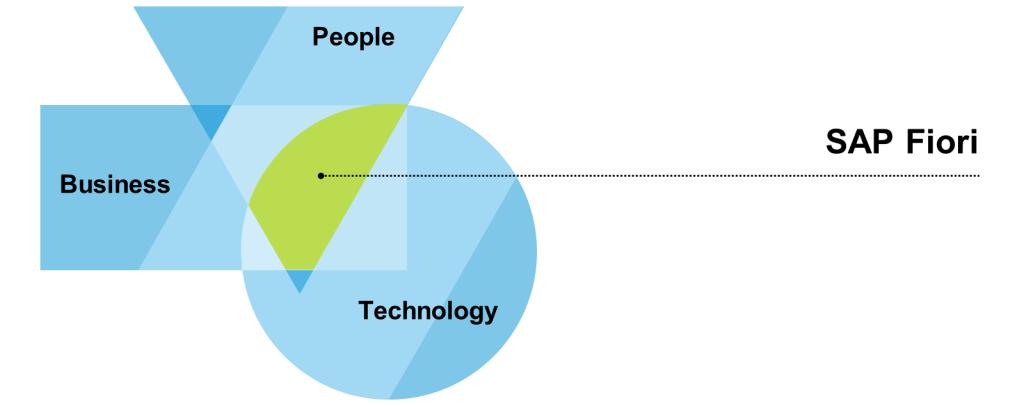
SAP Fiori isn’t just a “prettier SAP.” It represents a complete shift in user experience design. Its core idea is to tailor applications to fundamental business roles and everyday tasks. Users see exactly what they need – no clutter, no unnecessary complexity. The apps are responsive, lightweight, and accessible from desktops, tablets, or phones.
But behind this simplicity lies a complex and powerful system that must be carefully designed, configured, and secured. At the heart of it all are authorizations.
How does SAP Fiori work under the hood?
At the core of the Fiori experience is the SAP Fiori Launchpad – a central entry point where users log in to access their assigned applications. The tiles visible on the Launchpad home screen are not random; they result from deliberate configuration involving catalogs, pages, spaces, and roles.
Depending on the application type, SAP Fiori can run modern SAPUI5-based apps and classic legacy transactions (SAP GUI or Web Dynpro) rendered in HTML and styled to fit the Fiori look & feel.
Fiori applications are typically divided into three main categories:
- transactional (e.g., creating purchase orders),
- analytical (e.g., displaying KPIs),
- and fact sheets (e.g., navigating detailed object data).
These rely on OData services to communicate between the front-end UI and the backend system.
Authorizations – who sees what and why?
SAP Fiori introduces a precise authorization model based on catalogs, spaces, pages, and roles. One key difference from classic SAP is that tile visibility in the Launchpad is itself authorization-controlled. If a user isn’t assigned the right catalog or space, they won’t see the application, even if they have backend access.
From a technical standpoint, authorization is split into two main layers: the Front-End Server (FES) and the Back-End Server (BES).
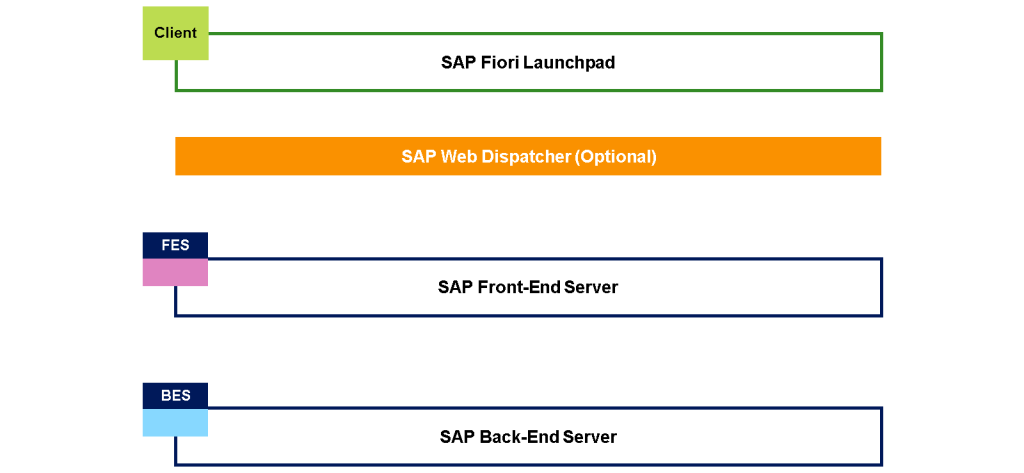
The FES manages UI-level access, controlling what the user sees, as well as the start authorizations for OData services. It’s where we assign catalogs, spaces, and pages that define the structure of the user’s Launchpad.
The BES controls access to the actual business data, which is where the application logic executes. Therefore, users must also have appropriate roles in the backend; otherwise, the app may open but show no data or throw an authorization error.
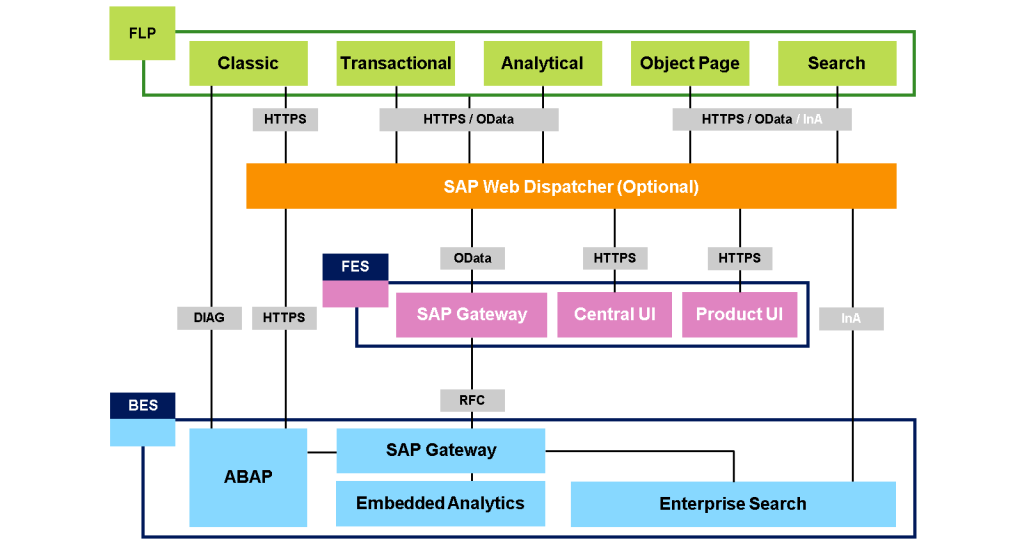
In embedded scenarios (FES and BES in one system), a single PFCG role is sufficient. You need roles on both sides in hub deployments (FES and BES are separate). While the hub setup is more complex, it offers flexibility and enhanced security, especially for centralized Launchpad scenarios across multiple backend systems.

Where to start? SAP Fiori Apps Reference Library
Whether planning access, building roles, or analyzing business needs, the SAP Fiori Apps Reference Library is your go-to resource. It’s SAP’s official online catalog of all available Fiori applications.
Here, you’ll find detailed technical information:
- App IDs,
- required components,
- supported databases,
- related roles, catalogs, and OData services.
The library lets you filter apps by module, role, technology, or system version. It even includes a “Get Recommendations” tool that can suggest which apps to implement in your organization based on real usage data (e.g., collected via ST03).
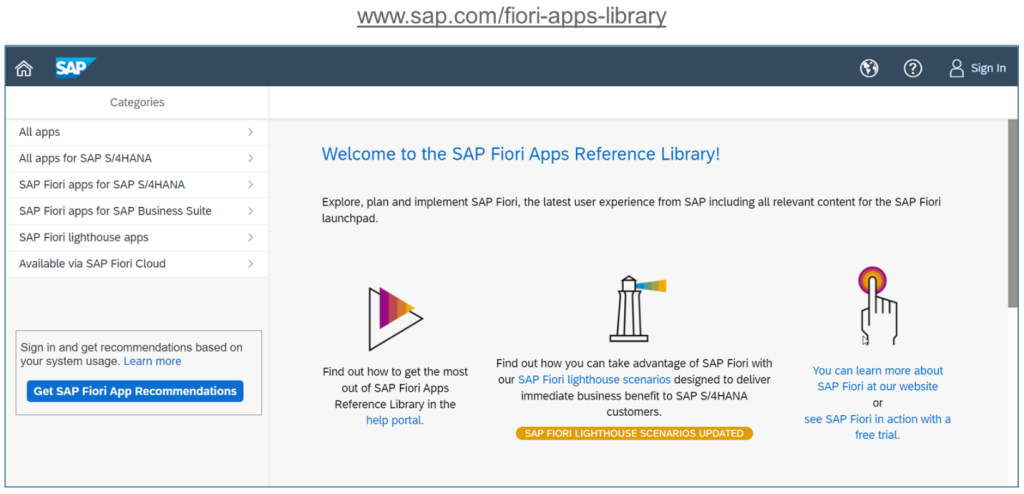
You can explore it freely online at: https://www.sap.com/fiori-apps-library. A valid S-user is needed for advanced features like recommendations.
This tool is invaluable – not just for technical consultants, but also for UX designers and business process owners.
Catalogs, pages, spaces – building the Launchpad experience
The process of granting access to Fiori apps starts with catalogs, which contain apps and their target mappings (launch information). These are then grouped into pages, and pages into spaces, which are assigned to users via roles.
This layered structure allows for tailored user experiences – for example, a finance manager might see a different Launchpad layout than a warehouse supervisor.
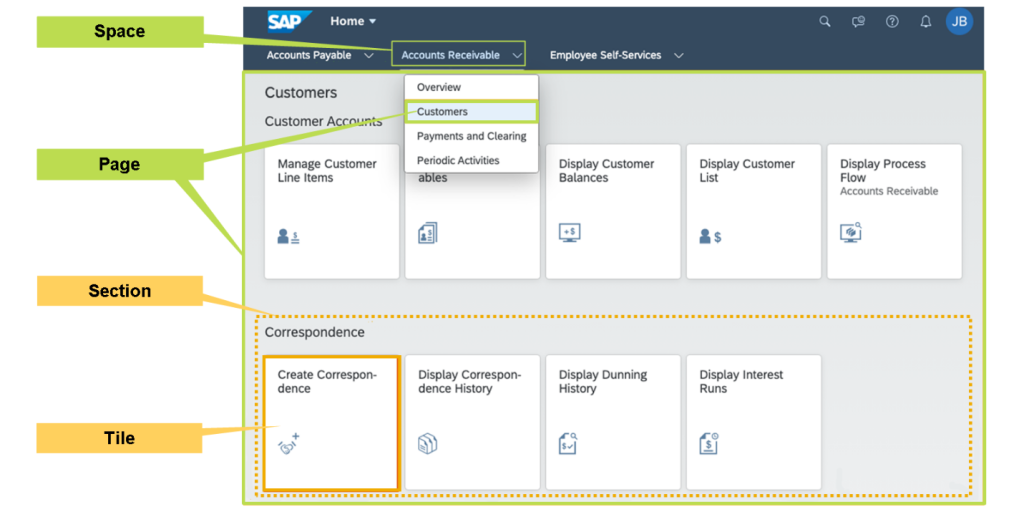
SAP also provides intuitive tools for managing this structure, such as the Manage Launchpad Spaces and Manage Launchpad Pages apps. You can also assign spaces and pages directly within the PFCG transaction.
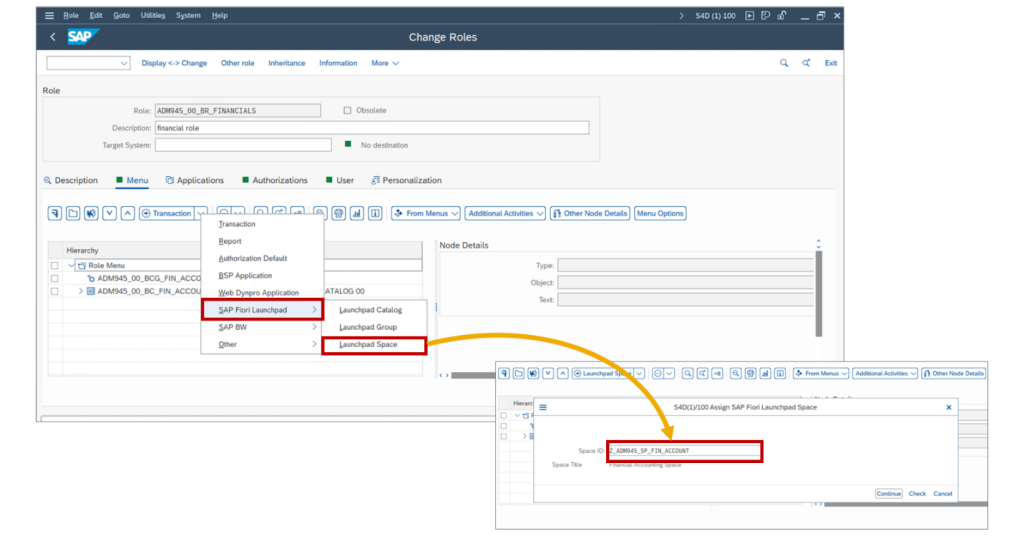
What about legacy applications?
Many organizations still rely on classic technologies like SAP GUI for HTML or Web Dynpro ABAP. Thanks to the Belize theme and integration into the Launchpad, these apps can look and behave like native Fiori apps. But they require special handling.
They must be included in Fiori catalogs and embedded in pages and spaces to be visible. Backend authorizations (e.g., SU24) must also be in place, just like for standard transactions.
Maintenance and diagnostics – enter Launchpad Content Manager
As systems evolve and new app versions are released, administrators face the challenge of keeping Launchpad content current. The Launchpad Content Manager (transaction /UI2/FLPCM_CUST) helps by providing visibility into catalog consistency, tile errors, missing mappings, and deprecated content.
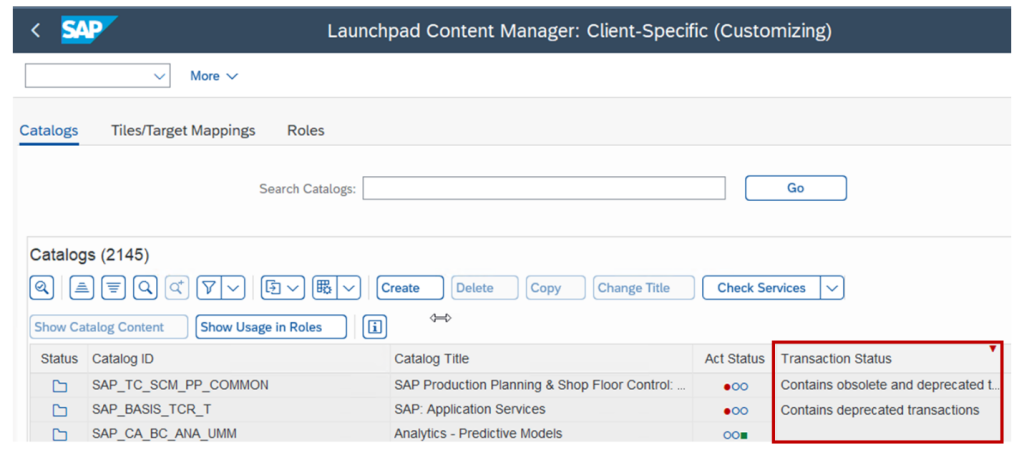
This tool is especially useful after system upgrades. It identifies obsolete or deprecated apps, finds their successors, and updates catalogs and roles accordingly. It’s your central dashboard for content governance in the Launchpad.

Summary
SAP Fiori is more than just a modern interface – it’s a UX platform that transforms users’ interactions with SAP. However, a well-structured authorization model is essential for it to work efficiently and securely. This model is built around catalogs, roles, OData services, and business roles.
Though the initial setup of SAP Fiori can seem complex, it ultimately provides a powerful and flexible way to deliver personalized, role-based access to the right applications, all within a unified, secure, and intuitive environment.
If you’re working on an SAP S/4HANA implementation or improving an existing system, it’s worth investing time in understanding how SAP Fiori authorization works. It’s not just about access – it’s about delivering real business value through a great user experience.













Leave a comment