


The practice of establishing SLA (Service Level Agreement) is almost as old as the entire IT industry. According to ITIL4, an SLA is a documented agreement between a service provider and a customer that defines both the services required and the expected level of the service. The provider and the customer may be separate entities (in which case the agreement is commercial), or they may be part of the same organization (in which case the agreement is non-commercial).
In addition to SLAs, we also distinguish:
- OLA – Operational Level Agreement: an agreement on the guaranteed level of internal support.
- UC – Underpinning Contract: a contract with an external supplier.
The relationships between SLA, OLA, and UC are as follows:
- SLA represents the main agreement regarding the services provided by the provider to the customer.
- OLA and UC concern supporting services provided either:
- OLA – internally (departments, teams within the service provider’s organization),
- UC – externally (third-party service providers).
Example:
- SLA – agreement for service provision: maintaining a website,
- OLA – internal agreement covering network, infrastructure maintenance, or user support,
- UC – agreements with external entities for supporting services necessary to deliver the leading service, such as internet connectivity, power supply, physical security, etc.
The practice of using Service Level Agreements
In many organizations, these three types of agreements are not always clearly distinguished. Instead, the term SLA is used in all cases, often with an additional qualifier indicating the parties involved (e.g., “SLA with the client” or “SLA with the ISP”). This is not a significant issue since each of these agreements typically contains the same elements:
- Scope of the agreement (which services are provided).
- Required service levels.
- Service measurement and verification methods.
- Payment terms and penalties (in internal agreements, these may differ from commercial ones).
Mapping the terms of SLA/OLA/UC agreements into the ServiceNow system can be a significant challenge, especially when contract terms are imprecise or do not account for the realities of ITSM tools. Moreover, SLA reports generated by ServiceNow can serve as the basis for evaluating service quality and, consequently, for settling accounts between parties. This makes the topic extremely important.
Features of services covered by SLAs
Parameters or service characteristics that are (or should be) included in SLAs usually cover:
- Volume/Traffic: Can the service handle the required volume of requests or data? (e.g., up to 100,000 HTTP requests per month)
- Availability: Is the service available to users/customers when they need it? (e.g., 99% availability, 24×7)
- Latency: Is the service response delivered within an acceptable time frame? (e.g., HTTP service response within 300 ms.)
- Errors: Does the service provide the required functionality? (e.g., HTTP requests do not return 4xx or 5xx errors)
- Ticket Handling: Is support effective and efficient? Are tickets (incidents, requests, changes) resolved within the agreed timeframe?
It is worth noting that the parameters listed above are generally well understood by users, customers, and the business; however, assessing the quality of their delivery using the SLA mechanisms available in ServiceNow may prove challenging.
Due to space limitations, the examples provided here focus on ticket handling (such as incidents or service requests) and typical scenarios (not covering all possible cases).
Parameters for ticket handling
Common SLA parameters for ticket handling include:
- Scope of services provided (e.g., issues with the website will be handled, but a user’s workstation failure will not).
- Communication channels through which issues or requests can be reported (phone, e-mail, portal, chat)?
- Who is authorized to submit requests/report issues?
- Defined ticket volume (e.g., the customer is entitled to 100 tickets per month under the agreement, with additional tickets billed separately).
- Response time (how soon after ticket submission or creation actions will be taken).
- Resolution time (how soon the issue will be resolved or the request fulfilled).
A well-written (precise) SLA is a prerequisite for a good implementation in ServiceNow.
In the above example, precision concerns points:
- 1, 2, 3, and 4: On what basis do we determine whether a ticket is valid/properly submitted? Should invalid tickets also be logged, and if so, do they count toward the customer’s quota?
- 5 and 6: How do we measure time? When do we start, pause, or stop the timer? Are response and resolution times cumulative or separate (do they start simultaneously, or does resolution time start after the response time ends)?
The complexity increases when SLAs are established in large organizations operating across different time zones (different working hours), cultures (different calendars of working days and holidays, communication languages), and when services vary by location.
SLA Definitions in ServiceNow
The first element you may need to configure is the SLA Definition. The form for a new record looks as follows:
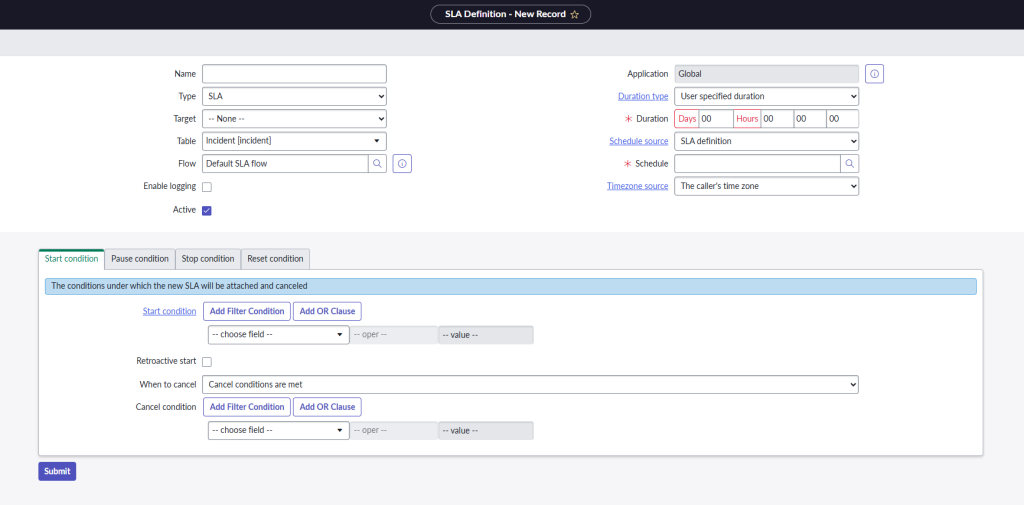
Field descriptions
Name: The name of the record – it’s best to define a naming convention before configuration to keep names meaningful and organized. The more records in the contract_sla table, the more important this becomes. A consistent naming convention helps with list navigation and significantly improves name-based filtering.
Type: While you can differentiate types of SLAs in ServiceNow, this only affects reporting and does not influence the SLA Definition’s functionality. In relation to CSDM, SLAs are usually linked to a BSO (Business Service Offering), whereas OLAs or UCs relate to a TSO (Technical Service Offering).
Target: Distinguishes between Resolution and Response. This property is relevant only for reporting purposes and does not affect the behaviour of the SLA Definition itself. However, it is important to configure the remaining record parameters consistently if one of the above values is used. Note: The configuration of this property should reflect the content of the agreement. It is essential to ensure that both parties share a common understanding of what constitutes a response and a resolution, particularly regarding when each action begins and ends.
Table: Important setting that determines the table the SLA Definition applies to. Common examples include tables like: incident, sc_req_item, sc_task, and problem. The table selection determines which process the SLA definition is associated with.
Flow: Enables triggering specific actions during SLA execution, such as sending notifications or initiating escalations.
Vendor: References the core_company table to indicate the vendor responsible for fulfilling the agreement (especially relevant for UC).
Service Commitment: Check this option if the SLA Definition is linked to a Service Commitment (and, consequently, to a Service Offering).
Enable logging: Enables detailed logs for the SLA definition, which are helpful for diagnosing SLA-related issues.
Active: Marks the SLA definition as active and ready for use.
Duration type: Specifies how SLA time is calculated and changes the behaviour of the definition and form. Choices include:
- User-specified duration: Requires specifying a duration in the Duration field.
- Other options: Specify a relative time, e.g., “End of next business day.” This requires selecting the record type for relative time calculation under “Relative duration works on.”
Duration: Appears when “User specified duration” is selected. Defines the time after which the SLA is breached. Note: Time measurement may not be continuous – it depends on other SLA Definition parameters, such as Schedule and Start/Pause/Stop Condition.
Relative duration works on: Appears when a relative duration type is selected. Options: Task record or SLA record.
Schedule source: Determines the schedule used to measure SLA time. Choices include:
- No schedule: 24×7 schedule without exceptions.
- SLA Definition: Requires selecting a schedule in the next field.
- Task field: Depends on the selected table (e.g., Incident field, catalog task field) and requires specifying an object with a schedule (e.g., Configuration Item → Schedule).
Schedule source field: Specifies the object containing the schedule (e.g., Configuration Item Schedule or Caller Schedule).
Schedule: Select a specific schedule from the cmn_schedule table (typically defining working days and hours).
Timezone source: Determines the time zone used when creating the SLA task:
- Caller’s time zone
- SLA definition’s time zone (specified in the Timezone field)
- CI’s location’s time zone
- Task’s location’s time zone
- Caller’s location’s time zone
Note: Time zone settings are particularly important in international organizations where support operates in different time zones from the users (e.g., a European service desk supporting users in the U.S.).
Start/Pause/Stop/Reset Condition
These conditions define when SLA time tracking should be started (start), paused (pause), completed (stop), or reset (restarted under specific circumstances).
The configuration of Start/Pause/Stop/Reset conditions offers a wide range of possibilities. It typically uses simple to highly complex conditions (filters) that must be met to trigger a specific time-tracking action.
Start condition: An example configuration form is shown in the figure below. A set of filters defining when the time measurement should begin.
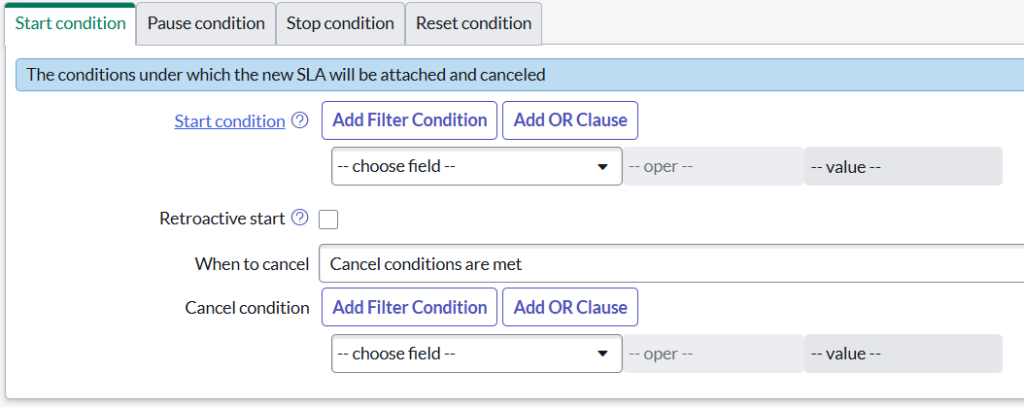
Retroactive start: Selecting this option enables two additional parameters – Retroactive pause and Set start to. When enabled, it changes the way time is measured: instead of starting when the condition defined in the Start condition filter is met, time measurement begins at the point specified in the Set start to field.
This option is required when there is a possibility that one SLA definition may be cancelled and another triggered in its place. Example of use: A change in a ticket’s priority during its handling.
Retroactive pause: Previously recorded pause periods are included in the time calculation.
Set start to: Specifies which point in the entry history is considered the start of time tracking when Retroactive Start is enabled.
When to cancel: Defines when time measurement should stop. Three options are available:
- Cancel conditions are met – selecting this option enables an additional Cancel conditions setting and requires specifying the conditions that must be met to cancel the operation of the given SLA definition.
- Start conditions are not met – time measurement stops when the conditions specified in the Start condition are no longer met.
- Never – Time measurement is never cancelled; no additional configuration is required.
Pause condition: Contains conditions (filter) that must be met to pause time measurement.
When to resume: Defines when time measurement should resume (either when pause conditions are no longer met or when specific resume conditions are met).
- Pause conditions are not met: as soon as the conditions specified in the Pause condition option are no longer true, time measurement is resumed.
- Resume conditions are met: specifies the conditions that must be met to resume time measurement. Requires the addition of a Resume conditions option, which is a set of conditions (filters).
Stop conditions: it only contains conditions (filters) that, when met, stop time measurement.
Reset condition: Allows you to define additional conditions that, when met, result in the immediate termination or cancellation of the current SLA definition and the initiation of a new one. This option is practical when a significant parameter changes during task execution and requires the SLA to be updated. For example, assigning a task to a different Assignment group that operates under conditions different from those defined in the currently active SLA. If the new SLA definition meets the Start condition, it will be launched automatically.
Note:
SLA conditions (Start / Pause / Stop) are evaluated in the following order:
- Stop condition
- Pause condition
- Start condition
If a matching condition is found during processing, subsequent conditions are NOT evaluated!
Case Study
As a detailed description of all SLA Definition record configuration options would be extensive enough to warrant a separate article, this article is limited to illustrating the most common use cases.
Before beginning the configuration, it is advisable to review key recommendations for approaching this task. In addition to thoroughly understanding the content of the SLA agreement(s), it is beneficial to map out (or visualize) the process by which the SLA definitions are being created. All potential use cases for the process should be carefully considered and appropriately reflected in the configuration.
Defining SLAs for incident management
Suppose SLA definitions need to be configured for incident management with four priorities, as shown below:
| Type | P1 24/7 | P2 24/5 | P3 8/5 | P4 8/5 |
| Response | 15 min. | 1 h. | 4 h. | 8 h. |
| Resolution | 4 h. | 12 h. | 24 h. | 48 h. |
Next to the priorities, schedules, and execution times (Duration) are given.
Three support teams are involved (represented in sys_user_group in ServiceNow):
- Service Desk
- Level 2
- Level 3
A task defined in this way presents specific challenges during implementation:
- How should time be measured for tickets handled by multiple teams – separately or as a whole?
- Who owns the ticket from creation to closure?
- How should response time versus resolution time be measured?
- Under what conditions should time measurement be paused?
- Under what conditions should ticket processing be cancelled?
- Do schedules account for holidays?
When assigned a similar task, the individual responsible for configuring ServiceNow SLA Definitions must obtain answers to the questions outlined above. These answers may already be specified in the SLA document; if not, clarification should be sought from the person responsible for drafting the agreement.
For this example, let us assume that the following answers have been obtained:
- Time is measured holistically from the customer’s perspective.
- Service Desk is always the owner.
- Response and resolution time measurement start simultaneously. Response time stops when the Assigned to field is populated.
- Waiting for user communication allows time measurement to be paused.
- All tickets must be resolved (no cancel conditions).
- Schedules do not account for holidays.
Even in this relatively simple scenario, at least eight SLA definitions are required (four priorities × two definitions: response and resolution).
A little practice
Consider the following case: According to the example above, P2 incidents must be resolved within 12 hours of being logged. Processing occurs 24 hours a day on business days. In summary, every P2 incident must be resolved within the specified timeframe, implying a 100% resolution rate. The same principle applies to incidents of other priorities in the example provided.
In SLA management practice, achieving a 100% resolution rate is rare, often impractical, or prohibitively expensive (for instance, maintaining 99.999% system availability) and is therefore reserved for exceptional cases. Can similar principles apply to ticket resolution? The answer is Yes – SLAs should define expected resolution levels, for example:
| Type | P1 | P2 | P3 | P4 |
| Fulfilment level | 99% | 99% | 98% | 98% |
SLA definition records themselves do not include a field for this. However, SLA performance can be measured and reported in SLA reports. Another option is to use Service Commitment, which includes the SLA Percentage property.
Sample SLA report:
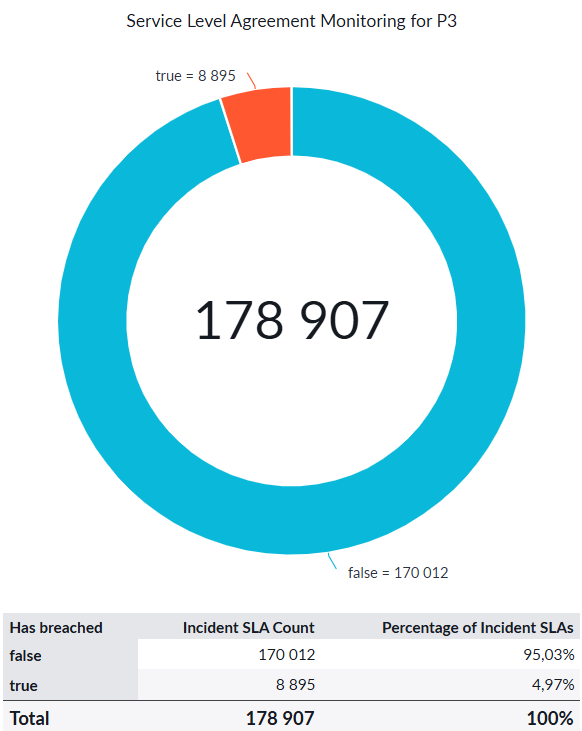
During the given billing period, 95.03% of Priority 3 (P3) incidents were resolved within the parameters specified in the SLA definition for this priority. 4.97% of incidents were not resolved within the required timeframe.
According to the table above, the required fulfillment rate for P3 incidents is 98%. Therefore, in this example, the SLA was violated, as the achieved fulfilment rate was just over 95%.
Sii x ServiceNow
With the cloud-based ServiceNow AI platform, we automate processes and facilitate the work of departments to increase productivity within entire organizations.
ServiceNow offeringSummary
Managing SLAs using ServiceNow’s capabilities is a complex task that requires not only in-depth knowledge of the platform but also expertise in IT management, process management, legal matters, and financial management, as these agreements impose specific obligations on both parties. It is unrealistic to expect all of these skills to reside in a single person or role.
In practice, the negotiation, drafting, and management of Service Level Agreements are handled by dedicated teams. All of the competencies mentioned above are essential to ensure that agreements are well structured, mutually beneficial, and – most importantly – feasible, both in terms of the commitments made and their implementation within the leading ITSM tool, ServiceNow.













Leave a comment