


In recent years, artificial intelligence has moved from the experimental phase to real business applications. ServiceNow, a leader in the automation of IT and business processes, has not been left behind. It has introduced to its Now Assist platform a set of functions based on generative AI (GenAI), which really changes the way we work with the system.
For administrators and advanced users, this means new opportunities and challenges, but above all, a chance to significantly optimize everyday tasks, which I will present in this article.
AI in the service of automation
ServiceNow has been investing in the development of artificial intelligence for years – previously mainly in the form of predictive engines (such as Predictive Intelligence or Performance Analytics). However, since the Vancouver version, and especially in Washington and newer ones, tools based on Large Language Models (LLM) have appeared, operating within the so-called generative AI.
In practice, this means the ability to use mechanisms that can understand context, analyze data in real time, and generate responses in natural language – all integrated directly with the Now platform.
Now Assist is just such a contextual intelligence layer that does not work as an external add-on, but as a native part of ServiceNow, respecting data availability, user permissions, and instance context.
What is Now Assist?
Now Assist is a set of GenAI functionalities that support users in interacting with data, processes, and records in ServiceNow. It is not a single product, but rather a functional umbrella under which there are, among others:
- Agent Assist – a tool for support agents that suggests possible solutions, automatically summarizes tickets, and generates answers.
- Search Assist – intelligent search for knowledge and data in a conversational way.
- Virtual Agent with GenAI – a chatbot that understands natural language and can conduct multi-step conversations.
- Now Assist for Developers – support for creators of flows and scripts, including through automatic generation of steps or code.
All of this is based on LLM models, trained by ServiceNow (or technology partners such as Microsoft Azure OpenAI), but used within a closed customer environment – with full data isolation.
Starting with the Washington release, ServiceNow also provides the option to use a customer-supplied large language model – called Bring Your Own LLM (BYO LLM). This allows organizations to leverage their own pre-approved language models (e.g., hosted in their private cloud or on platforms such as AWS Bedrock, Google Vertex AI, or Azure AI) and integrate them with the ServiceNow GenAI layer. This approach is particularly well-suited for environments with heightened data privacy requirements, compliance, and model governance.
This model provides administrators with greater flexibility, including:
- The ability to choose a specific LLM provider and architecture,
- The option to fine-tune models on organization-specific data,
- Enhanced control over AI behavior, performance, and cost management.
What does the administrator gain?
From the administrator’s perspective, Now Assist not only changes the way end users use the platform. It is also a powerful tool for:
- Speeding up the handling of tickets and tasks,
- Automating parts of the configuration (e.g., creating flows or generating scripts),
- Facilitating data analysis and improving the quality of content (e.g., knowledge articles).
With Now Assist, you can, for example, automatically generate a ticket summary, suggest a related business service, or even generate a new topic for the Virtual Agent without writing conversational rules manually.
This not only saves time but also reduces the number of errors and improves data standardization – AI works consistently, based on past patterns.
Is this a revolution already?
Although AI features in ServiceNow do not fully replace human expertise, they certainly change an administrator’s work landscape. Instead of manually searching knowledge articles, analyzing ticket history, or writing complex scripts, you can rely on an intelligent assistant to handle repetitive and time-consuming tasks.
Ultimately, Now Assist is not a “magic box” but intelligent support that can significantly speed up and improve everyday work in ServiceNow when properly configured and used.
AI in the service of automation – summary
Now Assist is an intelligent extension of ServiceNow based on generative AI that supports users and administrators in working with data, tickets, and automation. It facilitates search, summarizes content, suggests actions, and speeds up configuration, opening a new chapter in the efficiency of work on the platform.
Advantages of Now Assist compared to the traditional administrative approach in ServiceNow.
| Area | Traditional Approach | With Now Assist (GenAI) |
| Knowledge Search | Manual filtering of articles, entering keywords | Conversational search takes the context of the ticket into account |
| Ticket Summarization | Manual summarization by an agent or administrator | Automatic summarization of key information from the record |
| Solution Suggestions | Based on system knowledge and manual database search | Intelligent suggestions based on similar tickets and knowledge articles |
| Flow/Script Creation | Manual design, coding, and debugging | Suggesting flow steps and generating code using natural language |
| End-User Support | Forms and simple chatbots based on predefined rules | Virtual Agent with GenAI understands natural language and conducts flexible conversations |
Now Assist architecture and components – how does it work from the inside?
Now Assist in ServiceNow is not one module but a set of intelligent, tightly integrated features using generative artificial intelligence (GenAI). Its job is to support the user – whether an agent, developer, or knowledge seeker – in real time, taking into account the data’s context and the platform’s structure. Understanding the components and architecture of Now Assist allows you to consciously implement and manage its capabilities.
Key components of Now Assist
Below are the key components that together form the Now Assist ecosystem:
- Agent Assist – this is the most noticeable feature for service agents. It works directly in the form interface (e.g., Incident, Change, Request), offering:
- Solution suggestions (based on knowledge articles and similar tickets),
- Response suggestions (ready-made messages to send to the user),
- Ticket summaries (automatic summary of the description, communication, and actions).
This allows the agent to understand the ticket faster and respond with more confidence.
- Virtual Agent with GenAI – this is a new generation of chatbot that:
- Understands the user’s natural language,
- Can conduct contextual dialogue (even with topic skipping),
- Can respond dynamically, without relying solely on predefined “topics”.
It works using LLM and dynamically generated prompts, using the user’s data. Importantly, you can still mix classic “topics” with AI-generated responses.
- Search Assist – allows conversational search for knowledge and data, e.g., through questions like “How do I reset my VPN password?”. AI analyzes the query and the user’s context (role, department, previous reports) to suggest the most relevant results. It can be embedded in Employee Center, catalog forms, or portals.
- Now Assist for Developers – helps with:
- Generating steps in Flow Designer (e.g., “Send email to requester if SLA is breached”),
- Creating client and server scripts in Studio,
- Creating UI policies and business rules and transforming scripts based on natural language.
This is an excellent help in prototyping and faster logic creation in the system.
How does GenAI work in ServiceNow?
Now Assist is based on LLM models – similar to those known from popular AI chatbots, but with significant differences:
- Models are tailored to the ServiceNow context – they know concepts such as “incident,” “KB article,” “workflow,” and “change request.”
- Models are “built” into the ServiceNow architecture – they work in a secure way, without sending data outside the ServiceNow cloud.
- User instance is isolated (data tenancy) – user data is not mixed with other tenants, and AI responses only include what the user has access to.
In short, ServiceNow does not build its own LLM from scratch, but uses models provided by partners (mainly Azure OpenAI) and “wraps” them in security logic and instance architecture.
Data flow and context
When a user uses Now Assist (e.g., by asking a Virtual Agent or using a search engine), the system:
- Creates a prompt built from context data (user role, field, request type),
- Sends it to LLM as part of a secured endpoint,
- Receives the generated response and presents it to the user in the interface,
- If necessary, add the option to send feedback or switch to the classic flow.
All responses can be logged and audited, and administrators can set rules for which data types can be used in prompts (e.g., excluding sensitive data).
Platform integration
Now Assist works natively with the following ServiceNow areas:
- ITSM: tickets, issues, changes, knowledge articles,
- CSM/HRSD: chatbot, customer/employee tickets, documents,
- Developer Tools: Flow Designer, Studio, App Engine Studio.
Important: Now Assist does not work “everywhere” immediately, requiring activation and license assignment (e.g., Now Assist for ITSM Pro Plus). Some components only work in specific interfaces (e.g., UI 16, Agent Workspace).
Data security and privacy
ServiceNow places great importance on compliance with GDPR and other regulations:
- Data is not used to train global models,
- Customers can configure prompt rules (Prompt Management),
- The “Guardrails” mechanism detects undesirable model behavior (e.g., generating false data).
Thanks to this, the administrator can be sure that AI responses will not violate data security or governance rules applicable in the organization.
Now Assist architecture block diagram
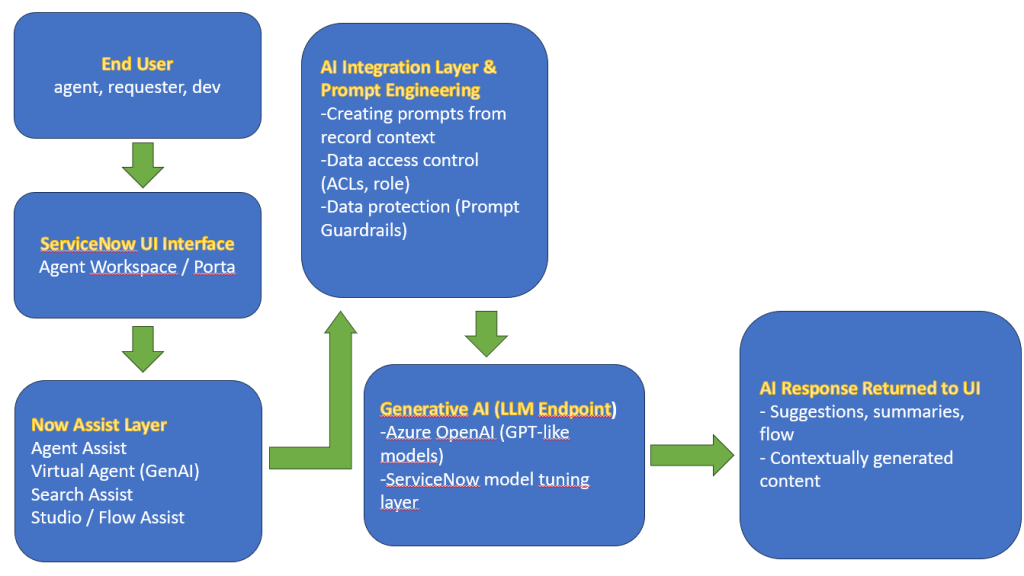
What does this diagram show?
- The end user interacts via any platform interface.
- The request goes to the Now Assist layer, where, depending on the context, Agent Assist or Search Assist is triggered.
- The prompt engineering layer processes the data, which formats the input data and filters available information.
- Then the request goes to the GenAI engine (LLM) – e.g., integrated with Azure OpenAI.
- The generated response is returned to the user and can be further used (e.g., as a ready response, a new step in a flow, a topic in a VA).
Now Assist Architecture and Components – summary
Now Assist is not a single component but a whole set of integrated AI functions that “understand” ServiceNow and support the user in working with the system. Thanks to the use of GenAI, these tools are dynamic, contextual, and safe. Administrators should know their operations from an architectural perspective to be able to consciously manage their implementation and development.
Practical applications – examples from the life of an administrator
Now Assist is not a futuristic promise – these are real-world features that can be implemented here and now to streamline processes, reduce the workload on teams, and improve the quality of services.
Below are some practical scenarios where Now Assist benefits administrators and power users.
Automatic ticket summaries
One of the most visible effects of GenAI in ServiceNow is summaries, which are automatically generated for incidents, problems, and change tickets. The system analyzes the full content of the record – including description, comments, actions, and attachments – and creates a short summary based on it.
Example: An agent opens a ticket containing a dozen or so log entries and three attachments. Instead of digging through history, they see an automatic summary like this:
“The user reported no access to the CRM application after the June 13 update. An SSO synchronization issue was detected on the IT side. The solution was implemented by restarting the integration. The solution was confirmed.”
Such a summary shortens the response time and makes it easier to escalate or take over the ticket by another agent.
Suggestions for solutions and answers
Now Assist can analyze the description of the ticket and – based on it – suggest:
- Knowledge Base articles that match the problem,
- Similar tickets and their solutions,
- A ready-made response to the end user.
Example: The ticket describes: “VPN stopped working after changing the password.” Agent Assist suggests the article: “How to synchronize a new password with VPN access” and proposes the response:”To reconnect to VPN after changing the password, please restart the VPN client and log in with the new password. If the problem occurs again, please reset the SSO portal.” Instead of copying or writing the content from scratch, the agent can approve and send a ready-made message.
Intelligent knowledge search
Search Assist is a conversational extension of the classic search that works, for example, in Employee Center, catalog forms, and ticket windows. The user can ask questions in natural language, and the system searches for the most relevant content, taking into account:
- user context (role, department, location),
- history of similar queries,
- relevance of articles.
Example: Instead of typing “reset VPN,” the user types: “I can’t connect to the office remotely after changing my password. What should I do?” The system analyzes the whole thing and returns a matching article, taking into account the current user account and the operating system used.
Support for developers – Flow Assist and Studio AI
Now Assist is also available to administrators and developers. In Flow Designer and Studio, you can use the so-called GenAI prompts – that is, suggestions and automatic generation of:
- Workflow steps based on a description in natural language,
- Client and server scripts (e.g., in GlideRecord),
- Business Rules and UI policies.
Example: The administrator wants to create a flow that “sends an email to the user if their ticket has been open for more than 48 hours”. Just enter this phrase in natural language – Flow Assist offers a ready-made flow structure with a condition and an action to send an email. This significantly speeds up prototyping, especially for less experienced application developers.
Unconventional and future applications
Now Assist can also be used in areas such as:
- HR – generating answers for employees to HR questions,
- CSM – analyzing customer reports and generating proactive answers,
- SPM – project status summaries, progress summaries, governance support.
As the platform develops, experimental applications also appear, e.g., generating technical documentation, testing flows, or detecting data gaps.
Now Assist application map
| Ticket handling (ITSM) | Information search | Virtual Agent (chatbot) | Developer support | Other business applications |
| Automtic ticket summarization | Search Assist (conversational search) | Natural language understanding | Studio AI – script generation | HR (HRSD) – onboarding assistance |
| Knowledge base (KB) article suggestions | Contextual matching (role, department) | Dynamic response generation | Flow Assist – creating flows from descriptions | CSM – Customer ticket analysis and feedback generation |
| Generating responses for users | Internal portal search (Employee Center, Service Catalog) | Hybrid operation with classic topics | UI Policy i Business Rules in natural language | SPM – project status summarization and generation of reports and initiative notes |
| Comparision with similar incidents |
Practical applications – summary
Now Assist is not a gadget, but a practical tool that affects administrators’ and agents’ quality of work. From generating answers, through intelligent search, to creating scripts, each of the AI functions saves time, improves data consistency, and makes it easier to maintain a high level of service. Knowledge of these functions allows administrators to fully utilize the platform’s potential and better support end users.
ServiceNow Assist deployment and configuration – how to get started with Now Assist
ServiceNow Assist is a powerful tool that helps organizations automate ITSM, CSM, and HR processes. Using artificial intelligence, Now Assist enables effective information management and quick response to user requests. This section will discuss the key aspects of implementing and configuring Now Assist so that administrators can effectively start working with this solution.
License requirements and availability
To use Now Assist, you must have the appropriate licenses. ServiceNow offers a variety of packages, including Pro Plus for ITSM, CSM, and HR, which provide access to advanced features. Before implementing, administrators should carefully review the licensing requirements to ensure that their organization has the resources.
Activating Now Assist also requires the appropriate system permissions. Administrators must have a role that allows them to manage AI features and access the configuration of Virtual Agent and other components. It is worth noting that the availability of features may vary depending on the version of ServiceNow, so regular system updates are essential.
Enabling features and testing
Administrators can start enabling the Now Assist features once the licensing requirements have been met and the appropriate permissions have been obtained. It is worth starting with components such as Virtual Agent (VA) and Search Assist. These features can be enabled through the ServiceNow administration panel, where you will find options to activate individual components.
Testing best practices suggest that testing should be done in a dedicated development or test environment. This allows administrators to experiment with different settings and features without impacting the production environment. Access control is also key – it is important to ensure that only authorized people can make changes to the configuration, which will help avoid unintended errors.
Configuration
After activating individual functions, it is time to configure them and adapt them to the organization’s specific needs. A key step is adding knowledge sources to support the Virtual Agent in answering user questions. This can be done by integrating existing knowledge bases and documentation, allowing agents to access up-to-date information.
One of the most important aspects of configuration is training responses based on user feedback. By analyzing interactions with the Virtual Agent, administrators can identify areas for improvement and adapt responses to users’ actual needs. Regularly updating and optimizing responses increases the agent’s efficiency and user satisfaction.
Finally, configuring Virtual Agent topics for GenAI is a key element that allows you to use artificial intelligence’s advanced capabilities. Administrators can create topics that answer specific questions and scenarios, significantly increasing the solution’s usability. Adapting these topics to the specific processes or needs of the organization can bring significant benefits.
Customization and personalization
Configuring and customizing Now Assist is a key step that allows you to use this tool’s capabilities optimally in your daily work. After adding knowledge sources, an important step is creating a structure allowing the Virtual Agent to respond to queries effectively. Administrators should develop a hierarchy of topics and links between them, making it easier for users to navigate and find answers to their questions faster.
It is also worth paying attention to personalizing the user experience. Customizing the Virtual Agent interface, such as changing the language, tone, and style of communication, can significantly affect user satisfaction. Thanks to these changes, the agent will become more accessible and user-friendly to the end user, which can contribute to increasing its use.
Another important aspect is analyzing data on user interactions with the Virtual Agent. Administrators can use built-in ServiceNow analytics tools to monitor the agent’s performance, identify the most common questions, and identify areas where users encounter difficulties. This information allows them to constantly optimize answers and update knowledge sources, which contributes to improving the customer service process.
Administrators should also consider the various scenarios that users may encounter when configuring Virtual Agent topics for GenAI. Creating a wide range of topics that cover different aspects of an organization’s operations will allow for better-tailored responses to user needs. Well-crafted topics can also include guidance on next steps, allowing users to resolve issues independently. Finally, regular training of the customer service team on how to use Now Assist and interpret data from Virtual Agent interactions is essential. The team should have the ability to respond quickly to new challenges and make necessary adjustments, ensuring that the tool is continually adapted to the changing needs of the organization and its users.
ServiceNow Assist deployment and configuration – summary
Implementing and configuring ServiceNow Assist is a process that requires care and a well-thought-out strategy. Understanding licensing requirements, enabling features, and adapting solutions to the organization’s needs are key elements of success. With the right approach to testing and configuration, administrators can effectively leverage the potential of Now Assist, which translates into better user experience and more efficient management of processes in the organization.
Pitfalls and opportunities – what to watch out for and what ServiceNow is planning next
While Now Assist opens up new possibilities for ServiceNow users and administrators, like any AI-based technology, it also carries significant limitations and risks. In this chapter, we will look at:
- what to watch out for,
- how to best implement AI solutions in the ServiceNow ecosystem,
- what the manufacturer is planning for upcoming releases.
Technology limitations
- Language (mainly English, localizations in development): ServiceNow Now Assist’s current capabilities are most developed for the English language. Although work is underway to support multiple languages, localization is limited for now – the generative assistant “thinks” in English. This means that questions asked in other languages are translated into English for the AI model, and the generated answer is translated back into the user’s language.
ServiceNow provides built-in translation mechanisms: native (using their own multilingual LLM model) and dynamic (based on Azure services). The list of natively supported languages is gradually growing, but full localization (e.g., adapting the style of responses to the language) is still in development. Administrators should be aware that the best results are currently achieved for conversations conducted in English, while for other languages, you have to rely on automatic translation, which can sometimes affect the quality of responses. - Conversation context – how AI “understands” data: Generative AI in Now Assist tries to interpret the user’s intentions based on the context of the current conversation, but its “understanding” of data has limitations. The language model does not have true consciousness – it relies on statistical dependencies and information provided in prompts (in the question and previous interactions).
This means that if we enter incomplete or unclear data, the assistant may misinterpret it or supplement it with its own guesses (so-called hallucinations). Although Now Assist has been trained to recognize contextual dependencies and use historical data (e.g., previous tickets or conversations) when generating answers, it still works within the limits set by the model’s context window.
Therefore, in very long conversations, previous threads may “fall out” of the model’s memory – it is therefore worth summarizing or recalling key information if the conversation is extensive. It should also be noted that the AI only responds based on its available data (e.g., knowledge bases, report descriptions). If this data is missing or out of date, the answers may be inaccurate. It is therefore good practice to provide the assistant with as much context as possible, so that the generated suggestions will be more accurate.
Risks and best practices
- Input data quality control: The old saying “garbage in, garbage out” applies here in full. The quality and structure of the data on which Now Assist provides answers directly affect the effectiveness of the AI. If the knowledge base is outdated and the incident descriptions are chaotic, even the best model will generate a poor-quality response. As experts emphasize, “as with any AI system, poor input yields poor output” – poor input data means poor results.
Therefore, it is good practice to maintain high data quality by updating knowledge articles, standardizing the formats of report descriptions, and cleaning up duplicates. It is worth reviewing and improving the knowledge base and other content before implementing Now Assist so that the AI has a solid foundation for generating accurate answers. Implementation teams often start with a “data health” audit and make improvements where they detect deficiencies. - Audit and monitoring of AI statements: Despite increasingly better model matching and fine-tuning, generative AI can still make mistakes or provide undesirable responses. These can include substantive errors (hallucinations), inappropriate content (e.g., tone inconsistent with company policy), or even potentially sensitive data appearing in responses.
For this reason, ServiceNow has introduced supervision mechanisms, such as Now Assist Guardian, which is a built-in layer of security and compliance. Guardian monitors both user entries and AI-generated responses for harmful content (hate speech, prejudice, disinformation) and abuse attempts (e.g., prompt injection). The administrator can decide whether detected cases should only be logged for auditing or blocked before the content reaches the end user. For example, if the model generates a potentially offensive response, the system can replace it with a neutral error message before displaying it.
A regular audit of AI-led conversations is recommended – it allows you to catch mistakes and assess whether the assistant is not exceeding his or her competences. ServiceNow provides logs and reports (e.g., in the Now Assist Admin console or generative AI metrics tables) for analyzing such cases. Sensitive organizations can also configure their own filters or extend Guardian with internal dictionaries of prohibited phrases. Monitoring AI activity and responding quickly to deviations is key to maintaining user trust and safe use of Now Assist. - Feedback as a training mechanism: As AI system maintainers, we impact its further improvement. Every user interaction with Now Assist is valuable information that can be used to improve models – provided that we collect and pass on this feedback to the system creators.
ServiceNow allows data from interactions to be shared for the purpose of training models (by default, data collection starts 30 days after installation, to give time to disable this option). If the organization agrees, its anonymous data will be used to “train” models, making them more accurate. This has real benefits: thanks to such data, ServiceNow can reduce the susceptibility of AI to errors such as hallucinations and better adapt suggestions to the specifics of customer requests.
On the end-user side, the feedback mechanism also plays a role. Virtual Agent with Now Assist allows, for example, marking an AI response as helpful or not, which becomes a signal to improve future responses. A good practice is to actively collect feedback from agents and customers using AI (e.g., through short surveys after a chat session or analysis of agents’ most frequently edited suggestions). This feedback can be used in two ways: to improve the model itself (by providing it to ServiceNow as part of training) and to improve the system configuration (e.g., adding missing knowledge articles, clarifying prompts in Now Assist for VA, etc.).
The feedback loop allows Now Assist to learn from real-world cases, so it will increasingly accurately answer questions specific to our organization over time.

What’s next for Now Assist?
Planned improvements (greater integration with DevOps, Virtual Agent in mobile apps)
Looking to the future, ServiceNow announces further expansion of Now Assist’s capabilities and its deeper integration with various platform aspects.
One of the development directions is the DevOps area, where we can expect generative AI to be used to support development and operations teams. For example, Now Assist could help analyze changes in the DevOps pipeline, generate change requests, or even suggest code/script snippets based on bug reports. Although a dedicated Now Assist for DevOps module has not yet been announced, the market trend indicates that integrating AI into the software lifecycle is a natural step – perhaps we will soon see an assistant suggesting code reviews or automating test writing.
Another improvement that ServiceNow is working on is making Now Assist available in native mobile apps. Already, there are options for using a generative Virtual Agent on mobile devices, allowing employees to ask questions to an AI assistant directly from their smartphone or tablet. Now Assist in the mobile app offers the same intelligent prompts and conversational experience, but adapted to a small screen interface. This will make AI support available anytime, anywhere – for example, a field technician can ask a chatbot about a procedure or solution to a problem over the phone and receive an immediate response. ServiceNow is focusing on making the mobile experience just as rich, including the ability to provide feedback on AI responses in the mobile app as well. Integrating Now Assist with the mobile channel will increase the availability of this functionality and fit into the trend of mobile ITSM.
Extensions for other domains (SPM, ESG, SecOps)
Now Assist is gradually being introduced to other business domains supported by the ServiceNow platform. In recent releases, we have already received Now Assist for ITSM, CSM, HRSD, and Creator (App Engine), as well as industry solutions such as Now Assist for Field Service Management (FSM) to support field technicians.
The next natural step was to reach for the security area – in 2024, Now Assist for Security Operations (SecOps) was made available, which can, among other things, automatically summarize a security incident or generate notes after its closure. Thanks to this, SOC analysts have gained a tool that shortens the time needed to review the masses of data and facilitates the documentation of actions taken.
Further expansion of AI to other modules is planned. During the Knowledge 2024 conference, Now Assist for Strategic Portfolio Management (SPM) was announced. Generative AI is also to help summarize customer feedback and prioritize project initiatives. It is possible to imagine that a portfolio manager will receive a summary of dozens of ideas and customer votes with one click, facilitating decision-making.
An equally interesting area is ESG (Environmental, Social, Governance), where ServiceNow is developing solutions for sustainability reporting – Now Assist could support the generation of ESG reports in the future, summarize environmental data, or suggest corrective actions based on trends. Although Now Assist for ESG has not yet been officially mentioned, the extension of AI to this domain seems likely, considering the growing importance of ESG reporting in companies.
The future – summary
To sum up, the direction of Now Assist development is full platform integration: ServiceNow wants to add intelligent, generative functions in all key modules, from IT through HR and security, to business areas such as project portfolio management or sustainability initiatives.
For administrators, this means that in the upcoming updates, they can expect more Now Assist plugins dedicated to various departments of the organization. It is worth following the roadmap – ServiceNow is already announcing one of the most ambitious GenAI strategies in the industry: making “AI First” a reality in everyday workflows. The benefit is expected to be increased productivity across the enterprise while maintaining security and control, which is the overarching goal in rolling out Now Assist across all platform corners.













Leave a comment