



















In this article, I outline the process of setting up the environment, integrating data retrieval with the foundation model, and deploying a chatbot capable of delivering accurate, context-aware responses.
What is Amazon Bedrock?
Amazon Bedrock is an AWS service that enables the secure and scalable building and deployment of generative AI applications. It provides access to powerful foundation models from leading providers, all of which are managed on AWS infrastructure. Bedrock simplifies development by offering managed endpoints and integrations, fine-tuning capabilities, and enterprise-grade security.
Foundation models in Amazon Bedrock
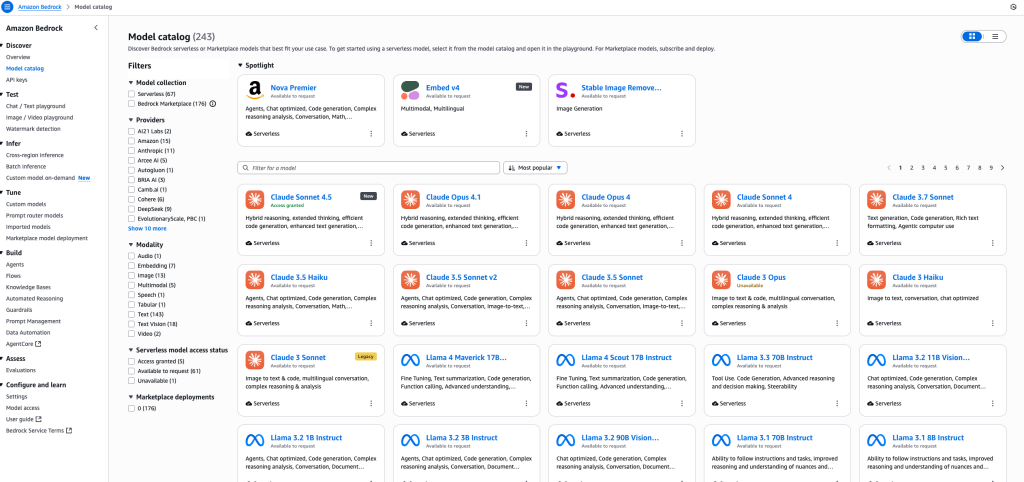
Amazon Bedrock provides access to a broad and continually expanding set of state-of-the-art foundation models (FMs) from leading providers, all accessible via a single API and fully managed by AWS. This allows enterprises to pick the best models for their use case – whether for text, image, code, multimodal understanding, or embeddings.
Popular providers and models (as of October 2025)
- Anthropic Claude:Claude Opus, Claude Sonnet 4.5, Claude Haiku – Advanced text-generation models known for their conversational reasoning, safety, and quality of language understanding. Used for chatbots, enterprise QA, legal document drafting, and multi-step reasoning.
- Amazon Titan: Titan Text, Titan Image Generator, Titan Embeddings, Titan Multimodal – Amazon’s own models for text generation, embedding, and image creation. Titan is valued for its enterprise support, speed, security/compliance integration (e.g., with AWS IAM/S3/VPC), and versatility across various use cases, including summarization, search, content generation, translation, and recommendations.
- Stability AI Stable Diffusion: State-of-the-art image generation from text prompts. Used for high-fidelity marketing asset production, UI/UX prototyping, creativity tools, and gaming.
- Meta Llama 2: Powerful large language models for code, dialogue, and general text. Llama 2 (13B, 70B version) is often used for multi-turn conversational AI, knowledge extraction, and chatbots in regulated industries.
- AI21 Labs Jurassic-2: Known for high-quality, nuanced, multi-lingual text and content generation. Useful in the finance, research, and legal sectors for Q&A, data extraction, summarization, and document processing.
- Cohere Command & Embed: Specializes in fast, privacy-centric content generation and semantic searches, including support for over 100 languages and efficient document clustering.
- Alibaba Qwen3 (new in 2025): Mixture-of-experts (MoE) and dense language models, unique for code-generation, repository analysis, hybrid agent workflows, and balancing cost/performance for advanced use cases.
- Hugging Face Open Models (via Bedrock Marketplace): Includes access to leading open-source models for more specialized or niche AI tasks, fine-tuning, and edge deployments.
How to choose the right model?
- Anthropic Claude is preferred when you need the safest and most advanced conversational agents or nuanced document understanding.
- Titan excels for scalable, highly integrated AWS-centric deployments.
- Stable Diffusion is the top choice for high-quality, creative image generation.
- Llama 2 and Jurassic-2 are best for sophisticated text applications, including multi-language and complex document workflows.
- Qwen3, Cohere, and HuggingFace models fill advanced, multilingual, private, or code-focused needs.
Conclusion: To choose the best model, evaluate the following elements:
- output quality (and safety),
- cost and latency per request,
- multi-language/document support,
- integration with AWS services (IAM, S3, VPC, etc.),
- need for custom training (prompt engineering, fine-tuning),
- compliance or data locality requirements.
Knowledge bases in Amazon Bedrock
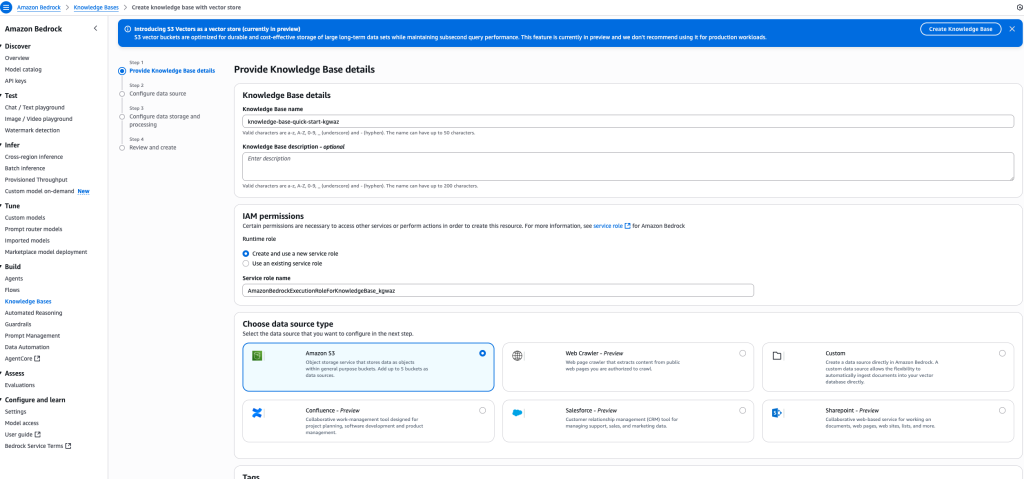
Knowledge Bases in Amazon Bedrock are used to connect your AI chatbot to your enterprise data sources. With Knowledge Bases, your chatbot can answer company-specific questions by retrieving information from your own data rather than relying just on public or general sources.
Bedrock supports multiple data source types: you can use Amazon S3 buckets to store files, manuals, or documentation, or connect directly with your Confluence wiki, where company-specific knowledge lives. Thanks to this, your chatbot can answer internal questions from IT, HR, or other departments, delivering accurate, context-aware information to users.
Using vector databases for embeddings
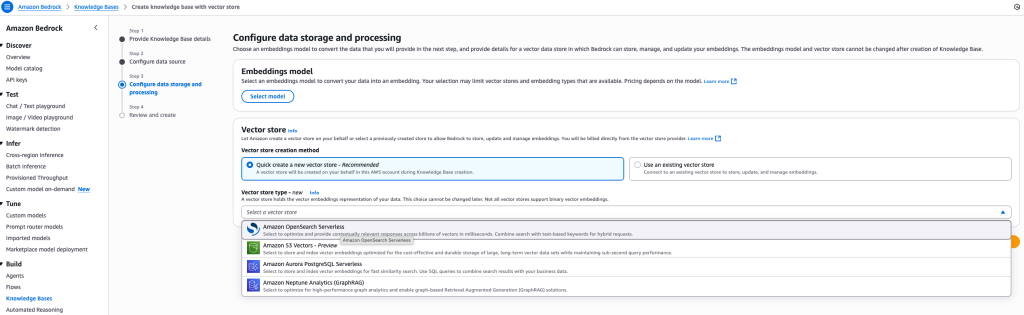
To store and index your document embeddings, Amazon Bedrock supports various vector databases (vector stores). These stores are critical for enabling fast similarity searches and hybrid retrieval over your company data.
You can use:
- Amazon OpenSearch Serverless,
- Amazon S3 Vectors,
- Aurora PostgreSQL,
- Neptune Analytics (GraphRAG) and more.
In this project, we chose Amazon OpenSearch Serverless for our vector database. OpenSearch Serverless is fully managed, offers high performance at scale, and integrates natively with AWS security and monitoring tools. It’s ideal for RAG scenarios where low-latency access to context and scalability are key priorities.
Synchronizing your knowledge base data
After creating your knowledge base in Amazon Bedrock, you need to synchronize your data from the connected source, such as Confluence or your internal wiki.
The synchronization process uploads and indexes your documents, allowing them to be accessed by the AI chatbot for retrieval and answering user questions. The operation usually takes a few minutes, depending on the size and number of files in your source. Large knowledge bases may require more time, but the synchronization is a one-time process and can be automated. Once complete, your chatbot can immediately search and respond to enterprise-specific queries using the freshly indexed data.
Making your chatbot available: Deploying the Bedrock Agents API
After verifying that your model and Knowledge Base are working correctly, it’s time to make your chatbot available to users and applications by exposing the API.
Amazon Bedrock provides Agents for Bedrock Runtime and the powerful RetrieveAndGenerate API to enable integration.
Key API features:
- RetrieveAndGenerate (API documentation): This endpoint retrieves relevant context from your Knowledge Base and generates answers using your selected foundation model (e.g., Claude Sonnet 4.5). It’s the main engine behind RAG chatbots on Bedrock.
- Agents for Amazon Bedrock Runtime (API overview): Agents let you manage models, documents, knowledge bases, and expose API endpoints to internal or external applications.
- Python integration (boto3): Example for programmatic access boto3 retrieve_and_generate implementation.
How does it work?
- Your chatbot is exposed as a REST API endpoint. Applications, websites, and users can send POST requests to it with natural language queries.
- The Agents for Bedrock Runtime automatically fetches data (using RAG) from your private company sources (Wiki, Confluence, S3 docs) and returns a generated, contextual answer.
- You can embed this API in MS Teams, Slack, intranet portals, HR or IT systems, or public-facing apps. Bedrock supports secure authentication, role-based access, and integrations with enterprise tools.
Typical use cases
- Internal company chatbot answers HR or IT questions by searching your own docs, not just public knowledge.
- Automated handling of FAQs, ticket triage, onboarding, or support queries using company data.
- Real-time access to curated enterprise knowledge for employees, contractors, or customers.
Full API documentation

Summary
Once your chatbot is configured, synchronize your Knowledge Base and then expose the API endpoint using Bedrock Agents for Runtime. This way, your users will be able to get instant, enterprise-specific answers directly from your company data – securely and at scale.













Leave a comment