



























For the first article in this series, go to this post.
It’s fairly easy to implement MobX in your SPFx solution. You have to know few basic concepts and then you’re ready to rock’n’roll. There are four fundamental elements:
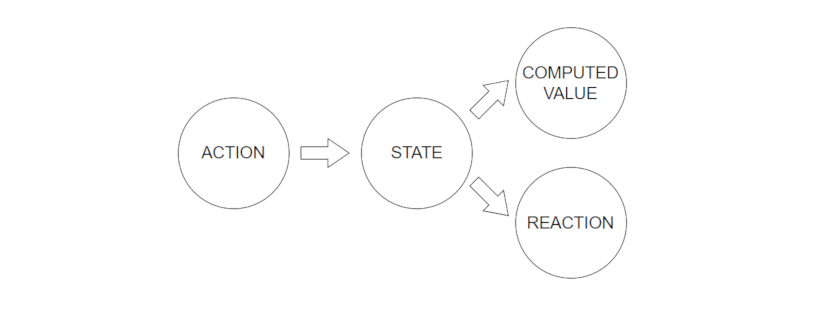
Fig. 1 Diagram of MobX’s basics
First of all, the state. It’s the main data model of your app. The state is represented by observables – properties that can change over time. In other words – components are dependent of this information and you want them to react to changes.
@observable classProperty = value;
Next, there are actions – functions that update the state. They change the values of observables. That’s their only purpose.
@action classMethod (value){
this.classProperty = value;
}
Finally, we have two elements that react to state changes – computed values and reactions. First ones are properties that are based on observable values. The easiest example is the arithmetical sum. Observable A + observable B = computed value C. Modifications of A or B cause changes of C’s value.
@computed get classPropertyC() {
return this.classPropertyA + this.classPropertyB;
}
And last but not least, we encounter reactions. Their name is pretty self-explanatory. They’re functions invoke by state changes. So, we could say that they ‘react’ to those changes. There are 3 types:
- ‘autorun’ – runs automatically, doesn’t return new value
- ‘when’ – waits for given statement to be true, then runs side effect
- simply ‘reaction’ – waits for an update of property, then runs side effect
autorun(() => { sideEffect }, options)

when(() => condition, () => { sideEffect }, options)

reaction(() => data, data => { sideEffect }, options)
One more thing to know is the concept of the observer decorator. It’s used for components that use observables in their ‘render’ methods. If those observables change, our components rerender.
@observer class MyComponent extends React.Component { ... }
To sum up:
- properties marked @observable change over time and create app state,
- functions marked @action update the state,
- properties marked @computed are calculated based on observables,
- state changes invoke functions called ‘autorun’, ‘when’ or ‘reaction’,
- classes marked @observer are dependent on observables.
How to actually use all these elements in our SPFx solutions? We’re going to find out in the third and final article in our MobX article series.













Leave a comment