
























Implementing Drupal from scratch always raises the question of initial environment configuration. At that point, we start digging in our memory for the modules we will need that will be useful or make life easier – modules that are not installed in the CMS by default.
Experience shows that it is helpful to collect in a single document the modules that are worth installing at the outset or at least worth considering. When administering an existing instance, knowing which additional modules can enrich it is also good. The descriptions below refer to modules compatible with Drupal 10 and 11.
I will also rely on experience, highlighting the functionality frequently required or appearing as best practice.
All modules can be installed through Composer (composer require drupal/[module_name]), and the project pages list installation commands for the latest available versions.
This set can also serve as a development path: mastering the listed modules will allow you to deliver solutions to clients quickly and cleanly.
I have divided the modules into several categories according to their purpose:
- Configuration
- Content
- Security
I also provide an assessment of each module’s usefulness in the context of larger projects. Every large Drupal project cannot do without some of these features, so they should be treated as “must‑haves” and studied carefully.
I include useful links that explain the functionality and show concrete use cases wherever possible.
Configuration
Here, I present modules that help manage and maintain Drupal’s configuration. They are convenient, and even indispensable, for large, multi-environment deployments (where you have separate test, production, and other environments).
Config Split
- Project: https://www.drupal.org/project/config_split
- Usefulness rating: always
This module lets you keep the configuration tailored to a given environment–development, testing, production, etc. You can create multiple configuration splits that are enabled according to rules you define in the configuration files for each environment.
The most basic usage is to add to settings.php a list of configuration sets that should be active or inactive depending on the value of an environment variable, where the key
config_split.config_split.{split_key},
{split_key} jest identyfikatorem środowiska skonfigurowanym w /admin/config/development/configuration/config-split.
Example:
if ('production' === $_ENV['ENVIRONMENT']) {
  $config['config_split.config_split.prod']['status'] = TRUE;
  $config['config_split.config_split.dev']['status'] = FALSE;
} else {
  $config['config_split.config_split.prod']['status'] = FALSE;
  $config['config_split.config_split.dev']['status'] = TRUE;
}
- Configuration path: /admin/config/development/configuration/config-split
Config Ignore
- Project: https://www.drupal.org/project/config_ignore
- Usefulness rating: very often
In its basic functionality, the module lets you ignore entire configuration files or only specific fields during import, thus ensuring that the configuration stored in the database will not be changed. This is useful when, for example, you do not want to keep the password to some system that is already set on the production server in a configuration file.
The latest version introduced two additional modes – Intermediate and Advanced – that now allow granular filtering during Imports and Exports and per Create, Update, or Delete operation.
- Configuration path: /admin/config/development/configuration/ignore
Config Readonly
- Project: https://www.drupal.org/project/config_readonly
- Usefulness rating: depends on needs
The module allows you to lock any changes to the site configuration by simply setting $settings[‘config_readonly’] = TRUE. You can condition on whatever logic you need, such as disabling any configuration changes on production.
Content
Here I present a list of modules that make working with Drupal easier, expand its capabilities, and improve the overall look and feel of the experience.
Paragraphs
- Project: https://www.drupal.org/project/paragraphs
- Usefulness rating: always
Paragraphs let you structure content by splitting it into independent, predefined paragraph types that can comprise any mix of text and media. Editors can add and reorder them freely instead of relying on one huge body field. This keeps the code base clean and gives greater flexibility when styling each section. Paragraphs are practically a must‑have in every project.
The Paragraphs Library sub‑module makes previously created paragraph items reusable across multiple documents.
- Configuration paths paragraphs types: /admin/structure/paragraphs_type
- Configuration paths paragraphs library: /admin/config/content/paragraphs_library_item
- Resources: https://www.youtube.com/watch?v=0gboYyLtTQk
Entity Usage
- Project: https://www.drupal.org/project/entity_usage
- Usefulness rating: depends on needs
This module tracks relationships between entities, letting you verify what is used where. Because of the performance cost, use with caution on large sites.
- Resources:
Entity Browser
- Project: https://www.drupal.org/project/entity_browser
- Usefulness rating: very often
Entity Browser allows you to build flexible, feature‑rich interfaces for searching and selecting entities (content, files, images, media, etc.). Instead of a simple select list, you can define sophisticated browsing, filtering, and previewing interfaces – for instance, with Views or modal windows. Editors can more easily search, sort, and pick objects, and the interface can be tailored to project needs.
- Configuration path: /admin/config/content/entity_browser
- Resources:
Redirect
- Project: https://www.drupal.org/project/redirect
- Usefulness rating: always
Provides a mechanism for redirecting any path to a specific Drupal document and lets you choose the appropriate HTTP status code (300 – 307, see https://developer.mozilla.org/en-US/docs/Web/HTTP/Reference/Status)
- Configuration path: /admin/config/search/redirect
Media
- Project: https://www.drupal.org/docs/8/core/modules/media
- Usefulness rating: very often
The module is part of Drupal 11 core but is not installed by default.
It introduces a mechanism for creating and managing several media types: Audio, Document, Image, Remote video, and Video. Each media type can have its fields and display settings, letting you tailor it to the site’s requirements. For example, you can create fields in a document that accept only a specific, predefined media type.
- Configuration paths: /admin/structure/media oraz /admin/config/media/media-settings
- Resources: https://www.youtube.com/watch?v=2x21f2MnQ8E
Media library
- Project: https://www.drupal.org/project/media_library
- Usefulness rating: very often
This is a convenient, advanced widget that extends the Media module, offering an intuitive interface for managing media assets. Integrated with CKEditor 5, it lets editors embed media directly in content.
To make the widget available in CKEditor 5, add the Drupal Media button to the chosen text format at /admin/config/content/formats.

- Resources:
Media entity browser
- Project: https://www.drupal.org/project/media_entity_browser
- Usefulness rating: depends on needs
This module is essential if you want users to have a convenient file‑management tool. It combines the strengths of Entity Browser with Drupal’s Media module.
You can customize this widget’s appearance and use Views to decide which available media items to display.
Note that it depends on inline_entity_form, currently in RC; test thoroughly before deploying to production.
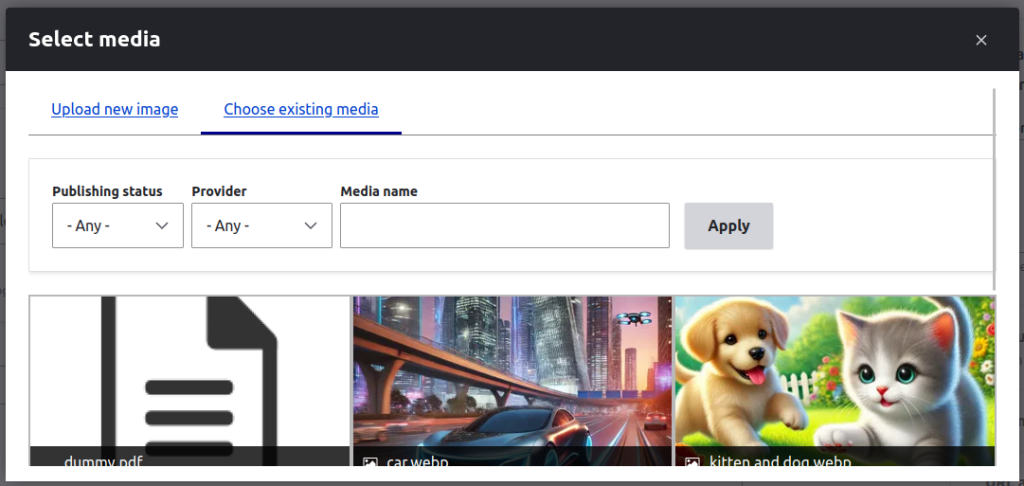
- Configuration path: /admin/config/content/entity_browser
Trash
- Project: https://www.drupal.org/project/trash
- Usefulness rating: depends on needs
This is a great safeguard against accidental deletion that introduces a Trash bin mechanism. You can choose which entity types are handled and set automatic cleanup after a defined time.
- Configuration path: /admin/config/content/trash
- Resources:
Dropzonejs
- Project: https://www.drupal.org/project/dropzonejs
- Usefulness rating: depends on needs
It exposes the DropzoneJS library and lets users upload files with drag‑and‑drop. It works great with Media Entity Browser. Installation requires adding to composer.json a repositories entry, followed by running composer commands.
 "repositories": [
        {
            "type": "package",
            "package": {
                "name": "enyo/dropzone",
                "version": "5.9.3",
                "type": "drupal-library",
                "dist": {
                    "url": "https://github.com/dropzone/dropzone/releases/download/v5.9.3/dist.zip",
                    "type": "zip"
                }
            }
        }
    ]
And then run the command: composer require drupal/dropzonejs enyo/dropzone
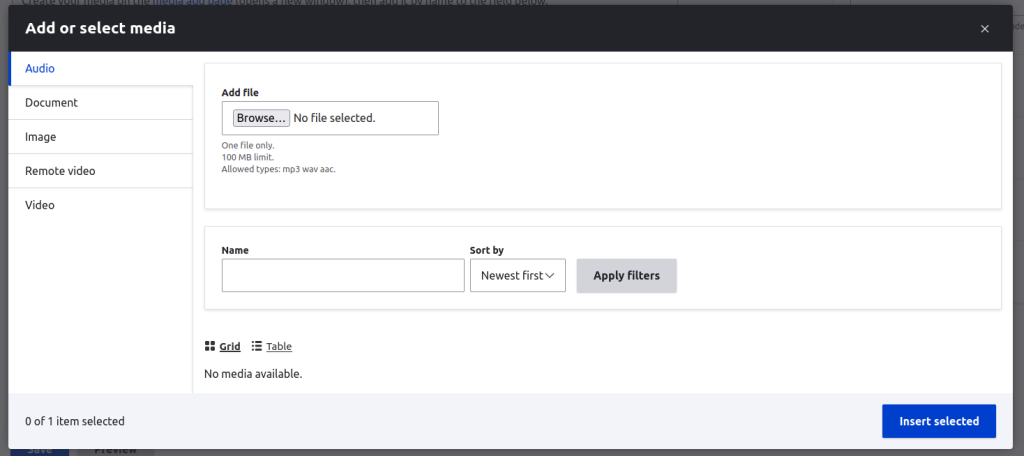
- Configuration path: No configuration is required.
- Resources:
Pathauto
- Project: https://www.drupal.org/project/pathauto
- Usefulness rating: always
Automatically generates URL aliases for any entity type. For each entity and language, you can configure a custom path pattern.
- Configuration path: /admin/config/search/path/patterns
- Resources: https://www.youtube.com/watch?v=Pi5CweTmF5Q
Security
Here, I present the most useful and widely used modules that enhance a site’s security, which every Drupal developer should be familiar with.
Rename Admin Paths
- Project: https://www.drupal.org/project/rename_admin_paths
- Usefulness rating: always
This is a simple yet effective module that hardens the site by changing default admin paths such as /admin and /user to custom ones, making it harder for attackers to find the login panel.
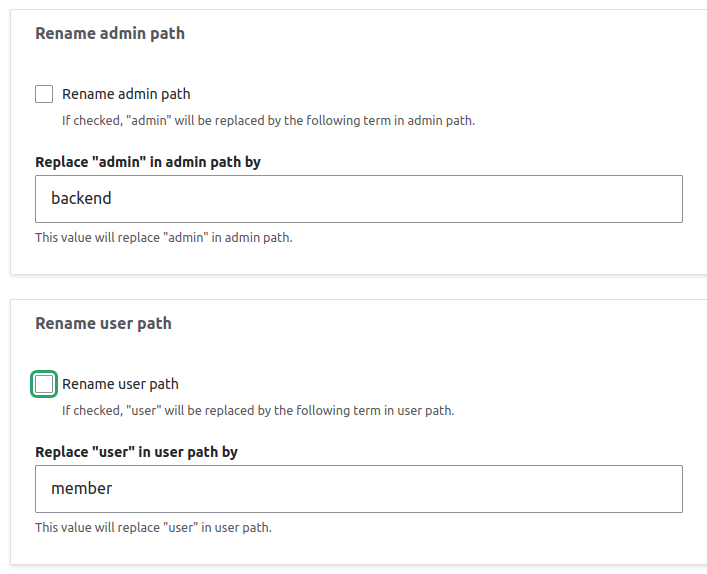
- Configuration path: /backend/config/system/rename-admin-paths
Password Policy
- Project: https://www.drupal.org/project/password_policy
- Usefulness rating: depends on needs
The module lets you create password policies for selected roles. By installing the accompanying Policy Constraints sub-modules, you can specify, among other things, the following settings.
- password_policy_blacklist: a list of strings that cannot be used as passwords and that passwords are not allowed to contain.
- password_policy_character_types: the minimum number of character types (2, 3, or 4) required from the following set: lowercase letters, uppercase letters, digits, special characters.
- password_policy_characters: specifies the minimum number of characters of each type (lowercase letters, uppercase letters, digits, special characters).
- password_policy_consecutive: limits how many times the same character may be repeated consecutively in a password.
- password_policy_delay: sets the hours that must pass before a password can be changed again (this limit also applies when changing a password via the admin UI).
- password_policy_history: prevents a user from re-using a previous password.
- password_policy_length: lets you define both the maximum and minimum length of a password.
It also lets you enforce a password change after a defined period.
- Configuration path: /admin/config/security/password-policy
- Resources: https://www.youtube.com/watch?v=aYLnFQh7Mj0
Security Kit
- Project: https://www.drupal.org/project/seckit
- Usefulness rating: depends on needs
This module enhances Drupal’s security by guarding against common web threats such as XSS attacks, clickjacking, and SSL stripping. It lets you configure HTTP headers, set a Content Security Policy (CSP), manage HTTPS, and block unauthorized embedded content. You can also disable the browser’s autofill of the username field on the login page.
- Configuration page: /admin/config/system/seckit
- Resources:
Autologout
- Project: https://www.drupal.org/project/autologout
- Usefulness rating: depends on needs
Let’s you configure automatic logouts based on inactivity or a hard session limit.
You can set an inactivity timeout that logs a user out after a period of idle time, and an absolute session limit after which the user is forcibly logged out regardless of activity. Both limits can be configured per role, and you can define a URL to which the user is redirected immediately after the automatic logout. It’s also worth looking at the companion module https://www.drupal.org/project/autologout_alterable.
- Configuration path: /admin/config/people/autologout
Shield
- Project: https://www.drupal.org/project/shield
- Usefulness rating: depends on needs
The module restricts access to a Drupal instance by requiring a predefined username and password before anyone can reach the site. It’s very useful for shielding test environments from external visitors and can replace mechanisms that DevOps teams often configure at the server level.
- Configuration path: /admin/config/system/shield
Username Enumeration Prevention
- Project: https://www.drupal.org/project/username_enumeration_prevention
- Usefulness rating: depends on needs
Prevents anonymous users from enumerating valid usernames.
- Configuration path: No configuration is required.
Masquerade
- Project: https://www.drupal.org/project/masquerade
- Usefulness rating: depends on needs
This module allows administrators to switch to another user without entering a password and to operate fully in that user’s context. It is an extremely useful tool for developers and site admins when testing user permissions or troubleshooting access and configuration issues.
To impersonate a user, go to /admin/people and choose Masquerade as from the operations column.
- Configuration path: No configuration is required.
Security Review
- Project: https://www.drupal.org/project/security_review
- Usefulness rating: always
This tool offers a set of tests that detect vulnerabilities related to your application’s configuration and environment.
You can run the tests manually from the admin interface or integrate them into your release scripts by executing drush security:review.
- Configuration path: /admin/config/security-review
- Resources: https://www.droptica.pl/blog/security-review-opis-modulu/
CORS UI
- Project: https://www.drupal.org/project/cors_ui
- Usefulness rating: always
It lets you manage Cross-Origin Resource Sharing (CORS) settings, allowing site administrators to configure CORS policies without manually editing config files. This makes integration with external applications and services more intuitive and less error-prone.
- Configuration path: /admin/config/services/cors
- Resources:
Flood control
- Project: https://www.drupal.org/project/flood_control
- Usefulness rating: always
The module lets you limit the number of failed logins per IP address or user, define a whitelist, and restrict form submissions for a specific email address.
- Configuration path: /admin/config/people/flood-control

Summary
In short, with the modules outlined above, you launch Drupal in its “pro” edition–easier to extend, maintain, and use securely. Knowing their capabilities lets you tailor solutions to client needs in no time, and it can also serve as your first-run checklist for every new deployment.
***
If you are interested in Drupal, be sure to also take a look at another article by our specialist: Drupal vs WordPress – which system should you choose?













Leave a comment